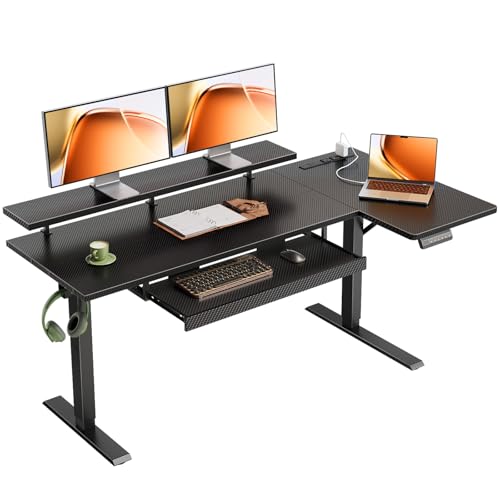
Standing Desk with Keyboard Tray
All about desks for your healthy workspace. Find the perfect ergonomic standing desk with a built-in keyboard tray — improve posture, reduce strain, and boost productivity.
Shop Top PicksA standing desk with a keyboard tray is the ultimate ergonomic upgrade for your home office. It combines the health benefits of a sit-stand desk with the comfort of a dedicated, height-adjustable keyboard platform. Whether you're a programmer, writer, or designer, this configuration keeps your wrists straight, shoulders relaxed, and monitor at eye level — reducing fatigue and preventing repetitive strain injuries.
In this guide, we explore the optimal standing desk height, the best under-desk keyboard tray mounts, and how to choose a model that fits your workspace. We also highlight top-rated desks with built-in trays, from electric standing desks with drawers to compact adjustable computer desks with keyboard trays.
Why a Built-in Keyboard Tray Matters
Ergonomic Wrist Position
A tray placed slightly below desk height allows your elbows to rest at 90°, keeping wrists straight and preventing carpal tunnel syndrome.
More Surface Space
By moving the keyboard off the main desk, you free up room for documents, a monitor stand with storage, or a cable management box.
Sit-Stand Versatility
Height-adjustable trays sync with your desk's movement, so you maintain perfect posture whether sitting or standing.
Reduced Shoulder Tension
When the keyboard is at the correct height, your shoulders relax, reducing neck and back pain from hunching.
What to Look For
| Feature | Why It Matters | Recommendation |
|---|---|---|
| Height Range | Accommodates both sitting and standing positions for all body types. | Look for 22″–48″ (or wider) with smooth electric or pneumatic adjustment. |
| Tray Depth & Width | Must fit your full keyboard + mouse comfortably (at least 28″ wide). | Choose a tray with built-in wrist rest and tilt adjustment. |
| Weight Capacity | Supports multiple monitors, a laptop, and the tray mechanism. | At least 150 lbs for the desk, 15 lbs for the tray. |
| Cable Management | Keeps wires tidy and prevents tangling when the desk moves. | Integrated cable channels or a cable management desk system. |
| Build Material | Durability and stability under daily use. | Steel frame with a solid wood or laminate top. |
🖥️ Pro Setup Tip: The 90°–90°–90° Rule
Your elbows, hips, and knees should all form 90° angles. With a standing desk with keyboard tray, adjust the tray so your forearms are parallel to the floor and your wrists are straight. Your monitor should be at eye level — use a monitor arm desk mount if needed. For a complete ergonomic setup, consider pairing with an ergonomic office chair and a standing desk converter for laptop if you're on a budget.
Compact & Corner Options
Not all home offices are spacious. A corner desk with keyboard tray or a small keyboard tray for L-shaped desk can fit tight spaces without sacrificing ergonomics. For ultra-compact setups, consider a adjustable-height computer desk with keyboard tray that doubles as a writing surface.
Ready to Upgrade Your Workspace?
Browse the top-rated standing desks with keyboard trays below. Each model has been tested for stability, ergonomics, and value.
See Our Recommendations