Teacher Desk: The Complete Guide to Your Ideal Classroom Workspace
A teacher desk is more than a piece of furniture — it is the command center of your classroom, a personal sanctuary amid the daily hustle, and a reflection of your professional identity. Whether you are a new educator setting up your first classroom or a seasoned teacher redesigning your space, this guide covers everything you need to choose, organize, and optimize a teacher desk that works as hard as you do.
Explore Teacher Desk OptionsWhy the Right Teacher Desk Matters: Educators spend a significant portion of their day at their desk — grading papers, planning lessons, communicating with parents, and organizing materials. A well-designed teacher desk reduces physical strain, improves focus, and creates a welcoming environment for students and colleagues. This guide breaks down desk types, storage strategies, ergonomic considerations, and practical layout ideas so you can make an informed decision with confidence.
Types of Teacher Desks: Finding Your Fit
The ideal teacher desk depends on your classroom layout, your teaching style, and how much storage you need. Below is a breakdown of the most common configurations, each suited to different priorities and classroom environments.
Traditional Teacher Desk
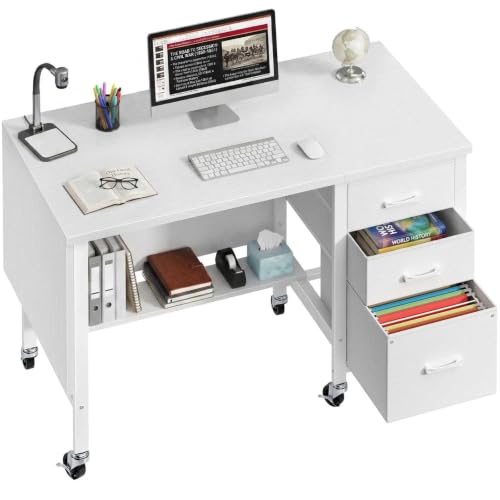
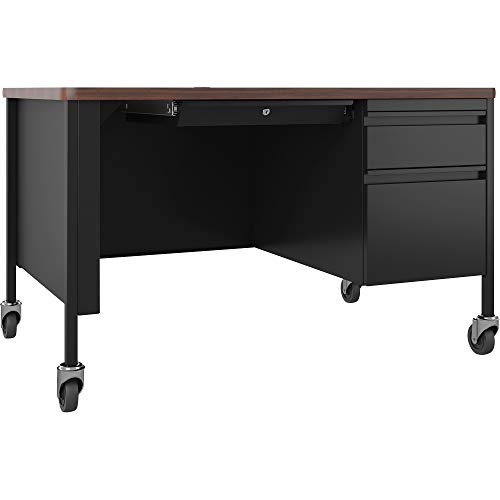
A classic single-pedestal or double-pedestal desk with drawers on one or both sides. These are the workhorses of classrooms — sturdy, familiar, and generous with storage. Ideal for teachers who keep physical files, grade books, and supplies within arm's reach. A traditional desk pairs well with a rolling chair and a modest footprint.
L-Shaped Teacher Desk
An L-shaped configuration creates a natural separation between your computer work zone and your grading or planning zone. This layout is especially useful for teachers who juggle multiple tasks simultaneously — a laptop on one wing and student papers on the other. It also defines a clear personal workspace without closing you off from the room.
U-Shaped Teacher Desk
For teachers who need maximum surface area and storage, a U-shaped desk wraps around the user, putting everything within a swivel. This configuration is excellent for classrooms where the desk doubles as a small-group instruction station or a parent-conference setup. The wraparound design also conceals clutter from student sightlines.
Standing Desk for Teachers
A tall desk or height-adjustable standing desk lets you alternate between sitting and standing throughout the day, which can reduce fatigue during long grading sessions. Many teachers pair a standing desk with a tall office chair for a balanced sit-stand routine. If you already own a standard desk, consider a converter to turn any desk into a standing desk.
Compact & Corner Teacher Desks
Classrooms with limited floor space benefit from compact or corner configurations. A triangle desk fits neatly into an unused corner, while a top desk with a small footprint can serve as a secondary grading station. These options keep the room open for student movement while still giving you a dedicated work surface.
Executive & Solid Wood Teacher Desks
For educators who value longevity and a professional aesthetic, a solid wood or executive-style desk makes a lasting statement. A U-shaped office desk or a well-built traditional model in oak, maple, or walnut offers decades of service. These desks anchor the room visually and signal to students and visitors that the workspace is a place of serious purpose.
What to Look For in a Teacher Desk
Before you commit to a specific model, evaluate these practical criteria. They matter more than any single feature because they determine how well the desk fits your daily reality.
- Surface Area: You need room for a laptop or monitor, a grade book or tablet, stacks of student work, and a coffee mug that will inevitably migrate. Aim for at least 48 inches of width if your classroom allows it; 60 inches is better for teachers who spread out papers.
- Storage Configuration: Drawers are essential, but the right mix matters. Look for at least one deep file drawer for hanging folders, one or two shallow drawers for pens and small supplies, and ideally a lockable drawer for personal items or confidential student records.
- Durability & Materials: A teacher desk endures decades of use. Laminate or melamine surfaces resist scratches and spills; solid wood offers repairability and timeless appeal. Check that drawer slides are rated for frequent use and that the frame is reinforced at stress points.
- Ergonomic Height: Standard desk height is 29–30 inches, which suits most adults. If you are taller or shorter, consider an adjustable-height desk or add a keyboard tray to bring the typing surface to a comfortable level. Pair with a supportive chair — see our guide to the top-rated desk chairs for home office for options that translate well to classrooms.
- Cable & Device Management: Classroom desks accumulate chargers, document cameras, and speakers. Plan for under-desk cable management from day one so cords do not become a tripping hazard or a visual distraction.
- Mobility vs. Permanence: Some teachers prefer a fixed desk that anchors the room; others value the ability to reconfigure the space. Casters or glides make a difference — decide which fits your classroom culture.
Teacher Desk Configurations Compared
| Tier | Configuration | Best For | Key Advantage |
|---|---|---|---|
| Essential Tier | Traditional single-pedestal | New teachers, small classrooms | Familiar layout, straightforward storage |
| Mid-Tier | L-shaped | Teachers who multitask between devices and paperwork | Separate zones for computer and grading work |
| Mid-Tier | U-shaped | Small-group instruction, parent conferences | Maximum surface area and wraparound reach |
| High-End Tier | Height-adjustable standing desk | Teachers with back or posture concerns | Sit-stand flexibility throughout the day |
| Balanced Tier | Compact / corner | Space-constrained classrooms | Efficient footprint without sacrificing function |
| Professional-Grade | Solid wood executive | Long-term classroom investment | Durability and professional presence |
Teacher Desk Organization: Systems That Stick
A cluttered desk drains focus and eats time. The most effective teacher desk organization systems are simple, visual, and forgiving of busy days. Here are approaches that work in real classrooms.
Zone Your Desktop
Divide your surface into three zones: a digital zone for your laptop or monitor, a paper zone for grading and lesson plans, and a capture zone for items that need action. Keep the capture zone small — a single tray or basket — so it forces you to process items rather than pile them up.
Use Vertical Storage
Wall-mounted files, a small vertical desk storage unit, or a desktop organizer with upright slots keeps papers visible and accessible. Vertical storage frees horizontal surface area and makes it easier to scan for what you need.
Tame the Cables
Chargers, document cameras, and speakers generate a surprising amount of cable clutter. A simple under-desk cable tray or under-desk cord organizer keeps cords off the floor and out of sight. This is one of the highest-impact, lowest-effort improvements you can make.
Add Under-Desk Storage
If your desk does not have enough built-in drawers, add a rolling under-desk storage unit or a set of under-desk drawers. Rolling units let you reconfigure the space when needed and keep bulky supplies out of the way.
Keep a Weekly Reset Routine
Set aside ten minutes at the end of each week to clear trash, file loose papers, and wipe down the surface. A consistent reset prevents small messes from becoming overwhelming and makes Monday mornings feel calmer. The desk organization section of this site has more routines you can adapt.
Store Paper Digitally Where Possible
Scan or photograph student work and lesson materials when appropriate. Reducing paper inflow means fewer stacks to manage on your desk. Keep a small file holder for the essential paper items that still need a physical home.
Ergonomic Essentials for Teacher Desks
Teachers often spend more consecutive hours seated than office workers realize — grading, planning, and responding to emails after the students leave. Ergonomics is not a luxury; it is a practical investment in your long-term comfort and health.
- Monitor Height: The top of your screen should be at or slightly below eye level. Raise your monitor with a stand or arm if needed. If you use a laptop, a laptop stand guide can help you find the right angle.
- Chair Support: Choose a chair with adjustable seat height, lumbar support, and armrests that fit under the desk. If you experience back discomfort, our list of top-rated desk chairs for back pain offers starting points.
- Footrest: A under-desk footrest keeps your feet supported and reduces pressure on your lower back, especially if your desk is slightly too tall for your leg length.
- Keyboard & Mouse Position: Your elbows should be near 90 degrees, with wrists straight. An under-desk keyboard and mouse tray can bring input devices to a comfortable height without changing the desk itself.
- Movement Breaks: Even the best ergonomic setup cannot replace movement. Stand up, stretch, and walk around the room every 30–45 minutes. A desk stretching routine takes only a few minutes and pays dividends.
Placing Your Teacher Desk in the Classroom
Where you put the desk affects classroom management, student flow, and your own ability to observe the room. There is no single correct placement, but these principles help.
Sightlines Matter
Position the desk so you can see the door, the majority of student seating, and the board. Avoid placing your back to the entrance or to large groups of students. A corner placement with an angled desk often provides the best compromise between visibility and personal space.
Define the Zone
Use a rug, a bookshelf, or the desk's orientation to create a subtle boundary between your workspace and student areas. A clear zone signals professionalism and reduces the likelihood of students casually taking items from your desk.
Keep High-Traffic Paths Clear
Do not block the flow of students moving to the door, the pencil sharpener, or group work areas. A desk that intrudes into walkways creates friction and safety concerns. Measure the space and consider a compact or corner configuration if the room is tight.
Plan for Power & Connectivity
Your desk needs access to outlets for your computer, chargers, and classroom technology. If outlets are scarce, use a surge protector with a long cord and route it safely. Under-desk wire management trays keep the cable run tidy and protect against accidental kicks.
Frequently Asked Questions About Teacher Desks
What size teacher desk is best for a standard classroom?
A desk between 48 and 60 inches wide and 24 to 30 inches deep works well for most classrooms. This provides enough surface for a laptop, papers, and supplies without dominating the room. If space is limited, a 42-inch compact desk or a corner model can be sufficient, especially if you add vertical storage.
Should I choose a standing desk or a traditional sitting desk?
It depends on your daily routine and physical needs. A height-adjustable standing desk offers flexibility and can reduce stiffness during long grading sessions. A traditional desk with a supportive chair and a footrest is also a solid choice. Many teachers find that a sit-stand routine — alternating between the two — is the most sustainable approach. If you already have a traditional desk, a converter can help you turn my desk into a standing desk without a full replacement.
How can I keep my teacher desk organized during busy weeks?
Focus on systems rather than willpower. Use a small inbox tray for items that need action, a vertical file for papers, and a drawer organizer for supplies. Set a ten-minute reset at the end of each day or week. The goal is not a perfectly empty desk — it is a desk where you can find what you need and where clutter does not accumulate beyond a manageable level.
What is the best material for a teacher desk?
Laminate and melamine surfaces are practical, easy to clean, and resistant to scratches — a good fit for busy classrooms. Solid wood desks (oak, maple, walnut) offer durability and a professional look, with the advantage of being repairable. Metal desks are rugged but can feel institutional. Choose based on your priorities: low maintenance, longevity, or aesthetics.
Do I need a locking drawer on my teacher desk?
It is highly recommended. A lockable drawer lets you secure confidential student records, personal items, and small valuables. Even if your classroom is generally secure, a locking drawer provides peace of mind and supports professional confidentiality practices.
How do I manage cables and chargers on a teacher desk?
Start with an under-desk cable management tray or raceway to contain the main runs. Use velcro ties or cable sleeves to bundle loose cords. Keep chargers in a dedicated drawer or organizer rather than scattered on the surface. A clean cable setup reduces tripping hazards and makes the desk feel calmer.
Ready to Build Your Ideal Teacher Desk?
You have the knowledge — now explore curated options that match your classroom needs. Our recommended teacher desk selections below are chosen for durability, storage, and ergonomic value across every tier.
View Recommended Teacher Desks