
Computer Desk with Keyboard Tray and Shelves: The Complete Workspace Guide
Discover how a computer desk with keyboard tray and shelves can transform your home office — improving ergonomics, freeing surface space, and organizing your entire workflow.
EXPLORE RECOMMENDED MODELSWhy this configuration matters: A computer desk with keyboard tray and shelves combines two of the most requested workspace features into a single footprint. The keyboard tray brings your input device to a healthier typing height while preserving the main desktop for monitors, writing, and tasks. The shelves add vertical storage for books, peripherals, and décor without eating into your working surface. For anyone researching this setup before buying, this guide walks through ergonomics, storage planning, material quality, and the practical trade-offs so you can choose with confidence.
What Exactly Is a Computer Desk with Keyboard Tray and Shelves?
This desk type blends three functional zones into one unit. The main work surface holds your monitor and daily essentials. The keyboard tray slides out from beneath the desktop, positioning your keyboard and mouse lower and closer to your body. The shelves — whether a hutch, side shelving, or vertical towers — add storage above or beside the work zone.
Together, these features address the two biggest complaints about standard desks: cramped surfaces and uncomfortable typing angles. If you're comparing broader categories, our guide to computer desks with hutches explains how shelf configurations differ, while the dedicated keyboard tray desk overview covers tray mechanics in more depth.
Key Benefits of This Desk Configuration
Better Typing Ergonomics
A keyboard tray lowers your typing plane, keeping wrists neutral and shoulders relaxed. This reduces strain during long sessions compared with typing directly on a standard-height desktop.
Free Surface Space
Moving the keyboard and mouse off the main surface frees room for monitors, notebooks, and task materials — a real advantage in compact rooms.
Vertical Storage
Shelves hold books, office supplies, speakers, and decorative items, keeping clutter off your working area and your workflow organized.
Single-Footprint Efficiency
Combining desk, storage, and ergonomic adjustment in one unit saves floor space compared with separate furniture pieces.
Choosing the Right Keyboard Tray
The tray is the ergonomic heart of this desk type, so its mechanism deserves careful attention. Three main styles exist, each with a distinct feel and adjustment range.
| Tray Type | Best For | Trade-offs |
|---|---|---|
| Fixed Slide-Out Tray | Straightforward typing, essential-tier setups | Limited height and tilt adjustment |
| Height & Tilt Adjustable Tray | Mixed-height users, mid-tier ergonomic needs | More moving parts to maintain |
| Full Articulating Arm Tray | Users who shift between typing and writing | Top-tier mechanism, requires sturdier desk frame |
Check the tray's width against your keyboard size — a tray narrower than your keyboard forces awkward wrist angles. Also verify the swing range: a tray that retracts fully under the desk keeps knee space open and reduces clutter. For a deeper ergonomic foundation, review our standing desk guidance if you plan to alternate postures during the day.
Shelving Options: Hutch, Towers, and Open Shelves
The shelf component determines how much storage you gain and how open your desk feels. Consider these common layouts:
- Overhead hutch: Adds two to three tiers above the monitor area. Best for books and display items; can cast shadows, so pair with a task lamp.
- Side shelving towers: Vertical units flanking the desk offer heavy-duty storage without blocking your view. Ideal for printers and binders.
- Open adjustable shelves: Flexible tiers you can reposition as your equipment changes. A solid choice for evolving setups.
- Combination hutch plus side shelves: The most storage-heavy layout — great for document-heavy home offices but requires a wider room footprint.
If your room is tight, explore desks with built-in shelves that stack storage vertically, or compare against an L-shaped office desk with hutch if you need more wrap-around surface.
Materials and Build Quality to Look For
Shelves and keyboard trays add structural demands that a plain desktop does not. A tray's sliding mechanism pulls on the underside, and loaded shelves put weight on vertical supports. Prioritize these build signals:
- High-grade steel frame: Heavy-duty construction resists wobble, especially important when the keyboard tray is extended.
- Reinforced tray rails: Metal ball-bearing slides outlast plastic glides and feel smoother over years of use.
- Durable shelf panels: Engineered wood with a scratch-resistant laminate or veneer holds up to daily handling.
- Rust-proof finish: Powder-coated frames protect against wear in humid rooms and near windows.
Solid build matters most when the tray and shelves share the load. If you need heavier capacity, our heavy-duty desk overview explores frames rated for demanding equipment. And if you favor a natural finish, the keyboard tray desk with drawers guide shows how wood surfaces pair with storage drawers.
Sizing Your Desk for Room and Body
Measure twice before committing. A three-zone desk needs more room than a simple table, and the ergonomic benefit only appears when the dimensions fit your body and your space.
- Desktop width: Allow at least 47 inches for a monitor plus tray clearance; wider is better if you use a dual-monitor layout.
- Knee clearance: Confirm the tray retracts fully so your legs stay free while sitting.
- Shelf height: Overhead shelves should not force you to duck or block monitor sightlines.
- Room depth: Leave 24 to 30 inches behind the desk for chair movement and airflow.
For compact rooms, the desk solutions for small spaces article offers space-saving layouts that still accommodate a tray. If you frequently move between sitting and standing, compare this setup with an adjustable desk for the office to see which adjustment style suits your routine.
Setting Up Your Workspace Step by Step
A careful setup multiplies the benefits of your new desk. Work through this sequence:
- Assemble on a protected floor: Lay out all parts and fasteners; attach the frame before mounting shelves.
- Position the tray first: Set its height and tilt to keep elbows near 90 degrees and wrists flat.
- Place the monitor: Top of the screen at or slightly below eye level, roughly an arm's length away.
- Load shelves evenly: Distribute weight across tiers and anchor tall units to the wall if the desk allows.
- Route cables: Use the shelf gaps and tray underside to hide cords; our cable management guide covers the tools.
Finish with a proper chair pairing — a desk chair with adjustable arms lets you align armrests with the tray height, completing the ergonomic chain. For a full room blueprint, see the first desk setup guide.
Who Should Choose This Desk Type?
This configuration suits a wide range of users, but it shines for specific profiles. Home-office workers who type for hours gain the most from the ergonomic tray. Students benefit from shelf space for textbooks and binders. Creative professionals who alternate between keyboard and paper tasks appreciate the clear main surface. Gamers often prefer dedicated gaming surfaces, so compare with a gaming desk with drawers and shelves if RGB and peripheral space are priorities.
If your work involves frequent printing, a related layout worth reviewing is the desk with keyboard tray and printer shelf, which trades some upper shelving for a dedicated printer zone.
How It Compares with Alternative Desks
| Desk Type | Keyboard Tray | Shelf Storage | Best For |
|---|---|---|---|
| This configuration | Yes — core feature | Yes — hutch or side shelves | Ergonomic typing plus organized storage |
| Standard computer desk | No | Minimal | Simple, open workspaces |
| Desk with hutch only | Often no | Yes — overhead | Display and book storage |
| L-shaped desk with hutch | Model dependent | Yes — expansive | Multi-zone office setups |
No single layout wins universally. If you rarely type for long stretches, a plain desk with a monitor stand may serve you fine. If storage volume is the priority, an L-shaped desk with shelves adds both surface and vertical capacity.
Keeping Your Desk in Top Condition
Regular care preserves both the tray mechanism and the shelf finish. Wipe surfaces with a soft, slightly damp cloth and avoid abrasive cleaners on laminate. Lubricate tray slides lightly once or twice a year with a silicone spray. Tighten shelf brackets every few months, since vibration from typing and sliding loosens fasteners over time. Keep heavy items on lower shelves to maintain stability, and check the frame's floor glides to prevent wobble.
Frequently Asked Questions
Is a keyboard tray actually better for typing posture?
For many people, yes. A tray lets you type with forearms roughly parallel to the floor and wrists neutral. That said, the tray must be adjusted to your body — an improperly set tray can create new strain. Pair it with an adjustable chair for the best result.
Will the shelves hold a monitor and printer?
It depends on the shelf rating and depth. Overhead hutches typically suit monitors and light items, while side towers handle printers and binders. Check the manufacturer's weight guidance and distribute loads evenly across tiers.
Can I add a keyboard tray to a desk that lacks one?
Yes. Clamp-on and under-desk mounted trays are widely available and install with basic tools. Confirm your desktop is thick enough for the mounting hardware and that the tray does not block drawer access or knee clearance.
Does this desk type suit small rooms?
It can, provided you choose a model with a narrow footprint and vertical shelving rather than a wide hutch. Measure your available wall length and leave room for the chair to roll back. Corner and compact variants often work best in tight spaces.
What should I check before ordering?
Confirm desktop dimensions, tray width and adjustment range, shelf weight capacity, frame material, and assembly requirements. Read the return policy as well, since bulky furniture is harder to ship back than small accessories.
Final Thoughts
A computer desk with keyboard tray and shelves solves two problems at once: it improves typing ergonomics and it consolidates storage into your workspace. The key is matching the tray mechanism and shelf layout to your body and your room. Use the checklists above to compare models on build quality, adjustment range, and storage capacity — then verify dimensions against your space before ordering. With the right choice, this desk type becomes a long-term investment in comfort and organization.
Recommended Computer Desks with Keyboard Tray and Shelves
⚠️ AFFILIATE DISCLOSURE: This website contains affiliate links. As an Amazon Associate, we earn from qualifying purchases. If you make a purchase through these links, we may receive a small commission at no additional cost to you. Read our full affiliate policy.
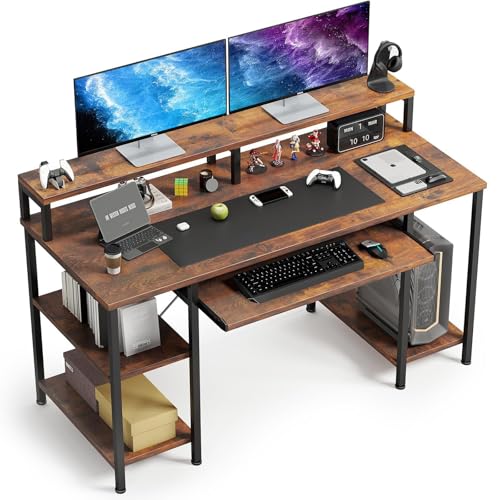
VERMESS 48" Computer Desk, Keyboard Tray, CPU Shelf, Storage, Rustic Brown | Wide surface accommodates dual-monitor setups
Check price on Amazon
Yaheetech Computer Desk with Keyboard Tray, Drawers, and Shelves, Black | This Desk Has a Pull-Out Keyboard Tray, a Drawer, and an Adjustable Open Shelf for Books, Files, and Home Office Supplies.
Check price on Amazon
VERMESS 48" Computer Desk, Keyboard Tray, Monitor Stand, Shelves, White | Wide surface for multitasking and daily projects
Check price on Amazon
PayLessHere Office Desk, Computer Desk with Drawers Keyboard Tray 43" Study Writing Desks for Home with Storage Shelves, Desks & Workstations
Check price on Amazon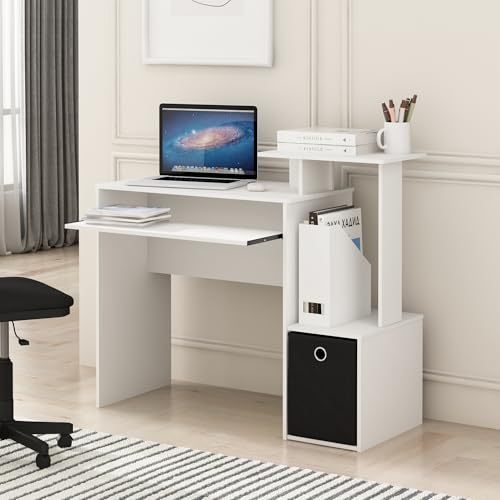
Furinno Econ Desk, 40-in Wide Gaming Desk with Keyboard Tray, Plain White | Computer Desk, Office Desk with Side Shelves and Storage Bin for Home Office
Check price on Amazon
Agilestic 48 Inch Standing Desk with Drawers & Keyboard Tray, Rustic Brown | Electric Height Adjustable, 2 Storage Drawer, Monitor Stand, Sturdy Steel Frame, Memory Presets, Hooks, 154 lbs, Splice Board
Check price on Amazon
Topeakmart 3 Tiers Rolling Computer Desk with Power Outlet and USB Ports for Space Saving, Home Office Desk with Keyboard Tray and Printer Shelf on Wheels, Laptop PC Workstation Table, Rustic Brown
Check price on Amazon