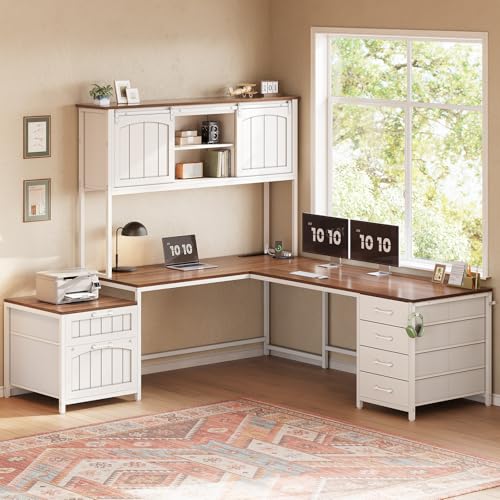
L-Shaped Office Desk with Hutch: The Smart Corner Workspace
An L-shaped office desk with hutch turns an awkward corner into a complete, organized workstation. This guide explains how the L-shape and hutch work together, what to check before buying, and how to lay out your corner office for daily productivity.
EXPLORE DESK OPTIONSWhy the L-shape plus hutch works: The two-sided desk surface gives you a primary work zone and a secondary return for paperwork, a second screen, or a laptop. The hutch adds vertical storage directly above the desk, so reference books, files, and supplies stay within reach without eating into the work surface. Together, they convert a corner into a self-contained office.
What Is an L-Shaped Office Desk with Hutch?
An L-shaped office desk with hutch is a corner workstation built from two connected desk surfaces that form an "L," topped with an elevated shelving unit called a hutch. The desk itself typically includes a main leg for the monitor and keyboard and a shorter return leg for secondary tasks. The hutch sits on the rear edge of one leg, adding open shelves, cubbies, or closed compartments above the surface.
This configuration is popular in home offices and small commercial spaces because it solves two problems at once: it uses corner floor space that a straight desk leaves empty, and it adds storage without a separate bookshelf. If you are comparing this layout against a single-surface design, our computer desk with hutch guide covers the straight-desk alternative in detail.
Main Leg and Return Leg: How the L-Shape Works
The main leg is the longer side where the monitor, keyboard, and chair sit. It should be deep enough for your monitor distance and arm movement. The return leg is the shorter perpendicular side, and it can face left or right depending on the room. Many models are reversible, meaning you can assemble the return on either side to match your wall and window layout. Our L-shaped reversible desk guide explains how to choose the orientation.
What the Hutch Actually Adds
A hutch is more than a shelf. It typically provides:
- Open shelves for binders, reference books, and decorative items.
- Cubbies for small supplies, notebooks, and chargers.
- Closed compartments or doors on some models to hide documents and clutter.
- A back panel that can hide cables and wall marks.
- Optional lighting underneath the shelf on higher-tier models.
For a broader look at how hutches compare with open shelving, see our guide to desks with shelves.
Types of Hutches for L-Shaped Corner Desks
Hutches vary mainly in height, depth, and storage style. Choosing the right one depends on your monitor setup, how much you store on the desk, and whether you need the hutch to stay out of your sightline while seated.
| Hutch Type | Best For | Key Consideration |
|---|---|---|
| Low-profile hutch | Users who want storage without blocking window light or sightlines | Shallow shelves limit what you can store; best for small items |
| Full-height hutch | Document-heavy roles and reference materials | Check monitor clearance and hutch depth against your display |
| Open-shelf hutch | Quick access and display of books and decor | Dust accumulates faster; needs regular cleaning |
| Hutch with closed cabinets | Concealing paperwork, files, and supplies | Doors need swing clearance; slightly heavier build |
| Detachable / modular hutch | Buyers who may rearrange the room later | Verify mounting hardware and stability once assembled |
Desk and Hutch Materials: What to Expect by Tier
The hutch and desk are usually built from the same material family, but the quality of the core, the edge finish, and the hardware separate entry-level from premium builds. Use the tier framework below to set expectations before you shop.
| Tier | Typical Construction | Durability Notes |
|---|---|---|
| Entry-level | Particle board or thin MDF with laminate or paper veneer | Fine for light daily use; edges and hutch joints are the first wear points |
| Mid-range | Thicker engineered wood with a durable laminate or real wood veneer | Better screw retention in hutch panels; holds up to regular file storage |
| Premium | Solid hardwood or high-grade veneer over plywood; steel reinforcement on larger spans | Heavy-duty construction; resists sagging on wide return legs |
| Commercial-grade | Steel frame with hardwood or high-pressure laminate top | Built for multi-user offices and long service life |
Wood choices matter for both look and maintenance. Oak and walnut bring distinct grain and tone, while laminate is easier to wipe down. If you are weighing wood options, our guides to L-shaped wood desks and L-shaped wood desks for home office break down the trade-offs. For corner layouts with drawer storage, the industrial L-shaped desk with drawers guide covers heavier-duty builds.
Buying Checklist for an L-Shaped Desk with Hutch
Before ordering, confirm these points so the desk fits your room and your work style:
- Corner orientation: Confirm the return leg faces the correct side. Reversible models give flexibility; fixed models do not.
- Main leg depth: Aim for enough depth to keep your monitor at a comfortable distance and still rest your forearms.
- Hutch clearance: Measure your monitor height and confirm the hutch bottom shelf clears the top of the display.
- Weight capacity: Check the shelf rating if you store binders, printers, or reference books in the hutch.
- Cable management: Look for grommets or a rear cutout. Without them, the hutch back panel traps cables. Our cable management guide covers routing options.
- Monitor mounting: Clamp-on monitor arms need a solid, unobstructed rear edge. A hutch back panel can block the clamp, so check compatibility before buying.
- Assembly and stability: Larger hutches should include anti-tip hardware or wall anchoring. Confirm the desk frame has a crossbar for rigidity.
Layout and Ergonomics: Making the Corner Work
The L-shape gives you two work zones, and the hutch adds a third vertical zone. The goal is to place each task in the right zone so you are not twisting or reaching all day.
Zone 1: The Main Leg
Put the monitor directly in front of your seated position on the main leg. The keyboard and mouse sit at elbow height, with the monitor top roughly at eye level. Keep this zone clear; the hutch shelves above it should hold items you rarely touch so they do not distract you.
Zone 2: The Return Leg
Use the return for paperwork, a laptop, or a writing area. This is also a natural spot for a printer or reference materials. If the return faces a window, be careful about glare on the main monitor.
Zone 3: The Hutch
The hutch is your vertical storage. Keep daily items at arm's reach and less-used items on the top shelf. Because the hutch sits within your peripheral vision, avoid filling every cubby; visual clutter in the hutch can make the whole desk feel busy. For decluttering methods that work with hutch storage, see our desk organization hub.
Ergonomics around the corner shape matter too. A comfortable chair that supports long sessions makes more difference than any desk add-on. Our guides to a comfortable desk chair for long hours and a desk chair to help with back pain cover seating adjustments that pair well with an L-shaped layout.
Setup Ideas for an L-Shaped Corner Office
An L-shaped desk with hutch supports several common configurations. Here are three practical layouts to consider:
The Focused Home Office
Monitor on the main leg, laptop closed on the return, and the hutch used for files and supplies. This keeps the return clear for writing and keeps the sightline clean. Pair it with a low-profile lamp and a small plant for warmth.
The Dual-Screen Corner
Main monitor on an arm centered on the main leg, second monitor angled on the return. This is a common layout for remote workers who switch between apps. Check that the hutch does not block the monitor arm clamp; if it does, use a freestanding stand instead. Our 2 monitor desk stand guide covers options.
The Creative Corner Studio
Main leg for the computer, return for sketching or a drawing tablet, and the hutch for art supplies and reference books. Keep frequently used tools in the lowest hutch cubby and rotate seasonal supplies to the top shelf.
Common Mistakes to Avoid
- Ignoring the hutch sightline: A hutch that sits too low crowds the monitor and causes neck strain. Measure before buying.
- Blocking monitor arm clamps: Many hutches have a solid back panel that prevents clamping a monitor arm to the rear edge. Confirm compatibility first.
- Overloading the return: The return leg is often shallower and less reinforced. Keep heavy items on the main leg or in drawers.
- Skipping cable planning: Without grommets or a rear cutout, cables pile up behind the hutch. Route them before the desk is fully loaded.
- Buying a non-reversible model for a tight corner: If the return faces the wrong way, the desk may block a door or closet. Confirm orientation first.
Related Corner Desk Guides
If you are still comparing corner desk options, these guides cover adjacent layouts and accessories that pair well with an L-shaped desk and hutch:
Frequently Asked Questions
What is an L-shaped office desk with hutch?
It is a corner workspace that combines a two-sided desk surface with an elevated shelving unit mounted on one side. The L-shape uses corner floor space, and the hutch adds vertical storage for files, books, and accessories without taking up the main work surface.
Is an L-shaped desk with hutch good for small home offices?
Yes. The L-shape makes efficient use of corner space, and the hutch adds storage vertically rather than spreading outward. For small rooms, a compact reversible model with a shallow, low-profile hutch is usually the most space-efficient choice.
What should I check before buying an L-shaped desk with hutch?
Confirm corner orientation, hutch height versus monitor clearance, main leg depth, weight capacity of the shelves, cable management openings, and whether your monitor arm clamp can fit past the hutch back panel.
Can a hutch be used with a standing L-shaped desk?
A traditional hutch is fixed furniture and does not rise with a sit-stand frame. For height-adjustable corner desks, use a clamp-on monitor riser or an adjustable shelf instead of a full hutch.
How do I organize an L-shaped desk with hutch?
Place the monitor on the main leg and keep the return clear for writing or a second device. Use the hutch top for reference materials and lower cubbies for daily items. Route cables through grommets and a cable tray so the cubbies stay clutter-free.