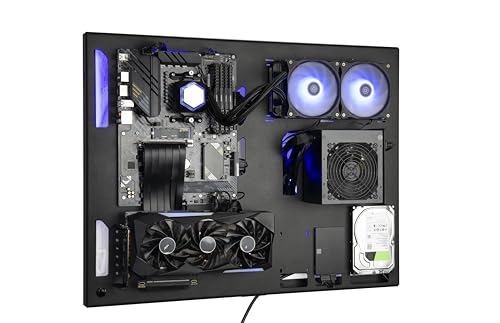
Desk PC Case: The Ultimate Workspace PC Build Guide
All about desks — and the powerful PC cases that fit right into your desk. Discover how to choose, build, and optimize a desk PC case for performance, cooling, and style.
What is a Desk PC Case? A desk PC case is a computer case designed to be integrated into or placed directly on your desk, often with a horizontal or low-profile form factor. Unlike traditional towers, these cases prioritize aesthetics, space efficiency, and often feature tempered glass or unique layouts to showcase your components. Whether you're a gamer, creator, or professional, a desk PC case can transform your workspace.
Why Choose a Desk PC Case?
Choosing a desk PC case offers several advantages over traditional tower cases. First, it saves floor space and can be a central design element of your desk setup. Second, many desk cases offer superior cooling due to their open layout and larger surface area for radiators. Third, they allow for a more personalized and showcase-worthy build, with transparent panels and customizable RGB lighting. Finally, a desk PC case often provides better accessibility to ports and buttons, making it a practical choice for any workspace.
Key Factors When Choosing a Desk PC Case
Size & Form Factor
Desk PC cases come in various sizes, from compact mini-ITX to full ATX and even extended E-ATX. Consider the size of your desk tabletop and the components you plan to install. A larger case offers more room for high-end GPUs and multiple radiators, while a smaller case saves space and is easier to move.
Price Range: $150–$600
Cooling & Airflow
Proper airflow is crucial for any PC, but especially for desk cases where components may be enclosed. Look for cases with multiple fan mounts, dust filters, and support for liquid cooling radiators. A well-ventilated case ensures your CPU and GPU run cool, prolonging their lifespan. For more on desk ergonomics, see our guide on desk height ergonomics.
Material & Build Quality
The material affects both durability and aesthetics. Aluminum and tempered glass are popular for premium cases, offering a sleek look and lightweight feel. Steel cases are heavier but often more affordable and sturdy. Check for quality finishes and reinforced edges to prevent damage. Complement your case with a desk mat for keyboard and mouse for a cohesive look.
Connectivity & Ports
Having accessible ports on the front or top of your desk PC case is a huge convenience. Look for cases with USB-C, USB 3.0, audio jacks, and even power buttons with RGB control. Some cases also include built-in cable management channels to keep your desk for cable management clean and tidy.
Popular Desk PC Case Types
There are several styles of desk PC cases, each with its own benefits:
- Open-Air Cases: These feature an open frame, often with a tempered glass top, providing excellent cooling and a striking visual. They are ideal for showcasing your components.
- Horizontal Cases: Designed to lie flat on your desk, these cases resemble a traditional desktop or workstation and are great for a clean, low-profile look. They often support multiple drive bays.
- Integrated Desk Cases: These are built directly into the desk itself, with the PC components housed in a compartment under the desk surface. This is the ultimate space-saving solution and creates a truly unique desk set-up.
- Mini-ITX Desk Cases: Perfect for small spaces or minimalist setups, these cases are compact yet powerful, supporting high-end components in a small footprint. Pair them with a desk monitor riser to maximize your workspace.
Building Your Desk PC: Step-by-Step Tips
1. Plan Your Components
Before buying a case, list all your components: motherboard size (ATX, mATX, ITX), GPU length, PSU type, and number of drives. Ensure your case supports them all. Check clearances for CPU coolers and radiators.
2. Prepare Your Workspace
Clear your desk and have a clean, static-free area. Use a desk mat to protect your desk surface and components. Keep tools like screwdrivers and zip ties ready.
3. Install Motherboard & CPU
Install the motherboard standoffs in the case, then mount the motherboard. Add the CPU, RAM, and M.2 drives before installing the motherboard if space is tight.
4. Cable Management
Route cables behind the motherboard tray or through dedicated channels. Use zip ties to bundle cables. Good cable management improves airflow and aesthetics, especially in desk cases with transparent panels.
After assembling, test your system outside the case to ensure everything works. Then, carefully mount the GPU and connect all power cables. Finally, install your operating system and drivers. For a complete workspace, consider adding a desk monitor or dual monitors to complement your new desk PC.
Maintaining Your Desk PC Case
Regular maintenance keeps your desk PC running smoothly. Dust filters should be cleaned monthly, and you should check fan operation and temperatures periodically. Since desk cases are often on display, keeping the glass panels clean is also important for aesthetics. Use a microfiber cloth and a gentle cleaner. If you're upgrading components, check that your case's layout allows for easy access. A well-maintained PC not only performs better but also enhances the look of your entire desk set-up.
Aesthetics: Make Your Desk PC a Showpiece
One of the biggest appeals of a desk PC case is the ability to create a stunning visual centerpiece for your workspace. Consider custom cable sleeves, RGB lighting strips, and themed components (like white or black builds). You can also integrate your PC with your desk light or monitor lighting for a synchronized glow. A cohesive design makes your desk not just functional, but a reflection of your personal style.
Ready to Build Your Dream Desk PC?
We've curated a selection of the best desk PC cases available today. Whether you prioritize cooling, aesthetics, or value, there's a case for you. Explore our top recommendations below and start building the ultimate workspace PC.
All about desks — because your workspace deserves the best.