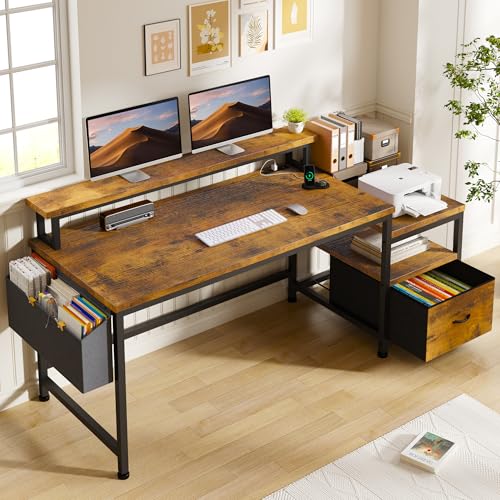
What to Look for in a Desk with Printer Shelf and Drawers
When you're shopping for a desk that combines a printer shelf with drawers, the first thing to consider is weight capacity. Printers can be surprisingly heavy, and the shelf must be able to support them without sagging. Look for desks with a solid steel frame or thick wooden shelves, especially if you have a large all‑in‑one printer.
Drawer configuration matters just as much. Some desks offer a single wide drawer for paper and accessories, while others include multiple smaller drawers for pens, sticky notes, and cables. If you store a lot of reference materials or files, a desk with a file‑sized drawer (letter/legal) can be a lifesaver. For more ideas on maximizing your workspace, check out our guide on desks for small spaces with drawer – the principles apply directly to your printer desk setup.
Ergonomics are critical: the printer shelf should be at a height that allows you to load paper and retrieve printouts without straining your back. Ideally, the main work surface should be at standard desk height (around 28–30 inches), and the printer shelf can be slightly lower or on a separate tier. If you're also looking for a desk that adapts to your posture, consider electric adjustable desk with drawers – many models now include a dedicated printer shelf.
Another aspect often overlooked is cable management. Printers need power and often a USB or network connection. A good desk with a printer shelf should have built‑in cable routing holes or a back panel to keep cords tidy. Pair it with a desk with built‑in cable management for a truly clean setup. And if you like to keep your monitor at eye level, you might also appreciate a desk with monitor shelf and drawers – though this adds another tier, which may reduce the space for your printer.
For those who want the ultimate in flexibility, some desks combine a printer shelf with a pull‑out keyboard tray, making the setup even more ergonomic. Explore our recommendations for desk with pull‑out keyboard tray and see how they integrate with printer storage. If you prefer a more traditional look, an executive desk with cable management can also accommodate a printer on a side shelf or credenza.
💡 Pro Tip: If you’re tight on space, consider a computer desk with drawers for small spaces and add a separate printer stand or shelf nearby. This gives you the flexibility to place the printer wherever it fits best, without compromising your work surface.
Which Style Fits Your Office?
Whether you prefer a modern minimalist look or a classic wood finish, there’s a desk with printer shelf and drawers for every taste. For a contemporary home office, look for clean lines, a white or black finish, and a compact footprint. If you love a warm, traditional vibe, go for a solid oak or walnut desk with brass handles. And if you're setting up a shared or kids' workspace, a durable computer desk with hutch and drawers can double as a printer station.
Remember, the best desk is one that fits your workflow. Before you buy, measure your printer's dimensions (width, depth, and height when the paper tray is extended) and compare them with the shelf specifications. Also, think about how many drawers you really need – more drawers mean more storage, but they also take up knee space or add to the desk's depth.
Finally, don't forget to check the assembly requirements. Many desks with a printer shelf and drawers ship flat‑packed, and some are easier to build than others. Reading reviews about build quality and stability is always a good idea – especially if you plan to place a heavy printer on the shelf.