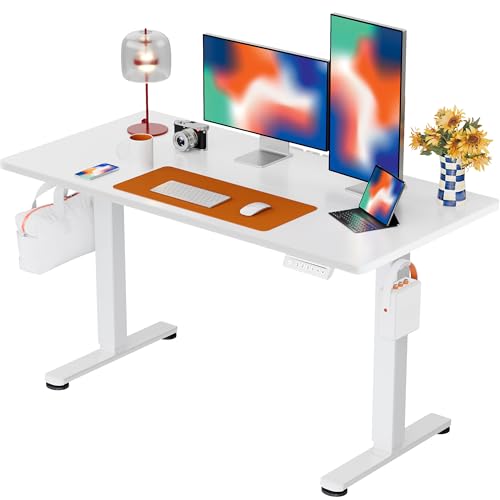
Ergonomic Desks: The Complete Guide to a Healthier Workspace
Your desk should work with your body, not against it. Learn how to choose an ergonomic desk that supports posture, reduces strain, and keeps you productive through long work sessions.
EXPLORE ERGONOMIC DESKSWhy ergonomics matters: An ergonomic desk is more than a flat surface — it is the foundation of a healthier workday. The right desk height, adjustability, and layout can dramatically reduce neck, shoulder, and lower back discomfort while improving focus and energy. This guide covers everything you need to evaluate before choosing an ergonomic desk for your home office or professional workspace.
What Makes a Desk Truly Ergonomic?
Ergonomics is the science of designing a workspace to fit the person using it. A genuinely ergonomic desk addresses three core dimensions: height, adjustability, and surface layout. When these align with your body measurements and daily tasks, your body maintains neutral posture without unnecessary strain.
Height is the most critical factor. A desk that is too high forces your shoulders upward and compresses nerves in the wrists. A desk that is too low encourages slouching and rounds the lower back. The ideal ergonomic desk surface sits at elbow height when you are seated with your feet flat on the floor and your shoulders relaxed. For most adults this falls within a range that adjustable desks can accommodate far more precisely than fixed-height models.
Adjustability turns a good desk into a great one. Height-adjustable desks, especially electric models, let you transition between sitting and standing throughout the day. This movement variation is one of the most effective ways to reduce prolonged-static-posture fatigue. Even manually adjustable or convertible desks offer meaningful benefits when used consistently.
Surface layout matters too. A desk deep enough to place your monitor at a comfortable viewing distance — typically an arm's length away — prevents eye strain and forward head posture. Width matters for spreading out documents, keyboard, mouse, and accessories without crowding. If you often work with multiple screens, consider a model designed for a dual monitor setup that provides enough surface area and cable routing.
Key Benefits of an Ergonomic Desk
Better Posture
A properly fitted desk keeps your spine in a neutral position, reducing slouching and the lower back tension that builds during long seated sessions.
Reduced Discomfort
Correct height and adjustability ease pressure on the neck, shoulders, and wrists, lowering the risk of repetitive strain and fatigue.
More Energy
Switching between sitting and standing with an adjustable desk keeps circulation active and helps you stay alert through the afternoon.
Improved Focus
When your body is comfortable, your mind stays on the task. A well-organized ergonomic surface minimizes distractions and physical irritations.
Long-Term Health
Consistent use of an ergonomic setup supports spinal health and reduces the cumulative wear that poor posture causes over months and years.
Flexible Workflow
Height-adjustable desks adapt to different tasks, chairs, and even users, making them a versatile investment for shared or evolving workspaces.
Types of Ergonomic Desks Explained
Not every ergonomic desk is the same. Understanding the main categories helps you match a desk to your workflow, room dimensions, and physical needs.
Electric Height-Adjustable Desks
Electric adjustable desks use motorized legs to move the surface between sitting and standing heights at the touch of a button. They are the most convenient option for frequent transitions and often include memory presets so you can return to your preferred positions instantly. Many models also support cable management and accessories. For a deeper look at this category, explore our guide to electric height-adjustable desks.
Manual Height-Adjustable Desks
Manual desks rely on crank or pin-and-lock mechanisms. They are mechanically simpler and often favored for their durable construction and zero reliance on power. If you prefer a dependable, low-maintenance adjustable desk, consider a desk that goes up and down through manual adjustment.
Standing Desk Converters
If you already own a fixed desk, a standing desk converter sits on top and raises your monitor and keyboard to standing height. This is a practical way to add movement without replacing your entire desk. Learn more in our guide to desktop adjustable height computer stands.
Ergonomic Desks with Storage
Adjustability does not have to come at the expense of storage. Many ergonomic desks integrate drawers, shelves, or hutch units. If organization is a priority, look at options such as a desk with storage drawers and shelves or an electric adjustable desk with drawers that keeps essentials within reach without cluttering the work surface.
Choosing the Right Ergonomic Desk Tier
Ergonomic desks vary across quality tiers. Instead of comparing by numbers, think in terms of build quality, adjustability features, and long-term durability. The table below outlines the universal tier system used throughout this guide.
Entry-Level Ergonomic Desks
Reliable starting points for first-time ergonomic setups. These desks focus on core adjustability and stable construction without extra features.
- Manual or basic electric adjustment
- Solid build for everyday use
- Straightforward surface layout
- Good for light to moderate workloads
Mid-Range Ergonomic Desks
The sweet spot for most home offices. Mid-range desks add smoother mechanisms, memory presets, and better cable management.
- Dual-motor electric adjustment
- Memory height presets
- Reinforced frame and stable legs
- Integrated cable routing options
- More surface size choices
Premium Ergonomic Desks
Built for heavy daily use and demanding setups. Premium desks emphasize stability at full height and refined control systems.
- High-grade steel frames
- Fast, quiet motor systems
- Advanced anti-collision sensors
- Expandable accessories ecosystem
- Commercial-grade durability
Entry-level models are a practical way to begin, while mid-range desks typically offer a smoother adjustment experience and better stability for dual-monitor work. Professional-grade desks are a long-term investment for users who spend many hours at their workspace or need the desk to support heavier equipment.
Ergonomic Desk Setup Checklist
Follow these steps to dial in your workspace
- Set the desk height for your chair first. Adjust your chair so feet are flat and thighs are parallel to the floor, then set the desk surface to elbow height.
- Position your monitor at arm's length. The top of the screen should sit near eye level so your neck stays neutral. A monitor arm or a desktop monitor holder can help fine-tune the height.
- Keep the keyboard and mouse close. Your elbows should stay near your sides with wrists straight. Consider a keyboard tray model if you need a lower input height — see our guide to desks with a keyboard tray.
- Leave space for movement. Ensure enough room under the desk for your knees and legs, and avoid storing bulky items where your feet rest.
- Organize cables and accessories. Loose cables create visual clutter and trip hazards. Use trays or routing channels to keep the surface clean.
- Stand at regular intervals. If you use an adjustable desk, alternate between sitting and standing roughly every 30–45 minutes. For a structured routine, read our sit-stand routine guide.
- Re-check alignment after each change. When you switch from sitting to standing, adjust the monitor and input devices so your posture remains neutral.
Materials and Durability in Ergonomic Desks
An ergonomic desk is only as good as the materials beneath its surface. The frame determines stability, especially at standing height, while the tabletop affects durability and feel. High-grade steel frames with reinforced joints provide the rigidity needed to prevent wobble during adjustment and typing. Look for powder-coated or rust-proof finishes if your workspace sees humidity or temperature variation.
Tabletop options range from engineered wood and laminate to solid wood and bamboo. Laminate and engineered surfaces are practical for daily use and easy to maintain, while solid wood offers a warmer feel and can be refinished over time. Whichever material you choose, confirm that the desk's weight capacity comfortably exceeds the combined weight of your monitor, accessories, and any equipment you plan to keep on the surface.
For users who want a natural look with dependable durability, eco-friendly desks made from bamboo or reclaimed materials offer a balance of sustainability and strength. If your workspace is compact, a desktop computer desk for small spaces can deliver ergonomic adjustability without dominating the room.
Common Ergonomic Desk Mistakes to Avoid
- Buying for looks over fit. A stylish desk that does not match your seated elbow height will cause strain regardless of its design.
- Skipping the chair adjustment. The desk and chair must work as a pair. Set the chair first, then adjust the desk to match.
- Ignoring monitor distance. Placing the screen too close or too far forces the neck and eyes into awkward positions over time.
- Standing all day. Standing desks are most effective when used in intervals. Prolonged standing carries its own risks — variety is the goal.
- Overloading the surface. Keep heavy items within the desk's rated capacity and distribute weight evenly to preserve stability.
- Neglecting cable management. Tangled cables not only look messy but can limit the desk's height range and create hazards.
Frequently Asked Questions About Ergonomic Desks
What height should an ergonomic desk be?
For seated work, the desk surface should sit at elbow height when your feet are flat and shoulders are relaxed. For most adults this falls between roughly 24 and 30 inches, but body proportions vary. An adjustable desk lets you set the exact height that suits you rather than compromising with a fixed model.
Is a standing desk better than a traditional desk?
A height-adjustable standing desk is generally more ergonomic because it allows you to alternate between sitting and standing. Neither posture should be held for hours on end. The key benefit is variety and the ability to match the desk to your body rather than the other way around.
Do I need an electric desk or is manual enough?
Manual desks are dependable and mechanically simple, making them a solid choice if you adjust height occasionally. Electric desks are more convenient for frequent transitions and often include memory presets. Choose based on how often you plan to switch positions and whether ease of adjustment matters to your daily routine.
How do I know if my desk is ergonomic for my body?
Sit with your feet flat, shoulders relaxed, and elbows at roughly 90 degrees. Your wrists should stay straight while typing, and your monitor should sit at arm's length with the top near eye level. If you find yourself reaching, slouching, or tilting your head, the desk or accessory placement needs adjustment.
Can I make my existing desk more ergonomic?
Yes. A standing desk converter, monitor arm, keyboard tray, and footrest can significantly improve an existing setup. These accessories let you raise your screen and input devices independently, which is often enough to achieve neutral posture without replacing the desk itself.
Explore Related Desk Guides
Ready to Upgrade Your Workspace?
Browse our curated selection of ergonomic desks built for comfort, adjustability, and long-term durability. Find the model that fits your body, your room, and your workflow.
View Recommended Ergonomic Desks