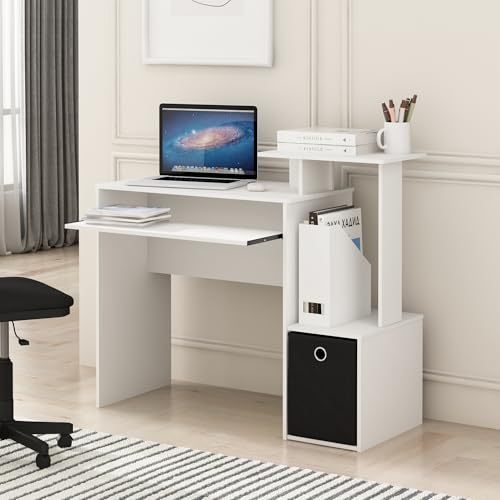
Desk with Keyboard Tray: Ultimate Guide to Ergonomic Comfort
Discover how the right desk with a keyboard tray can transform your posture, productivity, and overall well-being. From electric standing desks to classic executive models, we cover everything you need to know before you buy.
Why a desk with a keyboard tray? It’s more than just a sliding shelf. It’s the cornerstone of an ergonomic workspace, promoting neutral wrist posture, reducing shoulder strain, and freeing up valuable desk surface. Whether you're a programmer, writer, or gamer, the right tray can make all the difference. This guide explores the best options, key features, and how to choose the perfect desk for your needs.
Benefits of a Desk with Keyboard Tray
Ergonomic Health
A desk with keyboard tray allows you to position your keyboard at or below elbow height, keeping your wrists straight and shoulders relaxed. This reduces the risk of repetitive strain injuries (RSI) like carpal tunnel syndrome and promotes a healthier posture throughout the day. For the best results, combine it with an ergonomic desk chair for back pain relief.
Optimized Desk Space
When your keyboard is stored under the desk, you instantly gain valuable surface area for papers, a monitor, or a whiteboard. This is especially critical for small spaces where every inch counts. It also creates a cleaner, more organized aesthetic that reduces visual clutter and mental load.
Which Desk Type Suits You?
Electric Standing Desks
Pair an electric standing desk with a built-in or aftermarket tray for the ultimate in flexibility. These desks allow you to alternate between sitting and standing, while the tray ensures your keyboard is always at the optimal height. Many models, like the ergonomic standing desk, come with pre-drilled holes for easy tray installation.
$800 – $2,500 depending on size and frame quality.
Executive & L-Shaped Desks
Larger desks like the executive desk with hutch or L-shaped desk often feature dedicated keyboard trays. These are ideal for multi-monitor setups or those who need extensive workspace. Look for models with sturdy, slide-out mechanisms that can support a heavy keyboard and mouse.
$1,200+ for premium wood models.
What to Look for in a Keyboard Tray
5 Critical Features
- Adjustability: Look for height, tilt, and negative tilt adjustments to fine-tune wrist angle.
- Mouse Platform: A separate, sliding mouse platform on the right or left (or both) enhances comfort.
- Weight Capacity: Ensure the tray can support your keyboard and any other equipment (e.g., a numeric keypad).
- Slide Mechanism: Ball-bearing slides offer smoother movement and greater durability.
- Compatibility: Check if the tray can be installed under your existing desk or if you need a new desk with keyboard tray.
For a complete setup, consider pairing your desk with a dedicated desk tray that matches your workflow. If you're a gamer, a tray with a wide platform and mouse pad integration is a game-changer.
How to Set Up Your Keyboard Tray Correctly
Even the best desk with keyboard tray won't help if it's not adjusted properly. Follow these steps for an ergonomic setup:
- Sit back: Sit all the way back in your ergonomic chair. Your feet should be flat on the floor.
- Height adjustment: Position the tray so your elbows are at a 90-degree angle, with your forearms parallel to the floor.
- Negative tilt: If possible, set a slight negative tilt (the front of the tray higher than the back) to keep your wrists straight.
- Distance: The tray should be far enough that your elbows remain at your sides, not reaching forward.
- Test it: Type for a few minutes. You should feel no strain in your wrists, shoulders, or neck.
For a complete ergonomic workspace, consider an ergonomic desk set up guide for more tips.
Top Desk Picks with Keyboard Tray
While many desks offer keyboard trays, the best choices combine excellent build quality with thoughtful ergonomic design. Look for desks that feature a sturdy, all-steel frame, a high-quality laminate or wood top, and a tray that glides smoothly. For those who need flexibility, an electric adjustable desk with a pre-installed tray offers the best of both worlds.
If you're on a budget, consider retrofitting a keyboard tray to your existing flat top desk. Just ensure the tray is compatible with your desk's thickness and style. For a more integrated solution, an executive desk or desk with drawers often includes a premium tray as a standard feature.
Pro Tip: Check the tray's mounting depth and mechanism. An ergonomic desk with a full-extension slide allows you to pull the keyboard all the way out for typing, then push it back to save space.
Is a Desk with Keyboard Tray Right for You?
If you spend more than three hours a day at a computer, the answer is almost certainly yes. The benefits to your long-term health and daily comfort are well-documented. Whether you choose a standing desk, a traditional writing desk, or a multi-functional DIY desk, adding a keyboard tray is one of the best investments you can make for your workspace.
Ready to find your perfect desk? Browse our selection below. All our recommended products are rigorously vetted for quality, ergonomics, and value.