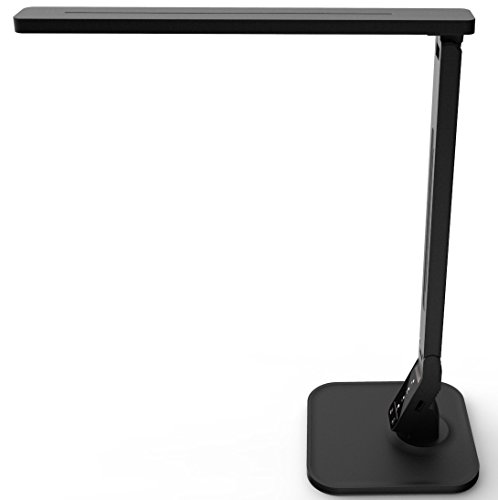
Dimmable LED Desk Lamp with Touch Control: Your Complete Workspace Lighting Guide
Everything you need to know about choosing, using, and benefiting from a touch-control dimmable LED desk lamp. Learn how the right lighting transforms your productivity, protects your eyes, and elevates your desk setup.
Explore the Buying GuideWhy lighting matters more than you think: A dimmable LED desk lamp with touch control is not just a light source — it is a productivity tool, an eye-health investment, and a centerpiece of your workspace. Whether you are reading documents, working on a laptop, sketching designs, or winding down with a book, the ability to fine-tune brightness and color temperature with a simple touch puts complete control of your lighting environment at your fingertips. This guide walks you through every consideration so you can choose with confidence.
What Is a Dimmable LED Desk Lamp with Touch Control?
A dimmable LED desk lamp with touch control combines three technologies into one elegant fixture. LED lighting delivers energy-efficient, long-lasting illumination with minimal heat output. Dimming capability lets you adjust brightness from a soft glow for evening reading to bright, focused light for detailed tasks. Touch control replaces traditional buttons and switches with capacitive sensors that respond to a simple tap, slide, or long press. Together, these features create a lighting experience that is intuitive, precise, and tailored to your moment-by-moment needs.
Unlike conventional desk lamps with fixed brightness levels, a touch-control dimmable LED lamp offers a continuous or stepped range of brightness settings. Many models also include adjustable color temperature — from warm white for relaxation to cool daylight for concentration. The touch interface typically resides on the lamp's base, stem, or a dedicated control strip, allowing you to make adjustments without fumbling for knobs or remote controls.
Key Features That Define a Quality Touch-Control LED Lamp
Touch Dimming Precision
A responsive touch sensor should register taps instantly and support either stepped or continuous dimming. Look for models with a memory function that recalls your last brightness setting when you turn the lamp back on.
Adjustable Color Temperature
Models that shift from warm (around 2700K–3000K) to cool daylight (5000K–6500K) adapt to different tasks. Warm light reduces eye strain in the evening, while cool light boosts alertness during focused work.
Flicker-Free Illumination
Cheap LEDs can flicker imperceptibly, causing headaches and eye fatigue over time. A quality lamp uses constant-current drivers and diffused light panels to deliver stable, comfortable illumination.
High Color Rendering Index (CRI)
CRI measures how accurately a light source renders colors. For a desk lamp used for reading, design work, or crafts, aim for CRI 90 or above so colors appear natural and true to life.
Stable Base and Flexible Arm
The lamp should stay firmly planted while you adjust the head or arm. A weighted base and a smooth, hold-anywhere arm (gooseneck or articulated joints) let you direct light exactly where you need it.
USB Charging and Extra Ports
Many modern touch-control lamps include a USB-A or USB-C port on the base, letting you charge your phone or accessories without reaching for a wall adapter. This is a practical addition for compact workspaces.
Buying Guide: Matching the Lamp Tier to Your Needs
Touch-control LED desk lamps span a wide range of capabilities. The table below organizes them by market tier so you can identify which level of features aligns with your workspace and usage patterns. Remember that a higher tier does not always mean better for your specific situation — an entry-level lamp with solid fundamentals can serve a student desk perfectly, while a professional-grade fixture makes sense for a design studio.
| Tier | Typical Features | Best For |
|---|---|---|
| Entry-Level | Basic touch dimming (3–5 steps), fixed or dual color temperature, plastic build, modest light output, USB-A port on some models. | Students, casual readers, secondary desk lighting, tight spaces. |
| Mid-Range | Stepless dimming, adjustable color temperature range, flicker-free driver, aluminum alloy arm, memory function, USB-A + USB-C charging. | Home office workers, remote professionals, mixed-use desks for work and study. |
| High-End Tier | Wide brightness range, high CRI (90+), precision touch slider, auto-dimming ambient sensor, premium metal construction, multi-joint arm, built-in wireless charging pad on select models. | Designers, architects, detail-oriented professionals, dedicated creative studios. |
| Flagship / Professional-Grade | Laboratory-grade flicker-free performance, tunable white from 2700K to 6500K, ultra-high CRI, touch-sensitive memory presets, seamless dimming curve, commercial durability, advanced glare control. | Color-critical work, professional photography or art studios, users with light sensitivity, long-session knowledge workers. |
Quick Checklist Before You Choose
- Touch responsiveness: Does the sensor respond instantly to a light tap, or does it require a firm press?
- Dimming range: Can it go dim enough for evening reading without blinding you, and bright enough for detailed tasks?
- Color temperature range: Does it cover both warm and cool white, or is it fixed?
- Flicker-free certification: Look for explicit flicker-free claims or third-party eye-comfort certifications.
- Light coverage: Will the lamp illuminate your entire work area, or only a narrow spot?
- Build and stability: Does the base stay put when you adjust the arm? Is the arm easy to position?
- Charging ports: Do you need USB-A, USB-C, or wireless charging built into the base?
- Memory function: Does the lamp remember your preferred brightness and color settings between sessions?
- Footprint: Will the base fit on your desk alongside your keyboard, monitor, and accessories? Consider a clamp-on model if desk space is tight.
- Cable length and routing: Is the power cable long enough for your desk layout, and can it be managed neatly?
How Touch Control Technology Works
Touch control on a desk lamp relies on capacitive sensing — the same principle behind smartphone touchscreens. A small sensor beneath the lamp's surface detects the electrical capacitance of your fingertip. When you touch the sensor, the lamp's microcontroller registers the change and translates it into an action: a tap might cycle through brightness levels, a long press might dim smoothly, and a slide across a touch strip might adjust color temperature. Because there are no mechanical buttons to wear out, touch controls tend to be more durable and easier to clean than traditional switches.
The quality of the touch experience varies significantly between tiers. Entry-level models sometimes have sluggish or inconsistent sensors, while mid-range and high-end lamps use tuned capacitive controllers that respond predictably even with dry or slightly damp fingers. If precise, repeatable control matters to you, prioritize lamps from the mid-range tier upward.
Lighting Ergonomics and Eye Health
The way you light your desk directly affects eye comfort, focus, and even sleep quality. A dimmable touch-control LED lamp gives you the tools to practice good lighting ergonomics: position the lamp to the side of your dominant hand (so your hand does not cast a shadow on your work), angle the light so it falls across your task without reflecting into your eyes, and adjust brightness to match the ambient light in the room. As evening approaches, shift toward warmer color temperatures to reduce blue light exposure and support your natural circadian rhythm.
For a deeper look at workstation ergonomics, explore our guides on ergonomic desks and how to create a desk with LED lights built in for a fully integrated lighting solution.
Setup and Placement Tips for Maximum Benefit
Where you place your lamp matters as much as the lamp itself. Follow these placement principles to get the most from your touch-control LED desk lamp:
- Position the lamp on the opposite side of your dominant hand. If you are right-handed, place the lamp on your left side so your writing hand does not cast a shadow over your work.
- Angle the light across your task, not directly into your eyes. The lamp head should point down and slightly toward the work surface, with the light source outside your field of view.
- Match brightness to ambient light. In a bright room, increase the lamp's output to reduce contrast; in a dark room, lower it to avoid harsh glare.
- Use warm settings after sunset. Shift to 2700K–3000K in the evening to minimize blue light exposure and help your body wind down.
- Keep the touch panel accessible. Ensure the control surface is within easy reach from your seated position so you can adjust lighting without disrupting your workflow.
- Manage the cable. Route the power cable along the back of your desk and secure it with clips or a cable tray to keep your workspace tidy.
Related Desk and Workspace Guides
Frequently Asked Questions
A dimmable LED desk lamp with touch control is a modern lighting fixture that uses LED technology and allows you to adjust brightness levels by simply touching the lamp's base, stem, or touch-sensitive panel. It combines energy efficiency with intuitive, gesture-based operation, eliminating mechanical buttons and offering precise control over your lighting environment.
Touch control uses capacitive sensors embedded in the lamp's surface. When your finger touches the sensor, it detects the change in electrical capacitance and triggers the lamp's microcontroller to adjust brightness, change color temperature, or toggle power. This is the same technology used in smartphone touchscreens, adapted for lighting control.
Yes. Quality dimmable LED desk lamps with flicker-free technology and adjustable color temperature reduce eye strain and fatigue. Look for features like diffused light panels, high color rendering index (CRI), and certifications such as eye-caring or low blue light. Proper placement and brightness adjustment further protect your eyes during long work sessions.
Consider brightness range, color temperature adjustability, flicker-free operation, build quality, base stability, USB charging ports, memory function, and touch responsiveness. Also check the lamp's light coverage area and whether it offers multiple lighting modes. A mid-range or high-end model with stepless dimming and a high CRI is a strong choice for daily professional use.
Absolutely. For makeup application or detailed crafts, choose a lamp with high CRI (90+) and adjustable color temperature so you can see colors accurately under different lighting conditions. A model with a wide, evenly diffused light panel and a flexible arm that holds its position will serve these tasks well.
Final Thoughts: Choosing with Confidence
A dimmable LED desk lamp with touch control is one of the most impactful upgrades you can make to your workspace. It gives you command over brightness and color temperature, supports eye comfort during long sessions, and adds a sleek, modern touch to your desk. Use the tier framework and checklist above to match a lamp's capabilities to your actual needs — whether that is a straightforward entry-level model for occasional reading or a professional-grade fixture for color-critical work. Whichever tier you choose, prioritize flicker-free operation, responsive touch control, and a stable build. Your eyes and your productivity will thank you.