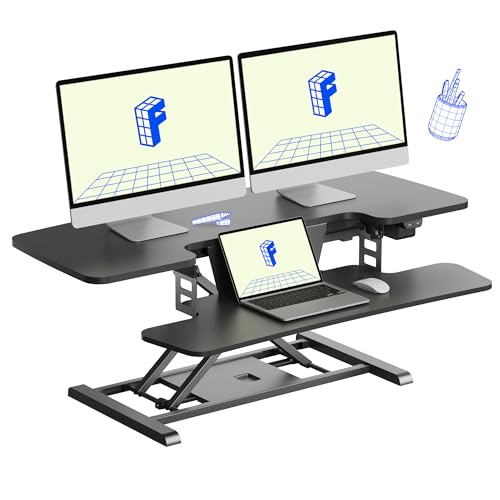
Electric Adjustable Standing Desk Converter: The Complete Buyer's Guide
Transform any fixed desk into a flexible sit-stand workstation. Learn how an electric adjustable standing desk converter works, what to look for, and how to choose the right model for your body, workspace, and workflow.
Explore Recommended ModelsWhat Is an Electric Adjustable Standing Desk Converter?
An electric adjustable standing desk converter is a motorized platform that sits on top of your existing desk. Instead of replacing your entire desk, you place your monitor, keyboard, and mouse on the converter, then press a button to raise or lower the platform to your preferred sitting or standing height.
This makes it one of the most practical upgrades for anyone who already owns a solid desk but wants the health benefits of alternating between sitting and standing throughout the day. Unlike manual converters that require lifting or a gas spring, electric models use a motor and control panel, often with programmable height presets.
If you are still deciding between a full replacement and a converter, you can compare options on our electric adjustable standing desk overview or explore desks that go up and down for a broader perspective.
Why Choose an Electric Converter Over a Manual One?
Manual converters are a solid entry-level option, but electric adjustable models offer clear advantages that matter for daily use:
- Effortless height changes: A single button press moves the platform. No lifting, no strain, no interruptions to your workflow.
- Height presets: Many mid-range and premium models store two or more favorite heights, so switching between sitting and standing is instant and consistent.
- Smoother motion: Electric motors raise and lower the platform steadily, which helps prevent spills and keeps monitors stable.
- Better for heavier setups: Electric lifts typically handle more weight than gas-spring or manual models, making them suitable for dual-monitor arms and larger keyboards.
- Accessibility: For users with limited upper-body strength or mobility concerns, an electric converter removes the physical effort entirely.
If you want a broader comparison of height-adjustable risers, our guide to desktop adjustable height computer stands covers the trade-offs between manual, gas-spring, and electric designs.
Key Features to Evaluate Before You Buy
Height Range and Presets
The most important specification is the height range. A good converter should raise your keyboard and monitor to a comfortable standing position for your body height. Look for models with programmable presets — they make the sit-stand transition a one-touch action instead of a guess. Entry-level electric converters often have a fixed upper and lower stop, while mid-range and high-end tiers add memory buttons.
Weight Capacity and Build Quality
Check the rated weight capacity against your actual setup: monitor, monitor arm, keyboard, mouse, laptop, and any accessories. A professional-grade or commercial-grade converter with high-grade steel construction and a reinforced lifting column will feel stable at full height. Lighter starter-tier models may wobble if you load them heavily or type aggressively.
Keyboard Tray and Two-Tier Design
Many converters use a two-tier layout: a lower keyboard deck and an upper monitor surface. This keeps your screen at a comfortable viewing distance while your arms rest at a natural angle. Some models offer a removable or adjustable keyboard tray. If keyboard ergonomics are a priority, also read our guide to a desk with keyboard tray for complementary advice.
Stability at Standing Height
Stability is where electric converters differ most. Look for a wide base, anti-slip pads, and a rigid lifting column. Reviews and spec sheets that mention "minimal wobble" or "reinforced frame" are worth prioritizing. A stable platform protects your monitor and keeps typing comfortable.
Control Panel and Cable Management
A simple up/down button panel is fine for essential-tier models. Mid-tier and top-tier converters add LED displays, height readouts, and memory presets. Cable management clips or a channel underneath the platform are a bonus — they keep your workspace clean as the converter moves up and down.
Converter Tiers: What to Expect at Each Level
To compare models without focusing on numbers, it helps to think in tiers. The table below summarizes what each tier typically delivers.
| Tier | Typical Build | Best For |
|---|---|---|
| Starter tier | Single motor, basic up/down control, lighter frame | Light setups, occasional standing, first-time users |
| Mid-range | Stronger motor, height presets, two-tier deck, better stability | Daily sit-stand routines, dual-monitor users |
| Premium / high-end tier | Dual-motor or heavy-duty lift, memory presets, reinforced frame, cable management | Heavy monitor arms, full-time standing use, shared workspaces |
| Professional-grade / commercial-grade | Heavy-duty steel, large surface, advanced controls, long warranty | Office deployments, multi-user environments, demanding daily use |
Within each tier, the best choice depends on your monitor weight, desk depth, and how often you plan to switch positions. A mid-range converter with presets is usually the sweet spot for home offices.
How to Set Up Your Converter Ergonomically
Buying the right converter is only half the job. Proper setup determines whether you actually get the ergonomic benefits:
- Position the converter centrally on your desk, with the keyboard deck at a comfortable reach distance.
- Set the sitting height first: elbows at roughly 90 degrees, feet flat on the floor or a footrest.
- Set the standing height second: elbows still near 90 degrees, monitor top at or slightly below eye level.
- Program your presets if your model supports them, so both positions are repeatable.
- Adjust monitor distance to about an arm's length, and tilt the screen slightly back.
- Manage cables so they have slack for the full height range.
For a full ergonomic walkthrough, see our ergonomic desks resource, and if you use a laptop on the converter, a laptop stand guide helps you raise the screen to eye level.
Converter vs. Full Standing Desk: Which Should You Choose?
An electric adjustable standing desk converter is not the right answer for everyone. Here is a quick decision guide:
- Choose a converter if: you already own a desk you like, you rent or move often, you want a lower-commitment upgrade, or your workspace is shared.
- Choose a full standing desk if: you want a larger uninterrupted surface, you need heavy load capacity, or you are furnishing a workspace from scratch. Our electric adjustable standing desk guide and dual motor standing desk overview cover those options.
- Consider a desktop riser with storage if you need drawers or shelves integrated into the platform — see desktop standing desk options.
Many people start with a converter and later upgrade to a full desk once they confirm they enjoy the sit-stand rhythm. Either path works — the key is consistency.
Common Mistakes to Avoid
- Overloading the platform: exceeding the rated capacity causes wobble and motor strain.
- Ignoring desk depth: a deep converter on a shallow desk leaves no room for your keyboard reach.
- Skipping presets: without saved heights, users tend to stand less often.
- Poor cable slack: cables that are too short can pull loose as the platform rises.
- Standing all day: the goal is alternation, not permanent standing.
Frequently Asked Questions
Can an electric standing desk converter hold two monitors?
Yes, many mid-range and premium models support dual monitors, especially when you check the weight capacity and platform width. For heavy dual-monitor arms, choose a high-end tier or professional-grade converter with a reinforced frame.
Do I need to drill into my desk?
Most converters are freestanding and require no drilling. They sit on anti-slip pads on top of your existing desk. A few models offer optional clamping, but freestanding is the norm.
How much height does a converter add when lowered?
Most converters add a few inches at their lowest setting. Check the collapsed height against your current sitting position — if you are already at the correct sitting height, a very tall collapsed converter may push your keyboard too high.
Is an electric converter noisy?
Electric motors produce a soft whir during movement, typically under a few seconds per transition. Premium models are generally quieter and smoother than starter-tier units.
Can I use a converter with a laptop only?
Absolutely. Place the laptop on the upper deck and use an external keyboard and mouse on the lower deck for the best ergonomics. A laptop stand can further improve screen height.