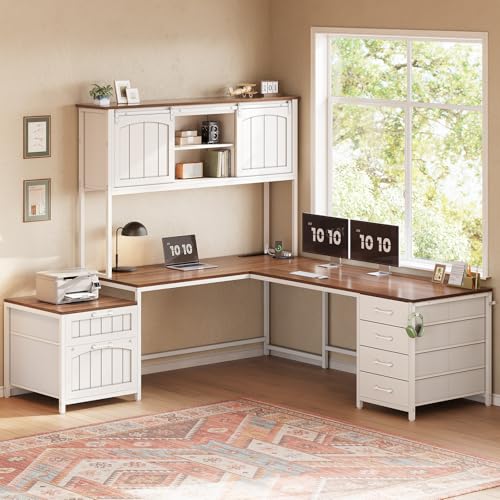
L-Shaped Desk with Drawers and Hutch: The Complete Guide to Choosing and Setting Up
An L-shaped desk with drawers and hutch combines expansive corner workspace, hidden storage, and vertical shelving into one efficient footprint. This guide explains layouts, hutch designs, materials, ergonomics, and setup so you can choose the right model for a productive home office.
Explore Recommended ModelsWhy Choose an L-Shaped Desk with Drawers and Hutch
An L-shaped desk with drawers and hutch solves three workspace problems at once: it provides a wide corner-friendly work surface, keeps supplies and documents behind closed drawers, and adds open shelving above the rear edge for books, binders, decor, and frequently used tools. For home office workers, students, and creative professionals, this combination turns an unused corner into a full command center.
The L-shape supports two distinct work zones — for example, a main monitor and keyboard area plus a side writing or secondary laptop zone. Drawers hide the visual clutter that accumulates on open shelving, while the hutch keeps reference materials within arm's reach without consuming surface area. Together, these features reduce the need for separate bookcases or filing cabinets, which is valuable in compact rooms.
If corner space is limited but you still want organized storage, a compact L-shaped desk with drawers for small spaces can preserve the same workflow logic in a tighter footprint. For those who prefer open shelving over closed storage, a version with a bookshelf offers similar vertical storage with a more open feel.
Quick tip: Measure your corner twice — once for the footprint and once for the chair clearance. Hutches add height, so also confirm ceiling height and monitor clearance before ordering.
Anatomy of the Setup: Base, Drawers, and Hutch
Understanding the three core components helps you evaluate any model. The base is the L-shaped work surface and frame; drawers are integrated storage, usually under one side of the return or main desk; the hutch is the shelving unit mounted on top of the desk's rear edge.
1. The L-Shaped Base
The base consists of a main desk and a return (the shorter leg of the L). The main desk usually holds the primary monitor, keyboard, and mouse, while the return serves as a secondary work zone, printer station, or writing area. Frame construction ranges from metal legs and crossbars to full pedestal supports. Heavy-duty frames are preferable when the desk will carry a hutch and multiple monitors.
2. Drawer Pedestals and Integrated Drawers
Drawers can be part of a pedestal that supports the desk, or they can be integrated into the desk apron. Pedestal drawers typically offer deeper storage for hanging files, while integrated drawers are shallower and better for supplies. Some models include a file cabinet integrated with the hutch configuration, which is useful for letter and legal documents.
3. The Hutch
A hutch sits on the rear portion of the desk, usually above the main work area or along the return. It may include open cubbies, adjustable shelves, a corkboard back panel, or closed doors. Hutches add vertical storage but also add height and visual mass, so they work best when the desk has adequate depth and the room has sufficient lighting.
For a broader look at storage combinations, see the guide to L-shaped desks with storage and hutch.
Layout Options and Hutch Placement
Hutch placement and return orientation are the two layout decisions that most affect daily comfort. The goal is to keep the hutch behind the monitor or along the return so it does not block sightlines or light.
Left Return vs. Right Return
A left-return desk extends the secondary surface to the left; a right-return desk extends it to the right. Choose based on room entry, window position, and dominant hand. If the room door is on your right, a left return keeps the primary work zone facing away from traffic. Reversible models allow you to assemble the return on either side, which is useful if you may move the desk later.
Specific configurations to compare include the L-shaped desk with hutch on the left side and the version with the hutch on the right side. If you prefer the hutch along the return rather than the main desk, a left-return hutch model keeps the main desk clear for monitors.
Hutch Span and Depth
Full-width hutches span most of the main desk and offer the most shelving, but they can feel enclosing. Partial-width hutches leave open space for a monitor arm or a window-facing view. Hutch depth typically ranges from shallow display shelves to deeper compartments that fit binders. Confirm that the hutch does not interfere with monitor height or a clamp-on monitor arm.
Corner and Reversible Layouts
Corner-specific models place the seating angle in the inner corner, maximizing reach to both legs. Reversible models offer flexibility during assembly. If you are unsure which orientation fits your room, a reversible L-shaped desk with storage lets you decide at setup time.
Drawer Configurations and Storage Capacity
Drawer layout determines how well the desk handles files, office supplies, and personal items. Most models fall into three patterns: a file drawer plus utility drawers, all utility drawers, or a mix with a locking cabinet.
| Storage Configuration | Best For | Typical Tier |
|---|---|---|
| File drawer + two utility drawers | Home office paperwork and supplies | Mid-range to premium |
| All utility drawers | Creatives and students with small items | Entry-level to mid-range |
| Locking file cabinet + hutch | Confidential documents and shared spaces | Premium to professional-grade |
| Two file drawers + open shelves | Heavy filing with display space | High-end tier |
If document security matters, look for models with a locking drawer option or a locking file cabinet. For maximum filing capacity, consider the two-file-drawer configuration. Those who need a matching aesthetic across the office may prefer an L-shaped desk with a matching filing cabinet.
Drawer glides matter as much as drawer count. Ball-bearing slides with full extension make it easier to reach the back of deep drawers; soft-close mechanisms reduce noise and wear. In heavier hutches, drawer pedestals often double as structural supports, so check the weight rating of the pedestal as well as the desktop.
Materials, Frames, and Surface Finishes
The material mix affects durability, maintenance, and visual warmth. Most L-shaped desks with hutches use engineered wood with laminate or veneer, supported by metal or wood frames.
Desktop Materials
- Laminate over engineered wood: Consistent finish, easy to clean, resistant to minor scratches. A practical choice for high-use family offices.
- Wood veneer: Real wood appearance with a stable core. Requires more care against moisture and scratches but offers a warmer look.
- Solid wood: The most repairable surface and the strongest long-term investment. Heavier and typically found in premium and luxury tiers.
- Metal and glass accents: Modern industrial looks, but glass requires careful cleaning and can show fingerprints.
Wood finishes such as oak, walnut, and white-painted surfaces dominate the category. For a lighter Scandinavian feel, a white L-shaped desk with hutch keeps a corner bright. For a warmer traditional look, a wood L-shaped desk with hutch pairs naturally with leather chairs and warm lighting.
Frame and Support
Metal frames with crossbars provide rigidity and resist side-to-side sway, which matters when a hutch adds weight up high. Wood pedestals offer a furniture-like appearance but may need periodic tightening. Check that the hutch is either attached to the desk with a back panel or anchored to the wall if the manufacturer recommends it.
Finish Care
Laminate and veneer surfaces benefit from a dry microfiber cloth and a mild, non-abrasive cleaner. Avoid soaking the surface, especially at seams and edges. Solid wood benefits from occasional conditioning to prevent drying and cracking.
Ergonomics and Workflow Planning
An L-shaped desk with a hutch can support excellent ergonomics if the primary work zone is planned around the monitor and keyboard rather than the corner itself. The most comfortable setup usually places the chair at the inner corner or along the main desk, with the return acting as a secondary reach zone.
Monitor and Keyboard Placement
Keep the primary monitor at eye level and an arm's length away. If the hutch limits monitor height, use a monitor stand or arm to raise the screen. The keyboard and mouse should sit at elbow height with wrists straight. If the hutch occupies the center of the desk, shift the monitor slightly to one side and use the open area for writing or a second screen.
Lighting and Sightlines
Hutches can block natural light from a window behind the desk. If the desk faces a window, choose a partial-width hutch or place the hutch along the return. Add a desk lamp or monitor light bar to fill shadows under the shelves.
Reach Zones
Items used daily — pens, notebooks, chargers — belong in the top drawers or open hutch cubbies within arm's reach. Reference binders and archived files can go in lower drawers or higher shelves. Keep the return clear enough to rotate between tasks without pushing items aside.
Ergonomic note: If you plan to alternate between sitting and standing, a fixed hutch desk is not suitable. Explore L-shaped desks with a standing option instead, and use a separate shelving unit for storage.
Advantages and Trade-offs
Advantages
- Generous corner workspace with two distinct work zones
- Hidden drawer storage reduces visible clutter
- Hutch adds vertical shelving without using surface area
- Consolidates desk, filing, and bookshelf into one footprint
- Wide range of finishes and reversible layouts
Trade-offs
- Requires a dedicated corner and sufficient chair clearance
- Hutches can block window light and limit monitor height
- Heavier and harder to move than a simple rectangular desk
- Fixed-height hutch models are not suitable for standing work
- Assembly is more involved than a basic desk
Buying Checklist and Fit Guide
Before ordering, confirm the physical fit and the storage plan. Use this checklist to compare models methodically.
Fit and Clearance
- Measure the corner footprint, including the return depth and chair swing
- Confirm ceiling height and hutch top clearance
- Check doorways and stair width for delivery
- Verify monitor height clearance under the hutch
Storage and Layout
- Decide between file drawers, utility drawers, or a mix
- Choose left, right, or reversible return orientation
- Confirm whether you need locking drawers or a locking file cabinet
- Plan hutch shelf heights for binders, books, and decor
Construction and Durability
- Check desktop material and edge banding quality
- Confirm frame rigidity and weight ratings
- Look for full-extension, ball-bearing drawer slides
- Verify hutch attachment method and wall-anchor guidance
For a broader comparison of corner workstations, browse the L-shaped desks for home office collection or the full L-shaped office desk with hutch category.
Frequently Asked Questions
What are the benefits of an L-shaped desk with drawers and hutch?
It combines a wide corner work surface, hidden drawer storage, and vertical shelving in one footprint. The L-shape supports dual-monitor or corner workflows, drawers keep supplies out of sight, and the hutch adds accessible shelving without reducing usable surface area.
How much desk surface does an L-shaped desk with hutch provide?
Most models provide a main work surface plus a return, creating a combined surface that comfortably supports a monitor, keyboard, and writing area. Hutch shelving sits above the rear of the desk, so it adds vertical storage without reducing usable surface.
Should the hutch be on the left or right side?
Choose hutch placement based on room traffic, window light, and your dominant hand. Left-return models suit rooms where the entrance is on the right; right-return models suit the opposite. Many reversible models let you assemble the return on either side.
What materials are best for an L-shaped desk with drawers and hutch?
Solid wood and wood veneer offer the most durable and repairable surfaces, while laminate and engineered wood provide consistent finishes and easier maintenance. Metal frames add rigidity and support heavier hutch loads.
Can an L-shaped desk with drawers and hutch support a standing setup?
Fixed-height L-shaped desks with hutches are not designed for standing use. For sit-stand capability, choose height-adjustable L-shaped desks, but note that most hutches are not designed to move with the desk. Consider a monitor arm or separate shelving instead.
Find the Right L-Shaped Desk with Drawers and Hutch
Explore top models selected for storage, stability, and workspace efficiency. Compare configurations and choose the setup that fits your corner, workflow, and style.
See Recommended Models