Monitor Stand Guide
Everything you need to know about monitor stands: types, ergonomics, materials, and how to choose the perfect stand for your desk setup. Elevate your screen, improve your posture, and transform your workspace.
Your monitor is the centerpiece of your desk setup. But if it's sitting at the wrong height, you're compromising your comfort, productivity, and long-term health. A monitor stand (or monitor riser) is a simple yet powerful tool that elevates your screen to eye level, freeing up valuable desk space and creating a more ergonomic workstation.
Whether you're working from home, gaming, or managing a creative studio, choosing the right monitor stand can make a world of difference. This guide breaks down everything you need to know to make an informed decision.
Why Your Desk Needs a Monitor Stand
Placing your monitor directly on your desk surface often forces you to look down, which strains your neck and shoulders over time. A monitor stand raises the screen to the correct height, so your eyes naturally align with the top of the monitor. This simple adjustment brings multiple benefits:
- Ergonomic comfort: Reduces neck and back pain by promoting a neutral posture.
- More desk space: Frees up the area under the stand for storing keyboards, notepads, or other desk organizer trays.
- Better viewing angle: Reduces glare and improves focus, especially when paired with proper desk lamp positioning.
- Improved cable management: Many stands have built-in channels to route cables neatly, complementing your desk cable management strategy.
- Dual monitor setups: A sturdy stand or arm allows you to position multiple screens side-by-side or stacked, optimizing your desk setup layout.
Types of Monitor Stands: Which One Is Right for You?
Monitor stands come in several styles, each with unique advantages. Your choice depends on your desk type, monitor size, and how you like to work.
Fixed Monitor Riser
A simple, solid platform that elevates your monitor to a fixed height. Often made of wood, metal, or acrylic. Ideal for single-monitor setups where you don't need height adjustment.
Best for: Minimalist desks, home offices, and anyone who wants a stable, no-fuss solution.
Adjustable Height Stand
Features a mechanism (like a gas spring or manual knob) to change the height. Offers flexibility for multiple users or when switching between sitting and standing.
Best for: Shared workspaces, sit-stand desks, and users who frequently change their posture.
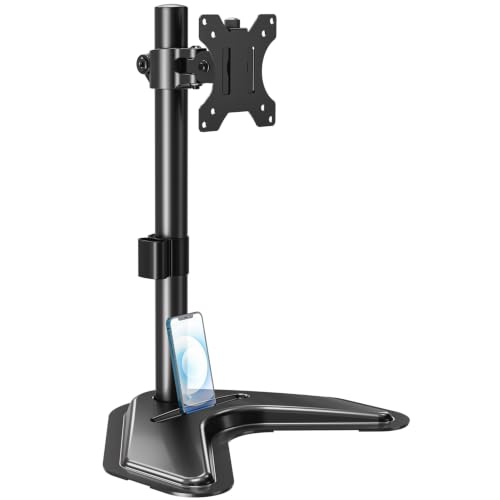
Articulating Monitor Arm
A clamp or grommet-mounted arm that offers full freedom of movement: height, tilt, swivel, and rotation. Can hold one or multiple monitors.
Best for: desk setup ideas that require maximum flexibility, such as dual-monitor or ultrawide configurations.
Monitor Stand with Storage
A riser that includes built-in drawers, shelves, or cubbies underneath. Combines elevation with organization.
Best for: Small desks or anyone who needs extra desk storage without cluttering the surface.
Key Features to Consider
When shopping for a monitor stand, pay attention to these specifications to ensure compatibility and performance:
| Feature | Why It Matters |
|---|---|
| Weight Capacity | Check that the stand supports your monitor's weight (including any accessories). Most stands handle 10–30 lbs per monitor. |
| VESA Compatibility | For arms and adjustable stands, ensure your monitor has VESA mounting holes (75x75mm or 100x100mm are common). |
| Height Range | Adjustable stands offer a range (e.g., 3–8 inches). Measure your eye level to ensure the stand can reach the ideal height. |
| Depth & Footprint | Measure your desk depth. A stand with a large base might not fit on shallow desks. Also, consider the space under the stand. |
| Material | Wood and bamboo offer a warm aesthetic, while metal and aluminum are sturdy and modern. Choose what complements your desk's material. |
| Installation Type | Freestanding stands sit on the desk. Clamp/grommet mounts attach to the desk edge or through a hole, saving surface space. |
Ergonomics: How to Position Your Monitor Stand
Even the best monitor stand won't help if you don't set it up correctly. Follow these ergonomic guidelines to protect your body and boost productivity:
- Height: The top of your monitor should be at or slightly below eye level. Your gaze should naturally fall on the upper third of the screen.
- Distance: Position the monitor about an arm's length away (roughly 20–30 inches). You should be able to read text without leaning forward.
- Tilt: Slightly tilt the screen backward (about 10–20 degrees) to reduce glare and maintain a comfortable viewing angle.
- Dual monitors: Place your primary monitor directly in front of you. The secondary screen should be angled inward, positioned at the same height.
Remember, your monitor setup works in tandem with other ergonomic gear. For ultimate comfort, pair your stand with an ergonomic office chair and a desk keyboard tray to keep your wrists straight.
Materials and Aesthetics
Your monitor stand isn't just functional – it's also a design element. Here's how different materials fit into various desk styles:
- Wood & Bamboo: Warm, natural, and timeless. Complements wood desk surfaces and adds a touch of sophistication.
- Metal & Aluminum: Sleek, modern, and durable. Ideal for modern industrial desk or modern steel desk setups.
- Acrylic / Clear Plastic: Minimalist and almost invisible. Perfect for clear glass desk styles where you want to maintain an airy feel.
- MDF with Laminate: Cost-effective and available in many colors and finishes. Great for best desks for small spaces where budget matters.
Choose a material that not only looks good but also fits your desk's surface type. A heavy metal stand might scratch a delicate wood finish, while a lightweight plastic stand might not support a large monitor securely.
Monitor Stand vs. Monitor Arm: Which to Choose?
This is one of the most common dilemmas. Here's a quick comparison to help you decide:
📌 Monitor Stand (Riser)
- Simple, stable, and affordable
- No installation – just place it on your desk
- Usually adds storage space underneath
- Fixed or limited height adjustability
- Best for single monitors up to 27 inches
🦾 Monitor Arm
- Full articulation: height, tilt, swivel, rotation
- Clamps to desk edge, saving surface space
- Supports multiple monitors on one arm
- Requires VESA compatibility and some installation
- Ideal for dual-monitor or ultrawide setups
If you value a clean, spacious desk surface and need flexibility, a monitor review will often recommend an arm. If you prefer a simple, cost-effective solution with a small footprint, a riser is a great choice.
Common Monitor Stand Mistakes to Avoid
Even with the best intentions, many people make these errors when setting up their monitor stand. Avoid them to get the most out of your purchase:
- Buying a stand that's too low: Always measure your eye level and desk height. A stand that only adds 2 inches might not be enough.
- Ignoring weight capacity: Using a stand that can't support your monitor's weight risks damage or injury.
- Not checking VESA compatibility: If you're buying an arm, confirm your monitor has VESA holes. Some monitors require an adapter.
- Placing it off-center: Always center your primary monitor in front of you to avoid twisting your neck.
- Overcrowding the base: Don't pile heavy objects on the stand's base if it's a lightweight riser – it could tip over.
Frequently Asked Questions
Q: Can I use a monitor stand with a laptop?
Yes! If you use a laptop as your primary display, place it on a stand and use an external keyboard and ergonomic mouse for proper ergonomics.
Q: Do I need a monitor stand if I have a standing desk?
Even with a standing desk for home office, a monitor stand or arm is useful for fine-tuning height and angle, especially if you share the desk with multiple users.
Q: Are monitor stands universal?
Most risers are universal as long as your monitor fits within the weight and size limits. For arms, check VESA compatibility.
Q: How much should I spend on a monitor stand?
Basic risers cost $20–$50. Premium adjustable stands run $50–$150. Articulating arms range from $80–$300+ depending on build quality and weight capacity.
Your Perfect Monitor Stand Awaits
A well-chosen monitor stand is one of the most cost-effective upgrades you can make to your desk setup. It protects your health, declutters your workspace, and enhances your overall productivity. Whether you opt for a simple wooden riser or a full-motion gas-spring arm, the key is to match it to your monitor size, desk shape, and working style.
Now that you know what to look for, explore the recommended products below. Each one has been carefully selected to meet the needs of different desk setups – from minimalist home offices to advanced dual-monitor command centers.
Ready to elevate your workspace? Browse our top picks and find the perfect stand for your monitor today.