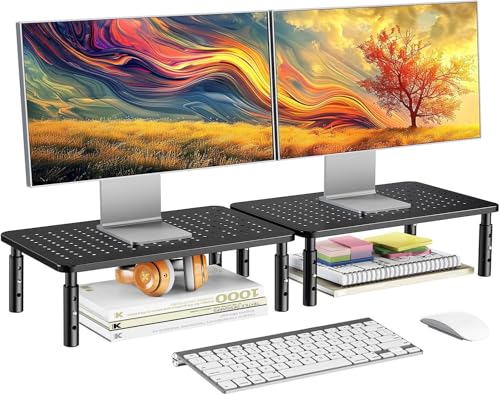
Monitor Stands: The Ultimate Guide to Ergonomics & Desk Space
Elevate your monitor to eye level, reclaim valuable desk real estate, and improve your posture with the perfect monitor stand. Discover expert insights, compare types, and find the best stand for your workspace.
Shop Top Monitor Stands →Why a Monitor Stand Matters: Whether you're working from home, gaming, or managing a creative studio, a monitor stand is one of the most impactful ergonomic upgrades. It raises your screen to the correct height, reduces neck and eye strain, and opens up valuable desk surface for other essentials. All About Desks brings you this complete guide to help you choose the right stand for your needs and budget.
Types of Monitor Stands
Fixed Height Risers
Simple, sturdy, and budget-friendly. These stands elevate your monitor to a set height, often with additional storage space underneath.
- Best for: Single monitor setups, users who don't need height adjustments.
- Price range: $20–$80
- Pros: Affordable, stable, often include drawers or shelves.
Adjustable Height Stands
Offer multiple height settings or gas-spring mechanisms for precise, tool-free adjustments. Great for shared desks or sit-stand routines.
- Best for: Users who alternate between sitting and standing, or share a desk.
- Price range: $40–$150
- Pros: Versatile, ergonomic, often include USB ports or cable management.
Monitor Arms (Full Motion)
Clamp or grommet-mounted arms that provide full articulation: height, tilt, swivel, and rotation. Ideal for multi-monitor setups and maximum flexibility.
- Best for: Dual or triple monitor setups, ergonomic perfectionists.
- Price range: $70–$350+
- Pros: Unlimited adjustability, frees up entire desk surface, sleek look.
Portable & Laptop Stands
Lightweight, foldable stands designed for laptops, but can also support compact monitors. Perfect for remote workers and digital nomads.
- Best for: Laptop users, temporary setups, or travel.
- Price range: $15–$60
- Pros: Portable, affordable, improves laptop ergonomics.
How to Choose the Right Monitor Stand
Before you buy, consider these crucial factors:
Monitor Weight & Size
Check the stand's weight capacity and VESA compatibility. Most stands support up to 22–30 lbs per monitor.
Desk Space & Clamp Type
Measure your desk depth and thickness. Some arms require a grommet hole, others use a C-clamp.
Ergonomics & Viewing Angle
Top of your monitor should be at or slightly below eye level. Tilt and swivel adjustability is key.
Cable Management & Aesthetics
Integrated cable routing keeps your desk tidy. Choose a stand that matches your desk's style.
For a full ergonomic setup, also consider a keyboard tray and monitor placement guide to optimize your entire workspace.
Monitor Stand Comparison at a Glance
| Type | Height Adjustment | Max Weight | VESA Compatible | Price Range |
|---|---|---|---|---|
| Fixed Riser | No (fixed height) | Varies (up to 50 lbs) | Usually no | $20–$80 |
| Adjustable Stand | Yes (multi-level) | Up to 40 lbs | Sometimes | $40–$150 |
| Monitor Arm (Single) | Yes (full motion) | Up to 30 lbs | Yes (75x75, 100x100) | $70–$200 |
| Monitor Arm (Dual) | Yes (full motion) | Up to 22 lbs per arm | Yes | $100–$350 |
| Laptop Stand | Limited (tilt) | Up to 10 lbs | No | $15–$60 |
Why Your Desk Needs a Monitor Stand
1. Improved Posture & Reduced Strain
Elevating your monitor to eye level reduces forward head posture, neck pain, and eye fatigue. Pair it with an ergonomic chair for complete support.
2. More Desk Space
A stand or arm clears the space under your monitor, giving you room for a notebook, keyboard, or even a small succulent. Some stands include drawers for extra storage.
3. Multi-Monitor Productivity
Dual or triple monitor arms let you position screens side-by-side or stacked, boosting workflow efficiency. Check our guide on vertical monitor setup for coding or reading.
4. Better Cable Management
Many stands feature built-in cable channels. Combined with cable management accessories, your desk stays clutter-free and professional.
Installation & Maintenance Tips
- Read the Manual: Always follow the manufacturer's instructions for weight limits and clamp/grommet installation.
- Test Stability: After mounting, gently shake the monitor to ensure the arm or stand is securely fastened.
- Adjust Gas Springs: For monitor arms, use the tension adjustment screw to balance the monitor's weight for smooth movement.
- Clean Regularly: Wipe down metal parts with a microfiber cloth. Avoid harsh chemicals that could damage the finish.
For more desk setup advice, explore our desk tips and ergonomic desk setup guides.
Ready to Elevate Your Workspace?
Browse our curated selection of the best monitor stands for every budget and need. Click below to see top-rated options on Amazon.
View Recommended Monitor Stands ↓