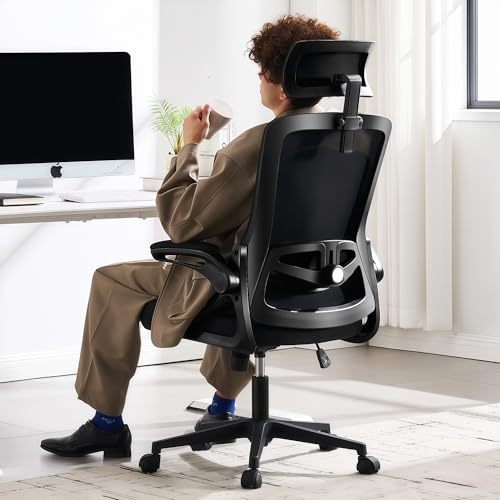
Ergonomic Chair Guide: Comfort Meets Productivity
All about ergonomic chairs — from lumbar support to adjustability, find the perfect seat that keeps you healthy and focused all day. Whether you're a remote worker, gamer, or executive, the right chair transforms your workspace.
Shop Top Ergonomic Chairs ↓🪑 Why Your Chair Matters
An ergonomic chair isn't just a seat — it's your health partner. Poor seating leads to back pain, fatigue, and reduced productivity. The right chair supports your spine, promotes good posture, and adapts to your body. All About Desks brings you expert insights to help you choose the best ergonomic chair for your desk setup.
Discover key features like adjustable lumbar support, seat depth, armrests, and breathable materials. Learn how to match your chair to your desk height and work style.
Key Ergonomic Chair Features
🧰 Adjustability
A truly ergonomic chair offers multiple adjustment points: seat height, tilt tension, armrest height and width, and lumbar support. Look for pneumatic height adjustment and independent tilt locks. The more you can fine-tune, the better the fit for your body.
- Seat height: feet flat on floor, knees at 90°
- Lumbar support: adjustable depth and height
- Armrests: 3D or 4D adjustable
- Tilt tension: reclining resistance
🦴 Lumbar Support & Posture
Lower back support is critical. A good chair has a lumbar mechanism that follows your spine's natural curve. This prevents slouching and reduces lower back pain. Some chairs feature dynamic lumbar that adjusts as you move — ideal for long work sessions.
Learn more about desk ergonomics and how your chair integrates with your entire workspace.
🛋️ Seat Comfort & Material
Seat depth and width should accommodate your thigh length. Breathable mesh backrests keep you cool, while padded fabric or leather offers comfort. High-density foam or gel-infused seats provide lasting support without bottoming out.
- Mesh: breathable, good for warm climates
- Fabric: soft, durable, good grip
- Leather: premium feel, easy to clean
⚙️ Base & Mobility
Sturdy 5-star base with smooth-rolling casters (suitable for your floor type). Weight capacity matters — check the chair's max load. Tilt lock and tension control let you recline safely. Explore more desk chairs that complement your ergonomic setup.
- Hard floor vs carpet casters
- Weight capacity: 250–400 lbs
- Gas lift cylinder durability
Ergonomic Chair vs. Regular Chair: What's the Difference?
Regular chairs are designed for short-term use — they lack adjustability and lumbar support. Ergonomic chairs are engineered for all-day comfort, with built-in support systems that reduce strain. Investing in an ergonomic chair pays off in better health, focus, and long-term savings on medical bills.
A proper ergonomic chair also encourages movement — you can rock, recline, and shift positions naturally, keeping your blood flowing and muscles engaged. Pair your chair with a sit-stand desk for the ultimate dynamic workspace.
How to Choose the Right Ergonomic Chair
1. Measure Your Space
Consider desk height, under-desk clearance, and room layout. A chair with a smaller footprint fits tight spaces. Compact desks pair well with ergonomic chairs that have a narrow backrest.
2. Match Your Work Style
Do you lean forward while typing? Look for forward tilt. Do you recline often? Get a chair with a deep recline and headrest. Gaming desks often pair with high-back chairs for immersive sessions.
3. Budget vs. Quality
Prices range from $200 to $1,500+. Mid-range chairs ($400–$800) offer excellent value with solid adjustability. Premium chairs ($800+) use superior materials and last a decade. Desk and chair bundles can save money.
4. Test Before You Buy
If possible, sit in the chair for 15–20 minutes. Check lumbar support, seat firmness, and armrest comfort. Look for a chair that allows you to maintain a neutral posture. See our desk setup guides for more tips.
Ergonomics Beyond the Chair
Your ergonomic chair works best when paired with a properly positioned monitor, keyboard, and mouse. Ensure your desk height allows your elbows to rest at 90°. Use a monitor stand to set the screen at eye level. Consider anti-fatigue mats if you stand occasionally. And don't forget to take short breaks — even the best chair can't replace movement. Explore ergonomic accessories that complete your wellness-focused workspace.
Quick FAQ: Ergonomic Chairs
- What is the ideal chair height? Your feet should rest flat on the floor, thighs parallel to the ground. Adjust height so your knees are at a 90° angle.
- How long do ergonomic chairs last? Quality chairs last 7–10 years with proper care. Look for warranty (5+ years) as an indicator of durability.
- Are mesh chairs better than fabric? Mesh is breathable and cools you down; fabric provides softer support. It's personal preference — both can be ergonomic.
- Can I use an ergonomic chair with a standing desk? Yes! A good chair complements a height-adjustable desk — lower it for sitting, raise it for standing breaks.
Find Your Perfect Ergonomic Chair
Browse our curated selection of top-rated ergonomic chairs. Each model is selected for quality, comfort, and value. Click any chair to check the latest price and availability.