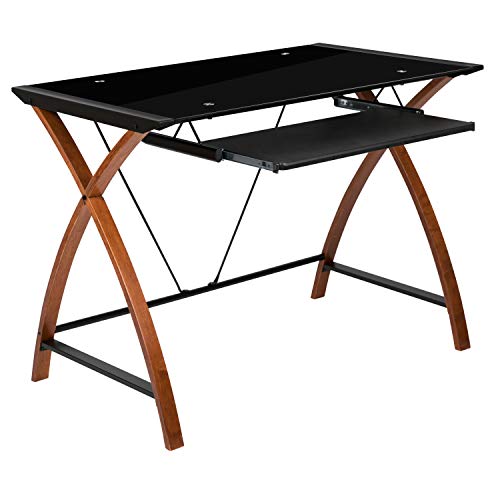
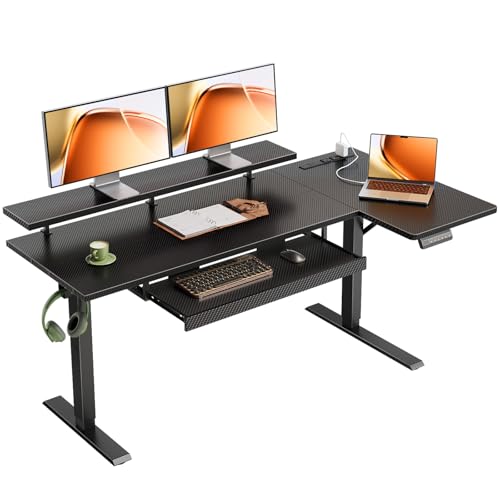
Office Desk with Pull Out Keyboard Tray
Ergonomics meets efficiency. A pull‑out keyboard tray saves space, improves posture, and keeps your desk surface clear. Whether you're a writer, programmer, or home office warrior – find the perfect desk with a slide‑out keyboard drawer.
🖥️ Ergonomic typing angle
Negative tilt reduces wrist strain – ideal for long hours.
📐 Space‑saving design
Frees up main surface for monitors, papers, and decor.
🪵 Durable materials
Solid wood, engineered wood, or metal frames – choose your style.
⚙️ Smooth glide mechanism
Ball‑bearing slides ensure silent, effortless operation.
Why choose a desk with a pull‑out keyboard tray?
A pull‑out keyboard tray is more than a convenience – it's an ergonomic essential. It lets you position your keyboard at the optimal height, keeping your wrists straight and shoulders relaxed. This reduces the risk of repetitive strain injuries (RSI) and carpal tunnel syndrome. Beyond health, it frees up valuable desk real estate, so you can place your monitor at eye level, keep a notebook handy, or even add a small desk with pull out keyboard tray in compact spaces.
For home offices, a small home office desk with keyboard tray is a game‑changer. It allows you to tuck the keyboard away when not in use, creating a clean, distraction‑free environment. If you're tight on space, consider a small L‑shaped desk with keyboard tray that maximizes every corner.
Key features to evaluate
- Tray size & clearance: Ensure it fits your keyboard and mouse. Look for at least 24″ wide and 10″ deep. Height clearance should accommodate your legs comfortably.
- Slide mechanism: Ball‑bearing slides are quiet and durable. Avoid plastic rails that may warp over time.
- Height adjustment: Some trays offer tilt and height adjustment – look for models with ±15° tilt for optimal wrist angle.
- Weight capacity: Check the tray's weight limit – heavier mechanical keyboards need sturdier support.
- Mounting style: Under‑desk mounted trays are most common. Some desks come with integrated pull‑out drawers that work just as well.
For those who prefer a standing desk, a stand up desk with pull out keyboard offers the best of both worlds: ergonomic height adjustment plus a dedicated keyboard surface. Similarly, a standing computer desk with keyboard tray is perfect for alternating between sitting and standing during the day.
Materials & build quality
The desk frame and tray material determine longevity. Solid wood (oak, walnut, maple) offers timeless beauty and strength, but comes at a premium. Engineered wood (MDF, plywood) is more affordable and still sturdy. For the tray itself, many manufacturers use high‑grade plastic or metal for the sliding mechanism, while the tray surface may be wood, laminate, or even bamboo.
If you prefer a more traditional aesthetic, a solid wood computer desk with keyboard tray combines durability with classic style. For smaller spaces, a small wood computer desk with keyboard tray provides the same quality in a compact footprint.
For modern offices, a small white computer desk with keyboard tray brightens up the room and fits well with minimalist décor. Meanwhile, a small black computer desk with drawers adds a sleek, professional touch.
Finding the right size for your space
Measure your available area carefully. A 48‑inch desk is ideal for a single monitor and a small keyboard tray. For dual monitors, go for at least 55‑60 inches. Corner desks, like the small corner computer desk with keyboard tray, are excellent for tight spots, while an L‑shaped computer desk with keyboard tray gives you ample surface area without overwhelming the room.
If you're setting up a home office, a small desk with pull out keyboard tray might be all you need. For shared workspaces, a rolling computer desk with keyboard tray offers mobility and flexibility. And for the ultimate in versatility, a sit‑to‑stand desk with keyboard tray lets you switch postures throughout the day.
Assembly & maintenance tips
Most desks with pull‑out trays require some assembly. Always follow the manufacturer's instructions – pay special attention to the tray mounting brackets. Use a level to ensure the tray is perfectly horizontal. For maintenance, periodically clean the slide rails with a dry cloth and apply a silicone‑based lubricant to keep the mechanism smooth.
If you're handy, you can also consider a desk frame and add your own keyboard tray. Many DIY desk plans include instructions for integrating a pull‑out keyboard drawer. For a more guided approach, check out our first desk setup guide for beginners.
Ergonomics: setup for health
Proper positioning is key. The keyboard tray should be just below elbow height when your arms are at a 90‑degree angle. Your wrists should remain straight, not bent up or down. The mouse should be placed on the same level, adjacent to the keyboard. Many trays come with a separate mouse platform – if not, consider a desk accessory like a mouse bridge.
For those who alternate between sitting and standing, a sit‑stand desk with adjustable keyboard tray is a worthwhile investment. And don't forget to pair your desk with a proper sitting posture routine to maximize the benefits.
Price range & smart buying
Prices vary widely based on material, size, and brand. You can find basic MDF desks with a pull‑out tray starting around $200. Mid‑range options with solid wood or advanced ergonomic features typically fall in the $400–$700 range. Premium standing desks with integrated keyboard trays can cost $900+. Always check the warranty and return policy – a good desk should last for years.
For the best value, consider a small computer desk with keyboard tray and printer shelf if you need multi‑functionality. Or a solid wood desk with cable management to keep your workspace tidy.
✅ Ready to buy? Browse our top picks below. Each model has been vetted for quality, ergonomics, and value. Click through to check current prices and customer reviews – your perfect desk is just a click away.