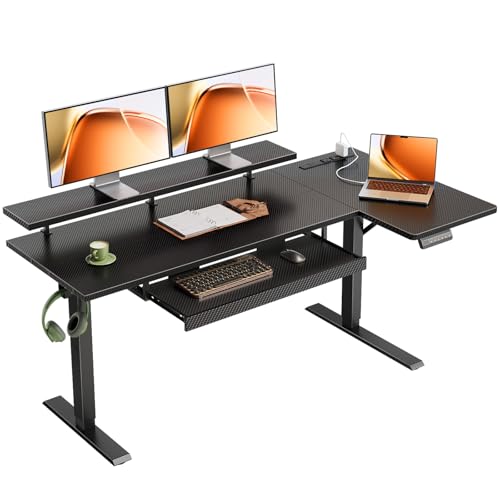
Stand Up Desk with Pull Out Keyboard: The Complete Guide
Discover the benefits of a standing desk with a dedicated pull-out keyboard tray. Improve your posture, boost productivity, and create a healthier workspace with this essential ergonomic setup.
Shop Top Rated Stand Up Desks →Why a Stand Up Desk with Pull Out Keyboard? Combining the health benefits of standing with the ergonomic positioning of a pull-out keyboard tray creates the ultimate workspace. This setup allows you to switch between sitting and standing while keeping your wrists and arms in a neutral, comfortable position, reducing strain and boosting productivity.
Key Benefits of a Standing Desk with Keyboard Tray
🪑 Ergonomic Posture
A pull-out keyboard tray positions your keyboard and mouse at the correct height, keeping your elbows at 90 degrees and wrists straight. This minimizes the risk of carpal tunnel syndrome and other repetitive strain injuries.
🔄 Sit-Stand Flexibility
Easily transition between sitting and standing throughout the day. The adjustable desk height and dedicated keyboard tray ensure your typing position remains optimal, no matter your stance.
📈 Boosted Productivity
Studies show that alternating between sitting and standing can increase energy levels, focus, and overall productivity. A dedicated keyboard tray makes the transition seamless, keeping you in the zone.
🧹 Clean & Clutter-Free
Keeping your keyboard and mouse on a separate tray frees up valuable desk surface space for your monitor, documents, and other essentials, creating a more organized and efficient workspace.
What to Look For in a Stand Up Desk with Pull Out Keyboard
When shopping for the perfect sit-to-stand desk for your home office, pay close attention to these critical features. The right combination ensures long-term comfort and durability.
| Feature | Why It Matters | What to Look For |
|---|---|---|
| Keyboard Tray Size | Must comfortably fit your keyboard and mouse. | At least 28 inches wide. Look for a tray with a mouse platform on either side. |
| Height Adjustment Range | Should accommodate both sitting and standing positions for users of various heights. | A range from ~22" to ~48" (or more) is ideal. Electric or pneumatic adjustment is preferred. |
| Tray Tilt & Swivel | Allows you to fine-tune the angle of your keyboard for optimal wrist comfort. | Negative tilt (sloping away from you) is excellent for reducing wrist strain. |
| Stability & Weight Capacity | A stable desk prevents wobbling when typing or adjusting height. | Check for a sturdy steel frame and a weight capacity of at least 150 lbs. |
| Ease of Adjustment | You'll be adjusting it multiple times a day; it should be effortless. | Electric or gas-spring mechanisms are the most user-friendly. |
Types of Stand Up Desks with Keyboard Trays
There are several styles to choose from, each catering to different needs and budgets. Consider your workspace and how you plan to use the desk.
⚡ Electric Standing Desks
These desks feature a powerful motor that allows you to adjust the height at the push of a button. They often come with programmable memory settings, making it effortless to switch between your preferred sitting and standing heights. Look for models with a sit-stand desk with adjustable keyboard tray for maximum customization.
💨 Pneumatic / Gas Spring Desks
These use a gas-spring mechanism for smooth, manual height adjustment. They are generally more affordable than electric models and don't require a power outlet. They are a great choice for a small electric adjustable standing desk alternative if you're on a budget.
📐 Desk Converters (Top-of-Desk)
If you already have a desk you love, a desk converter sits on top of your existing surface and provides a standing platform. Many converters now include a pull-out keyboard tray, making them a versatile and space-saving solution for a sit-to-stand desk converter for dual monitors.
📏 Corner Standing Desks
For those with limited space, a corner standing desk with a keyboard tray can maximize your workspace. They fit neatly into a corner and often provide a large surface area for multiple monitors and other peripherals. Consider this if you are looking for a small corner computer desk with keyboard tray.
How to Set Up Your Standing Desk Keyboard Tray for Ergonomics
Simply owning a standing desk with a keyboard tray isn't enough; you need to set it up correctly to reap the full benefits. Follow these steps for an ergonomic and comfortable workstation.
- Height: Stand up straight and let your arms hang naturally. Your elbows should be at a 90-degree angle. Adjust the keyboard tray so your fingers rest comfortably on the home row.
- Position: The keyboard and mouse should be at or slightly below elbow height. This keeps your wrists straight and reduces strain. Avoid a tray that is too high or too low.
- Tilt: If your tray has a tilt adjustment, angle it slightly downward (negative tilt). This promotes a more natural wrist position and can help prevent carpal tunnel syndrome.
- Depth: Place the keyboard far enough back so your wrists are straight and your shoulders are relaxed, not hunched forward. Your mouse should be within easy reach.
- Monitor Alignment: Your monitor should be at eye level, about an arm's length away. This, combined with the proper keyboard tray height, creates a completely ergonomic setup. For more guidance, check out our monitor placement guide.
Choosing the Right Size and Budget
Stand up desks with keyboard trays come in a variety of sizes and price points. The best choice for you depends on your available space, your typical workflow, and your budget.
Size Guide: For a standard home office, a desk top size of 48" x 24" is a good starting point. If you use multiple monitors or a large keyboard, consider a 55" x 28" or larger. If you have a small space, a small desk with pull out keyboard tray can be a lifesaver.
Budget Guide: You can find basic manual standing desks starting at around $300. A quality electric standing desk with a premium pull-out keyboard tray will typically range from $500 to $1,200. For a high-end, premium desk with advanced features and a larger surface, expect to spend $1,500+. Always balance your budget with the durability and features you need.
🌟 Our Expert Recommendation
For most users, an electric standing desk with a wide, sturdy keyboard tray and a weight capacity of at least 200 lbs offers the best balance of functionality and value. Look for models with a programmable memory controller to save your favorite heights. Models like these often come from reputable brands featured in our best monitor size for desk and setup guides.
Frequently Asked Questions (FAQs)
Can I add a keyboard tray to my existing standing desk?
Yes, in many cases. You can purchase an under-desk keyboard tray as an aftermarket accessory. Just make sure it is compatible with your desk's thickness and that the mechanism is easy to install. This is a great solution if you already have a sit-stand desk with wireless charging that you love.
Is a pull-out keyboard tray necessary for a standing desk?
While not strictly necessary, it is highly recommended for optimal ergonomics. A tray allows you to place your keyboard and mouse at the perfect height and angle for your body, preventing wrist and shoulder strain, especially when standing.
What type of keyboard tray is best for standing desks?
Look for a tray that is wide enough for your keyboard and mouse. A tray with a gel wrist rest can provide additional comfort. An adjustable tray that tilts and slides is ideal for finding that perfect ergonomic position.