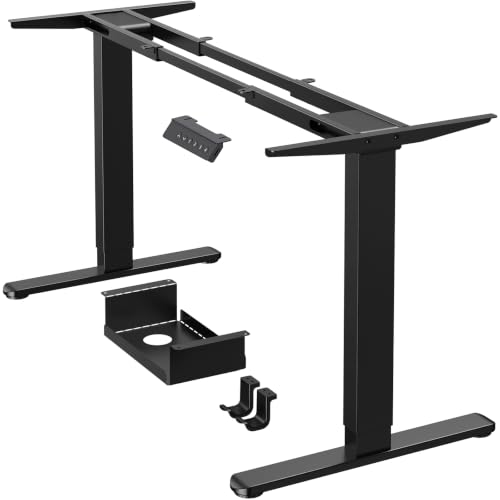
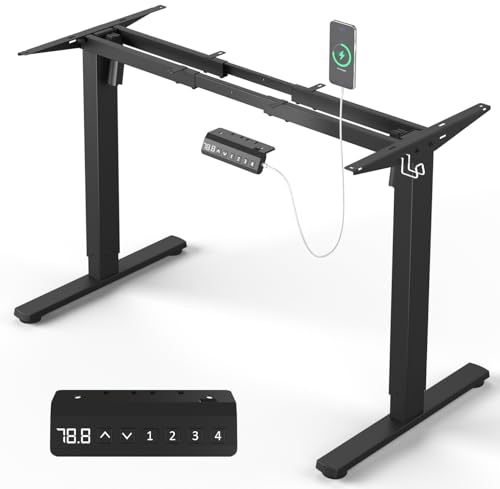
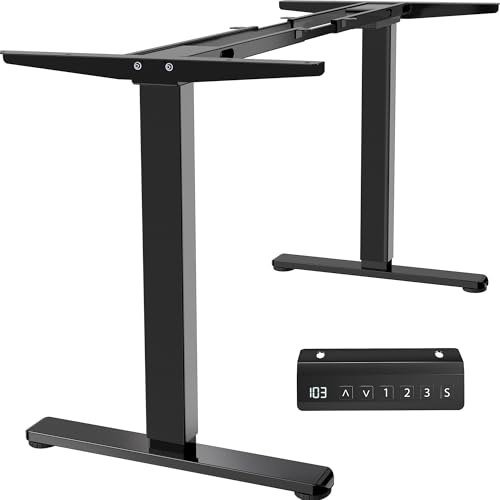
Stand Up Desk Legs: The Ultimate Guide to Choosing Your Perfect Frame
Everything you need to know about electric, manual, and pneumatic desk legs. Compare height ranges, weight capacity, noise levels, and more to make an informed choice.
Your desk starts with its legs. The base of your standing desk determines its stability, longevity, and overall experience. Whether you're upgrading an existing desktop or building a custom sit-stand workstation, choosing the right stand up desk legs is the most critical decision you'll make. This guide breaks down every specification, feature, and trade-off so you can buy with confidence.
Key Features to Consider in Stand Up Desk Legs
⚡ Electric vs Manual
Electric legs offer push-button adjustment; manual (crank or pneumatic) are budget-friendly and reliable.
📏 Height Range
Look for a range that fits your ergonomic needs. Standard: 22"–48". Tall users may need extended height.
🏋️ Weight Capacity
Ensure the legs can support your desktop + equipment. Typical: 150–350 lbs. Heavy-duty options go up to 500+ lbs.
🔇 Noise Level
Electric motors vary in decibels. Under 50 dB is whisper-quiet; ideal for shared offices or home use.
🔧 Number of Stages
Two-stage legs are common; three-stage offer greater height range and smoother operation.
📦 Frame Material
Steel frames with anti-corrosion coating provide durability. Look for heavy-gauge steel for stability.
Electric vs Manual vs Pneumatic: Which Is Right for You?
Choosing between electric, manual, and pneumatic stand up desk legs depends on your budget, frequency of adjustment, and preference for convenience. Below is a detailed comparison to help you decide.
| Feature | Electric (Dual Motor) | Electric (Single Motor) | Manual Crank | Pneumatic |
|---|---|---|---|---|
| Price Range | $600 – $1,200+ | $350 – $700 | $200 – $450 | $150 – $350 |
| Speed | Fast (1.5–2.5 in/s) | Moderate (1.0–1.8 in/s) | Slow (manual crank) | Instant (gas spring) |
| Noise | Quiet (<50 dB) | Moderate (50–55 dB) | Silent | Silent |
| Weight Capacity | High (300–500 lbs) | Medium (200–300 lbs) | High (250–400 lbs) | Medium (150–250 lbs) |
| Ease of Use | ✔ Effortless | ✔ Easy | Requires physical effort | ✔ Easy (lift) |
| Best For | Frequent height changes, heavy setups | Moderate use, budget-conscious | Occasional adjustment, minimal electronics | Single-user, lightweight desktops |
Electric Stand Up Desk Legs: Performance & Reliability
Electric desk legs are the most popular choice for modern home offices and corporate workstations. They offer precise height adjustment at the touch of a button, often with programmable memory presets. Dual-motor systems provide smoother lifting and higher weight capacity, while single-motor options are more affordable and still highly capable. If you plan to switch between sitting and standing multiple times a day, electric legs are a worthwhile investment.
When evaluating electric legs, pay attention to the motor quality and gear system. Premium models use German or Japanese motors with anti-collision sensors and thermal overload protection. Many top-rated electric legs also come with a 5–10 year warranty, ensuring long-term peace of mind. For those on a tighter budget, manual crank legs offer a reliable, maintenance-free alternative that never runs out of battery or needs programming.
If you're looking for a complete package, consider pairing your legs with a high-quality solid wood desktop for a premium feel, or explore standing desk frames that come with built-in cable management and additional stability features.
Height Range & Ergonomics: Getting the Right Fit
The ideal height range for your stand up desk legs depends on your body height and the type of work you do. For most users, a range of 22" to 48" (without desktop thickness) covers both sitting and standing positions comfortably. If you are over 6'2" (188 cm), look for legs that extend to at least 50" to avoid hunching. Conversely, shorter users may need legs that go as low as 20" to maintain a neutral wrist and elbow angle.
Use our stand up desk height calculator to find your exact ergonomic range. Remember that the thickness of your desktop adds to the total height, so subtract that from the leg's maximum extension. Many manufacturers now offer "extended height" and "low height" variants to cater to a broader range of users.
Stability and Build Quality: Why It Matters
No one wants a wobbly desk. The stability of your standing desk is determined by the leg width, footprint, and material gauge. Look for legs with a minimum of 18-gauge steel and a wide base (at least 27" deep and 30" wide). Crossbars or stabilizer bars between the legs significantly reduce lateral sway, especially at maximum height. For heavy desktops (e.g., butcher block or solid wood), a crossbar is almost essential to prevent bowing and ensure rock-solid performance.
If you plan to use a monitor arm or multiple heavy monitors, prioritize legs with a higher weight capacity and a wider stance. Some premium legs also feature anti-vibration pads and leveling feet to compensate for uneven floors, which is a nice touch for older homes or office spaces.
Cable Management & Accessories for Stand Up Desk Legs
Good cable management transforms your standing desk from a mess of wires to a clean, productive workspace. Many stand up desk legs come with built-in cable trays, grommet holes, or routing channels. If your chosen frame lacks these, aftermarket solutions like stand up desk cable management kits are easy to install and keep your cords organized. Also consider adding a standing desk cable management system to handle the extra slack when the desk moves up and down.
Other useful accessories include stand up desk accessory hooks for headphones, a CPU holder, or a stand up desk matting to reduce fatigue during long standing sessions. All of these small additions contribute to a more comfortable and efficient workspace.
Top Brands & Warranty: What to Look For
When investing in stand up desk legs, reputation matters. Established brands like Uplift V2, Fully Jarvis, Flexispot, and Vari Electric have proven track records for reliability and customer support. They typically offer 5 to 15-year warranties on frames and motors, which is a good indicator of quality. Budget-friendly options from SHW or Monoprice also provide solid performance for occasional use, though their warranty periods are shorter.
Read customer reviews focusing on long-term durability, noise levels, and after-sales service. A desk that works perfectly out of the box is great, but one that continues to perform after 3 years is truly worth the money. If you're on a tight budget, consider manual crank or pneumatic legs—they have fewer components that can fail and often last for decades.
💡 Pro Tip: Always measure your available floor space and desired desktop dimensions before purchasing. Ensure the leg's foot width and depth will fit comfortably under your desk, and leave enough room for your chair to slide under when sitting. If you're unsure about the height, order a standard desk sizes guide to compare common dimensions. Finally, check if the legs come with all necessary hardware—some require a separate purchase for casters or leveling glides.