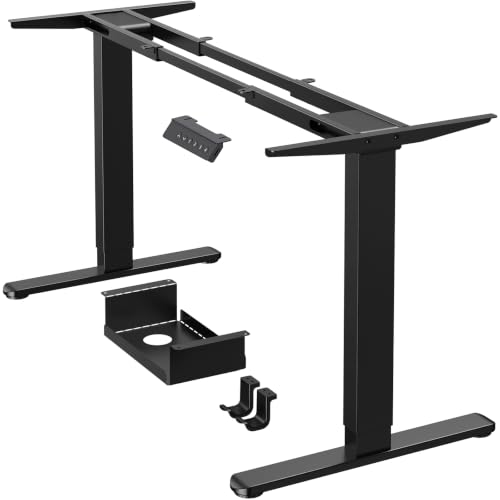
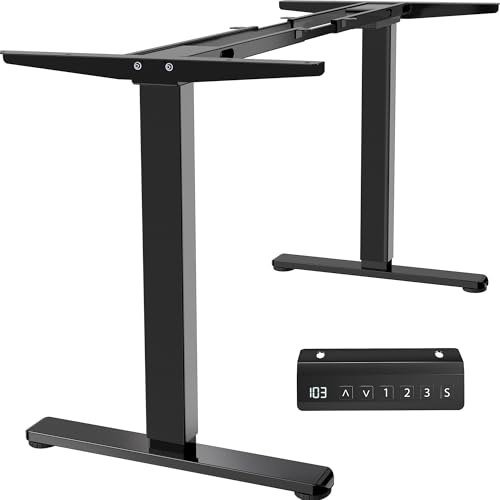
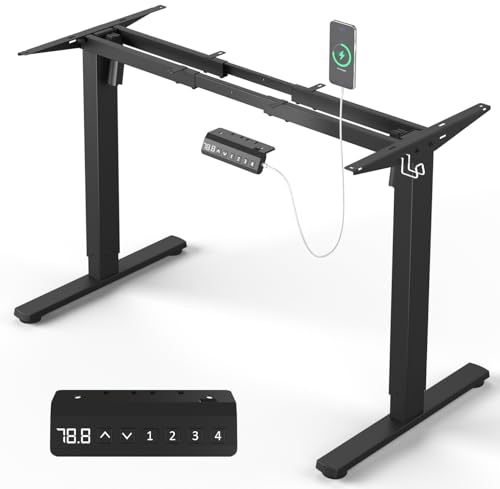
Standing Desk Frame: The Foundation of Your Healthy Workspace

Discover the best standing desk frames for every need. From electric height-adjustable bases to manual crank systems, we cover everything you need to build your ideal sit-stand desk.

SHOP TOP FRAMES

All About Desks Philosophy: The desk frame is the backbone of your workstation. A quality frame ensures stability, smooth height adjustment, and long-term durability. Whether you're building a DIY desk or upgrading an existing one, choosing the right frame is crucial for productivity and health.

What Is a Standing Desk Frame?

A standing desk frame is the structural base that supports your desktop and allows you to switch between sitting and standing heights. It typically consists of two or three motorized or manual lifting columns, a crossbar, and a control system. The frame is the most critical component of any standing desk, determining its stability, weight capacity, and height range.

When you're looking for a standing desk frame, you're essentially choosing the engine of your workstation. A high-quality frame ensures smooth transitions, quiet operation, and a wobble-free experience even at full extension. This is why it's essential to invest in a frame that matches your needs and workspace requirements.

If you're also exploring other desk types, check out our guides on standing desks for home office and standing L-shaped desks for more configuration ideas. For a complete setup, you might also consider a standing desk chair to complement your new frame.

Types of Standing Desk Frames

Understanding the different types of frames will help you make an informed decision. Here are the most common categories:

Electric Dual-Motor

Smooth, fast, and powerful. Supports heavy loads and offers precise height adjustments. Ideal for daily use.

Electric Single-Motor

More affordable than dual-motor. Slower and less powerful, but still reliable for lighter setups.

Manual Crank

Budget-friendly, no electricity needed. A reliable option for occasional height changes.

Pneumatic/Gas Spring

Quick adjustments via lever. Compact and lightweight, suitable for small workspaces.

If you're planning a DIY project, you might also be interested in stand-up desk frames or standing desk tops to pair with your frame. For those who already have a desktop, a standing desk attachment can be a practical alternative.

Key Features to Consider

Choosing the right frame involves more than just picking a type. Here are the critical specifications you should evaluate:

Feature Why It Matters
Height Range Ensure the frame fits your ergonomic needs. Look for a range of at least 22"–48" for most users.
Weight Capacity Check the maximum load. A frame should support at least 150–200 lbs for a dual-monitor setup.
Lifting Speed Dual-motor frames typically lift faster (1.5–2.0 in/sec). Speed matters if you switch often.
Noise Level Quieter motors (under 50 dB) are better for shared or quiet office environments.
Frame Stability A robust frame with a wide footprint reduces wobble at standing height.
Programmable Presets Memory settings let you save preferred heights for quick transitions.

For those considering a more flexible workspace, a standing desk with wheels might be a great option. And if you're working with limited space, a small standing desk frame could be the perfect fit.

Ergonomics and Health Benefits

A proper standing desk frame is the cornerstone of an ergonomic workstation. It allows you to switch between sitting and standing, reducing the risks associated with prolonged sitting. Studies show that alternating positions can alleviate back pain, improve circulation, and boost energy levels.

When setting up your frame, remember the ergonomic rule: your elbows should be at a 90° angle, and your monitor should be at eye level. A good frame with a wide height range makes it easier to achieve this. For more ergonomic advice, check out our guide on standing desk back pain and learn how proper posture can transform your workday.

If you're looking to complete your setup, consider a top-rated standing desk or browse our collection of top-rated desk chairs to ensure comfort throughout your day.

Installation and Assembly Tips

Most standing desk frames come with detailed instructions. Here are some pro tips to ensure a smooth assembly:

For more guidance on desk organization, visit our standing desk cable management page and discover how to keep your workspace neat and efficient. Also, check out stand-up desk cable management for additional tips.

Price Range and Value

Standing desk frames vary widely in price based on features and build quality. Here’s a general breakdown:

Entry-Level (Manual/Pneumatic): $150–$300 – Great for occasional use and light setups.

Mid-Range (Single-Motor Electric): $300–$600 – Reliable performance with decent features.

Premium (Dual-Motor Electric): $600–$1,200 – High-speed, high-capacity, and advanced features like presets and anti-collision.

Commercial/Heavy-Duty: $1,200+ – Designed for intensive use and extra-heavy loads.

When budgeting, remember that the frame is a long-term investment in your health and productivity. You might also find value in exploring standard desk sizes to ensure your frame fits your chosen desktop perfectly.

Top Brands to Consider

Several brands have earned a reputation for quality and reliability in the standing desk frame market. Here are a few you might encounter:

Before you buy, consider reading our comprehensive reviews on top desks and standing computer desks to see how these frames integrate into complete setups.

Frequently Asked Questions

Can I use any desktop with a standing desk frame?
Yes, but make sure the desktop is compatible with the frame's mounting holes and weight capacity. Most frames support desktops from 48" to 80" in width.

How long does it take to assemble a standing desk frame?
Depending on the model, assembly typically takes 30 minutes to 2 hours.

Is a dual-motor frame worth the extra cost?
Absolutely, if you plan to change heights frequently and have a heavy setup. It offers faster, smoother, and quieter lifting.

Can I add casters to my standing desk frame?
Many frames are compatible with caster kits, making them mobile. Check with the manufacturer for specific recommendations.

For more in-depth information, explore our guides on stand-up desk height calculator and stand-up desk height to fine-tune your ergonomics.

Top-Rated Standing Desk Frames

⚠️ AFFILIATE DISCLOSURE: This website contains affiliate links. As an Amazon Associate, we earn from qualifying purchases. If you make a purchase through these links, we may receive a small commission at no additional cost to you. Read our full affiliate policy.

Acer USB Hub 4 Ports, Multiple USB 3.0 Hub, USBA Splitter for Laptop with Type C Power Port, Extender for A Port Laptop, PC, Desktop and More (2ft)

Acer USB Hub 4 Ports, Multiple USB 3.0 Hub, USBA Splitter for Laptop with Type C Power Port, Extender for A Port Laptop, PC, Desktop and More (2ft)

$11.99
Price as of 2026-07-18 03:19:09
Buy on Amazon
⚠️ Note: The purchase links above are affiliate links. As an Amazon Associate, we earn from qualifying purchases at no additional cost to you.
Anker USB Hub 4 Ports, Multiple USB 3.0 Hub, USB Splitter for Laptop, Extender for A Port Laptop, PC, Desktop and More [Charging Not Supported](2ft USB-A)

Anker USB Hub 4 Ports, Multiple USB 3.0 Hub, USB Splitter for Laptop, Extender for A Port Laptop, PC, Desktop and More [Charging Not Supported](2ft USB-A)

$7.99
Price as of 2026-07-18 03:19:09
Buy on Amazon
⚠️ Note: The purchase links above are affiliate links. As an Amazon Associate, we earn from qualifying purchases at no additional cost to you.
Anker USB C Hub, 5-in-1 USBC to HDMI Splitter with 4K Display, 1 x Powered USB-C 5Gbps & 2×Powered USB-A 3.0 5Gbps Data Ports for MacBook Pro, MacBook Air, Dell and More

Anker USB C Hub, 5-in-1 USBC to HDMI Splitter with 4K Display, 1 x Powered USB-C 5Gbps & 2×Powered USB-A 3.0 5Gbps Data Ports for MacBook Pro, MacBook Air, Dell and More

$19.99
Price as of 2026-07-18 03:19:09
Buy on Amazon
⚠️ Note: The purchase links above are affiliate links. As an Amazon Associate, we earn from qualifying purchases at no additional cost to you.
Anker USB C Hub, 7in1 Multi-Port USB Adapter for Laptop/Mac, 4K@60Hz USB C to HDMI Splitter, 85W Max PD, 2 USB 3.0 & 1 USBC Data Ports, SD/TF Card Reader, for Type C Devices (Charger Not Included)

Anker USB C Hub, 7in1 Multi-Port USB Adapter for Laptop/Mac, 4K@60Hz USB C to HDMI Splitter, 85W Max PD, 2 USB 3.0 & 1 USBC Data Ports, SD/TF Card Reader, for Type C Devices (Charger Not Included)

$21.99
Price as of 2026-07-18 03:19:09
Buy on Amazon
⚠️ Note: The purchase links above are affiliate links. As an Amazon Associate, we earn from qualifying purchases at no additional cost to you.
UGREEN USB 3.0 Hub, 4 Ports USB A Splitter Ultra-Slim USB Expander for Mouse, Keyboard, Flash Drive, U Disk, Printer Compatible with Laptop, Desktop PC, Xbox, PS5, and More 0.5FT

UGREEN USB 3.0 Hub, 4 Ports USB A Splitter Ultra-Slim USB Expander for Mouse, Keyboard, Flash Drive, U Disk, Printer Compatible with Laptop, Desktop PC, Xbox, PS5, and More 0.5FT

$6.62
Price as of 2026-07-18 03:19:09
Buy on Amazon
⚠️ Note: The purchase links above are affiliate links. As an Amazon Associate, we earn from qualifying purchases at no additional cost to you.
Anker Nano 13-in-1 Laptop Docking Station with Detachable 6-in-1 Hub, USB-C 3 Display Docking (2 HDMI+1 DP), 10 Gbps USB-C, 3 USB-A, Audio, SD/TF, Ethernet, 100W Max PD for Dell/Lenovo/HP Home Office

Anker Nano 13-in-1 Laptop Docking Station with Detachable 6-in-1 Hub, USB-C 3 Display Docking (2 HDMI+1 DP), 10 Gbps USB-C, 3 USB-A, Audio, SD/TF, Ethernet, 100W Max PD for Dell/Lenovo/HP Home Office

$111.99
Price as of 2026-07-18 03:19:09
Buy on Amazon
⚠️ Note: The purchase links above are affiliate links. As an Amazon Associate, we earn from qualifying purchases at no additional cost to you.
【Upgrade】 USB C/USB Hub, BERLAT Aluminum 7 in 1 USB C & USB Hub with USB 3.0, USB 2.0 Ports for PC/Laptops/MacBook Pro/Air/iMac/iPad and More Devices

【Upgrade】 USB C/USB Hub, BERLAT Aluminum 7 in 1 USB C & USB Hub with USB 3.0, USB 2.0 Ports for PC/Laptops/MacBook Pro/Air/iMac/iPad and More Devices

$7.98
Price as of 2026-07-18 03:19:09
Buy on Amazon
⚠️ Note: The purchase links above are affiliate links. As an Amazon Associate, we earn from qualifying purchases at no additional cost to you.
UANTIN USB C Hub, 7 in 1 Multiport Adapter for Laptop/Mac Type C Devices

UANTIN USB C Hub, 7 in 1 Multiport Adapter for Laptop/Mac Type C Devices

$9.99
Price as of 2026-07-18 03:19:09
Buy on Amazon
⚠️ Note: The purchase links above are affiliate links. As an Amazon Associate, we earn from qualifying purchases at no additional cost to you.

Disclaimer

All About Desks provides educational content only. Not a substitute for professional ergonomist or interior designer services. Always consult a qualified professional for major structural or electrical work involving your desk. Some content may use AI. We are not responsible for product defects, injuries, or outcomes related to desk use. By using this site, you accept these terms. If you do not agree, please leave this website and discontinue its use. Read full disclaimer.