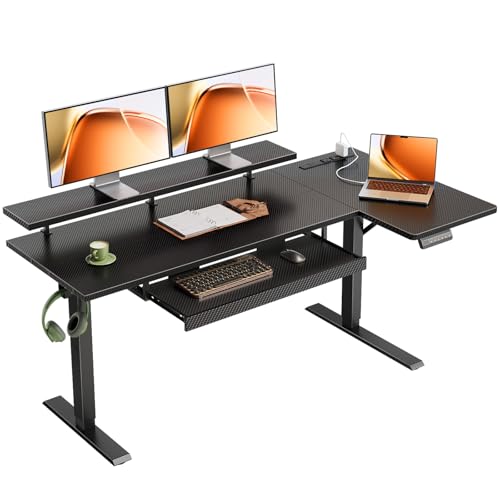
Stand Up Desk with Keyboard Tray – Complete Buying Guide
Find the perfect height-adjustable desk with integrated keyboard tray for superior ergonomics and workspace organization
SHOP TOP PICKSWhy Choose a Stand Up Desk with Keyboard Tray?
A stand up desk with keyboard tray is a game-changer for anyone who spends long hours at a computer. Unlike traditional desks that force you into a single posture, a height-adjustable standing desk with a dedicated keyboard tray allows you to switch between sitting and standing throughout the day, promoting better circulation, reducing back pain, and boosting energy levels.
The integrated keyboard tray is a crucial feature that sets these desks apart. It positions your keyboard and mouse at the ideal height for your arms and wrists, preventing strain and promoting a neutral typing posture. Whether you're looking for an electric standing desk with a premium tray or a manual model that fits your budget, this guide will walk you through everything you need to know to make an informed decision.
Key Takeaway
A stand up desk with a keyboard tray is not just a trend—it's a health investment. By allowing you to alternate between sitting and standing while keeping your keyboard at an ergonomic height, it significantly reduces the risk of musculoskeletal issues and improves long-term productivity.
Key Benefits of a Standing Desk with Keyboard Tray
Investing in a stand up desk with keyboard tray offers a range of benefits that go beyond mere convenience. Here's why this combination is a must-have for modern workspaces:
Ergonomic Typing Posture
Keeps wrists straight and relaxed, reducing the risk of carpal tunnel syndrome and repetitive strain injuries.
Healthy Movement
Easily switch between sitting and standing, improving blood flow and reducing the negative effects of prolonged sitting.
Clutter-Free Workspace
The tray frees up your main desk surface for documents, monitors, or other essentials, keeping your workspace organized.
Improved Focus
Standing has been linked to increased alertness and energy, helping you stay focused during long work sessions.
Customizable Comfort
Height adjustability ensures the desk suits users of different heights, making it a versatile choice for shared workspaces.
Versatile Use Cases
Ideal for home offices, corporate workstations, and even music studio setups where gear organization is critical.
Types of Stand Up Desks with Keyboard Trays
Not all standing desks with keyboard trays are created equal. Understanding the different types will help you choose the best option for your needs and budget.
Electric Standing Desks with Keyboard Trays
Electric models feature a motorized lifting mechanism that adjusts the desk height with the push of a button. They offer the most convenience, especially if you switch positions frequently. Look for models with quiet motors and programmable height presets for effortless transitions. These are ideal for home offices and professional environments where ease of use is a priority.
Manual (Crank) Standing Desks with Keyboard Trays
Manual standing desks use a hand crank to adjust the height. They are generally more affordable than electric models and are a reliable choice if you don't need to change height often. They're also a great option for a stand up desk attachment for regular desk, offering a cost-effective upgrade for an existing workspace.
Standing Desk Converters with Keyboard Trays
If you're not ready to replace your current desk, a standing desk converter is an excellent alternative. This is a stand-alone unit that sits on top of your existing desk and can be raised or lowered. Many stand up desk converter dual monitors models come with a built-in keyboard tray, offering a flexible and budget-friendly way to enjoy the benefits of a standing desk without a full replacement.
L-Shaped Standing Desks with Keyboard Trays
For those who need ample workspace, an L-shaped desk with a keyboard tray provides a spacious corner setup. These are perfect for multi-monitor arrangements and large projects. A standing l shaped desk with drawers adds extra storage, making it an excellent choice for home offices with limited space.
Gaming & Executive Standing Desks
Gaming desks often feature aggressive designs and built-in cable management, with some models now offering height adjustability. On the other hand, executive standing desks blend professional aesthetics with ergonomic functionality, often featuring premium materials like solid wood. For a broader selection, explore our standing desk for work from home guide.
What to Look For: A Complete Buying Guide
Choosing the right stand up desk with keyboard tray involves more than just aesthetics. Here are the critical factors you should consider before making a purchase:
Keyboard Tray Quality & Design
The tray itself should be sturdy and wide enough to accommodate your keyboard and mouse. Look for trays with a smooth glide mechanism and tilt adjustment (negative tilt is recommended for wrist health). Some trays also come with a built-in wrist rest for additional comfort.
Height Range and Adjustability
Check the desk's height range to ensure it suits your body type. A good standing desk should go low enough for comfortable sitting (around 26-28 inches) and high enough for standing (around 45-48 inches). For electric models, a programmable keypad for height presets is a valuable feature.
Weight Capacity and Stability
Consider what you'll place on the desk. If you have a heavy monitor setup or multiple monitors, you need a desk with a high weight capacity (typically 150-300 lbs). Stability is equally important; look for desks with a crossbar or a sturdy base to prevent wobbling at standing height.
Motor Quality (For Electric Desks)
For electric models, pay attention to the motor's decibel rating (quieter is better) and the speed of height adjustment. Dual-motor systems are often smoother and more robust than single-motor alternatives.
Material and Build Quality
The desktop material affects both aesthetics and durability. Options include solid wood, bamboo, laminate, and MDF. For longevity, a high-pressure laminate or solid wood is recommended, but it comes at a higher price point. Explore solid wooden desks for home office for premium options.
✅ Advantages
- Improved ergonomics and reduced pain
- Increased energy and productivity
- Customizable to different users
- Frees up desk space for other items
- Modern and professional appearance
❌ Disadvantages
- Higher cost compared to standard desks
- Electric models require a power source
- Manual models can be tedious to adjust
- Potential for wobbling at full height
- Assembly can be time-consuming
Price Range for Stand Up Desks with Keyboard Trays
The cost of a stand-up desk with a keyboard tray varies significantly depending on the type, material, and features. Here is a general breakdown of what you can expect based on current market prices:
- Budget (Under $300): Manual crank desks or basic standing desk converters. Often made from particle board or MDF with limited weight capacity.
- Mid-Range ($300 – $800): Electric standing desks with decent motors and laminate desktops. Good stability and features like programmable presets.
- Premium ($800+): High-end electric desks with dual motors, solid wood desktops, and advanced warranty coverage. Often feature superior stability and design.
For most users, a $400–$700 electric standing desk with a keyboard tray represents the best balance of quality, features, and affordability. If you're on a tight budget, a manual height adjustable standing desk can be an excellent entry-level choice.
Stand Up Desk with Keyboard Tray – Comparison Table
To help you quickly compare the key aspects of different desk types, here's a comprehensive comparison table. Please note that prices are approximate and may vary based on sales and configuration.
| Feature | Electric Standing Desk | Manual Standing Desk | Standing Desk Converter | Premium Executive Desk |
|---|---|---|---|---|
| Height Adjustment | Motorized (push button) | Hand crank | Spring-assisted / Manual | Motorized (quiet, dual-motor) |
| Price Range | $350 – $900 | $200 – $500 | $150 – $400 | $800 – $2,500 |
| Keyboard Tray Quality | Good to Excellent | Good | Basic to Good | Excellent (with tilt mechanism) |
| Weight Capacity | 150 – 250 lbs | 150 – 200 lbs | 50 – 100 lbs | 250 – 350 lbs |
| Stability at Standing Height | Good (crossbar recommended) | Moderate | Moderate | Excellent (heavy-duty frame) |
| Best For | Daily use, frequent position changes | Budget-conscious, infrequent changes | Upgrading an existing desk | Professional offices, heavy gear |
Additional Considerations Before You Buy
Beyond the desk itself, there are several accessories and factors that can enhance your experience with a stand up desk with keyboard tray.
Monitor Mounts and Placement
A stand up desk with monitor mount is a powerful combination. Using a monitor arm frees up desk space and allows you to position your screen at the perfect eye level, further enhancing ergonomics. For optimal setup, consider a monitor stand for stand up desk to ensure your monitor is correctly positioned for both sitting and standing postures.
Cable Management
With a height-adjustable desk, cable management is crucial to prevent tangled wires and maintain a clean aesthetic. Many standing desks come with built-in cable management trays, but you can also purchase aftermarket solutions. Check out our guide on standing desk with cable management for helpful tips.
Desk Chair Compatibility
Ensure your existing chair is compatible with your new desk's height range. If you need additional height, consider a tall office chair for standing desk to maintain proper posture while sitting.
Desk Accessories
Complement your new desk with essential accessories like an led desk lamp with wireless charging and a small foot stool for under desk to enhance comfort during extended sitting periods.
Frequently Asked Questions (FAQ)
Can I add a keyboard tray to my existing standing desk?
Yes, if your desk has a compatible surface and sufficient clearance, you can purchase an under-desk keyboard tray mount separately. However, integrated trays on purpose-built desks often provide better stability and ergonomics.
What is the ideal height for a keyboard tray?
The keyboard tray should be positioned so that your elbows are at roughly a 90-degree angle, and your wrists are straight. For most people, this is around 2-4 inches below the desktop height.
Do I need a standing desk if I already have a good ergonomic chair?
While a good chair is essential, prolonged sitting is still unhealthy. A standing desk allows you to alternate between sitting and standing, which is crucial for long-term health.
Are electric standing desks noisy?
Most modern electric standing desks are very quiet, with noise levels under 50 decibels. Higher-end models feature even quieter motors.
Can I use a stand up desk with keyboard tray for gaming?
Absolutely. Many gamers prefer standing desks to switch postures during long gaming sessions. Look for models with cable management and sturdy construction to support heavy gaming setups.
Final Verdict: Is a Stand Up Desk with Keyboard Tray Right for You?
If you spend more than 4 hours a day at a desk, a stand up desk with keyboard tray is a worthwhile investment. It combines the proven health benefits of standing with the ergonomic necessity of a properly positioned keyboard, offering a holistic solution for modern workspace challenges.
Whether you choose a budget-friendly manual model or a premium electric desk, the key is to ensure it suits your specific needs regarding height range, stability, and weight capacity. Pair it with a comfortable most comfortable desk chair for long hours and a good monitor setup, and you'll have a workspace that supports your health and productivity for years to come.
Remember, the best desk is one that adapts to you, not the other way around. Browse our top picks below to find the perfect model for your workspace.