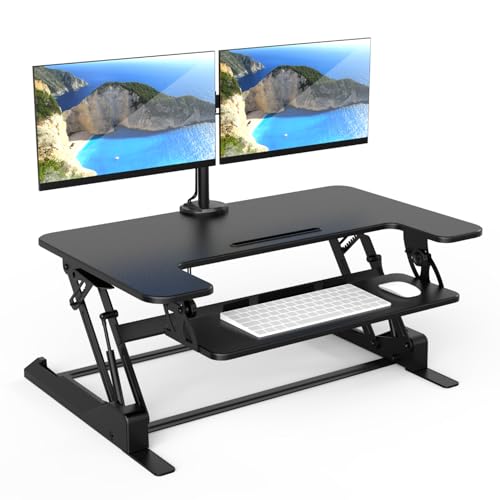
Standing Desk Converter for Dual Monitors
Your ultimate guide to finding the perfect standing desk converter that supports two monitors, improves ergonomics, and fits your workspace seamlessly.
If you're looking to transition to a sit-stand workstation without replacing your entire desk, a standing desk converter for dual monitors is the smartest upgrade you can make. These converters sit on your existing desk and allow you to raise your monitors and keyboard to standing height in seconds.
Whether you're a programmer, designer, trader, or remote worker, a dual-monitor setup is essential for productivity. But without proper ergonomics, it can lead to neck strain, shoulder pain, and fatigue. A well-designed converter solves these problems while preserving your desk space.
Why Choose a Standing Desk Converter for Dual Monitors?
⚡ Instant Height Adjustment
Gas-spring or counterbalance systems let you smoothly transition between sitting and standing in under 3 seconds, keeping your workflow uninterrupted.
🖥️ Dual Monitor Support
Most models support two monitors up to 27–32 inches each, with weight capacities ranging from 33 to 55 lbs. Perfect for multi-tasking professionals.
🧘 Ergonomic Posture
Raise your screens to eye level and your keyboard to elbow height. This reduces neck flexion and wrist strain, helping you work comfortably for hours.
🪑 No Desk Replacement
Simply place the converter on your existing desk. It's a cost-effective solution (typically $180–$450) that gives you the benefits of a standing desk without the renovation.
What to Look for in a Dual-Monitor Standing Desk Converter
- Weight Capacity: Ensure the converter can handle the combined weight of your monitors + keyboard + accessories. Look for at least 33 lbs (15 kg) for two 24" monitors.
- Height Range: The minimum height should be comfortable for sitting, and the maximum should allow you to stand with your elbows at 90°. A typical range is 4"–18" lift.
- Keyboard Tray Depth: Must be large enough for your keyboard and mouse. Some models include a separate, adjustable tray for better ergonomics.
- Stability: A wide base and robust construction prevent wobbling when typing. Steel frames and non-slip pads are indicators of quality.
- Ease of Adjustment: Gas-spring or pneumatic mechanisms offer smooth, effortless lifting. Avoid manual screw-based systems for daily use.
- Cable Management: Integrated channels or clips keep your cables tidy and prevent tangling as you raise/lower the unit.
For further insights on desk ergonomics, check our ergonomic desk setup guide and learn how to position your monitors correctly. If you're also looking for a monitor stand with extra storage, explore our monitor stand with storage options.
How to Set Up Your Standing Desk Converter for Dual Monitors
- Placement: Center the converter on your desk, ensuring there's enough depth for both monitors and your keyboard tray.
- Monitor Mounting: Attach your monitors to the VESA-compatible arms or place them on the platform. Adjust the tilt and swivel for a natural viewing angle.
- Keyboard & Mouse: Place your keyboard and mouse on the lower tray. If your tray is separate, position it so your elbows are at 90° when sitting.
- Height Calibration: While sitting, set the converter to its lowest comfortable position. When standing, adjust it so the top of your monitors is at or slightly below eye level.
- Cable Routing: Use the built-in cable management to organize wires. Leave enough slack for the converter to move up and down without pulling.
For more standing desk tips, visit our standing desk height guide and learn about sit-stand desks with drawers for extra storage.
📌 Related guides: If you're setting up a home office desk, you might also be interested in our must-have desk accessories for precision work. For those considering a full standing desk, check out electric standing desks with drawers and stand-up desk attachments for regular desks. Also, if you're in a small space, see our small desk with monitor shelf solutions.
Final Thoughts: Is a Standing Desk Converter for Dual Monitors Right for You?
A standing desk converter for dual monitors is an excellent investment for anyone who spends long hours at a desk. It offers flexibility, health benefits, and productivity gains without the need to replace your existing furniture.
When choosing, prioritize weight capacity, ease of adjustment, and stability. With the right converter, you'll enjoy a pain-free, energetic workday while maintaining the focus that dual monitors provide.
Ready to upgrade your workspace? Browse the top-rated standing desk converters below and find the perfect match for your dual-monitor setup.