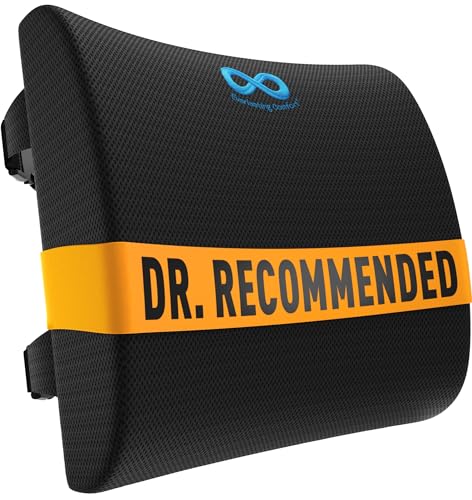
Desk Chair Support for Lower Back Pain: Your Complete Ergonomic Guide
If you spend hours at a desk and feel a dull ache settle into your lower back, you are not alone. The right desk chair support for lower back pain can make the difference between a productive day and a painful one. This guide explains exactly what to look for, how to adjust it, and which features actually help.
Explore Key Features
Lower back pain is one of the most common complaints among office workers, remote professionals, and students. The reason is simple: sitting for long periods compresses the lumbar spine and weakens the muscles that support it. A desk chair alone cannot fix everything, but the right support system removes one of the biggest daily stressors on your back. In this guide, we break down the anatomy of good lumbar support, the features that matter, and how to set up your chair so your lower back finally gets the relief it needs.
Key insight: The best desk chair support for lower back pain is not simply a cushion strapped to the backrest. It is a coordinated system of adjustable lumbar support, correct seat height, proper seat depth, and a backrest angle that keeps your spine in its natural curve. When these elements work together, pressure on the lower back drops dramatically.
Why Sitting Causes Lower Back Pain
When you sit, the discs in your lower spine bear more load than when you stand. If your chair does not support the natural inward curve of your lumbar spine, the muscles and ligaments around the lower back must work harder to hold you upright. Over time, this constant tension leads to fatigue, stiffness, and pain. Slouching makes it worse by flattening the lumbar curve and shifting pressure onto the discs and surrounding tissues.
A properly designed chair with dedicated lumbar support restores that natural curve. The support fills the gap between your lower back and the backrest, allowing your muscles to relax while your spine stays in a neutral position. For a deeper look at how ergonomics affects your whole workspace, see our desk ergonomics guide.
Key Features of Desk Chair Support for Lower Back Pain
Not all lumbar support is created equal. The following features determine whether a chair will genuinely help your lower back or simply look the part.
Adjustable Lumbar Height
The lumbar pad should move up and down so it can sit precisely in the curve of your lower back. A fixed pad often lands too high or too low, providing little real benefit. Look for chairs where you can lock the lumbar support at the correct height for your torso.
Adjustable Lumbar Depth
Depth adjustment controls how far the support pushes into your back. A firmer, deeper setting helps if you tend to slouch; a softer setting suits those who prefer a gentler touch. This feature is common on mid-range and premium ergonomic chairs.
Contoured Backrest
A backrest that curves inward at the lumbar region and outward at the shoulders distributes pressure more evenly. A flat backrest forces your lower back to do all the work. Contoured foam or a flexible mesh back both work well when shaped correctly.
Seat Depth Adjustment
If the seat is too deep, you slide forward and lose lumbar contact. If it is too shallow, pressure builds under your thighs. A sliding seat pan lets you set the depth so your back stays against the lumbar support while your knees bend at roughly 90 degrees.
Backrest Recline with Lock
A slight recline (around 100 to 110 degrees) reduces spinal compression and encourages the lumbar curve. The ability to lock the recline lets you hold a comfortable angle for focused work while still allowing movement when you lean back.
Firm, Supportive Cushioning
Softer is not always better. A seat and back cushion that is too soft bottoms out and offers no support. Medium-firm foam with a breathable cover keeps you comfortable without sacrificing the structural support your lower back needs.
Lumbar Support Types Compared
The table below compares the main approaches to desk chair support for lower back pain. Use it to match the right type to your needs and sitting habits.
| Support Type |
Tier |
Best For |
Key Consideration |
| Built-in adjustable lumbar pad |
Mid-range to premium |
Daily desk work with varying posture needs |
Check both height and depth adjustment range |
| External lumbar cushion |
Entry-level |
Adding support to an existing chair |
Must be secured so it does not slip during the day |
| Contoured mesh backrest |
Mid-tier to high-end tier |
Warm environments and breathability |
Mesh tension should be firm enough to hold the curve |
| Inflatable lumbar support |
Entry-level to mid-range |
Users who want on-the-fly firmness changes |
Durability varies; check valve quality |
| Posture corrective backrest |
Professional-grade |
Rehabilitation and guided posture training |
Best used in short sessions alongside a regular chair |
How to Adjust Your Chair for Lower Back Relief
Even the best chair only works if it is set up correctly. Follow this sequence to dial in your desk chair support for lower back pain.
- Set seat height first. Your feet should rest flat on the floor with knees bent at about 90 degrees. If your desk is fixed, adjust the chair to the desk, not the other way around.
- Set seat depth. Slide the seat pan so there is a two-to-three-finger gap behind your knees. Your lower back should stay in contact with the lumbar support.
- Position the lumbar pad. Move it to the natural inward curve of your lower back, usually just above the belt line. You should feel gentle pressure, not a hard push.
- Adjust backrest angle. Set a slight recline of about 100 to 110 degrees. Lock it if you tend to slouch forward.
- Set armrests. Arms should rest lightly with shoulders relaxed. Armrests that are too high push your shoulders up and pull your lower back out of position.
- Check monitor height. The top of your screen should be at or slightly below eye level. A monitor that is too low pulls your head forward and strains the lower back.
For a broader walkthrough of chair adjustments, see our guide on desk chairs with lumbar support and the full desk chair for lower back pain buying resource.
What to Look For When Choosing a Chair
When you are comparing chairs, focus on these practical points rather than marketing claims.
Adjustability Range
A chair that fits a six-foot user may not fit someone who is five-foot-two. Check that the lumbar height, seat depth, and armrest height ranges match your body. Adjustability is the single strongest predictor of long-term comfort.
Weight Capacity and Build
A sturdy frame and a gas lift rated for your weight keep the chair stable and prevent premature wear. Heavy-duty construction matters more for daily eight-hour use than for occasional sitting.
Material and Breathability
Mesh backrests breathe better and hold their shape; foam padded backs feel plusher but can compress over time. Choose based on your climate and how long you sit each day.
Warranty and Parts
Lumbar mechanisms and gas lifts are the parts most likely to fail. A multi-year warranty on the frame and mechanism signals a manufacturer that stands behind its build quality.
Beyond the Chair: Habits That Protect Your Lower Back
A supportive chair is the foundation, but daily habits complete the picture. Combine your chair setup with the following practices for the best results.
- Move every 30 to 45 minutes. Stand, stretch, or walk for a couple of minutes. Movement pumps nutrients into spinal discs and resets muscle tension.
- Strengthen your core. A few minutes of daily core and glute exercises reduce the load your lower back carries during sitting.
- Use a footrest if needed. If your feet do not reach the floor comfortably, a footrest keeps your pelvis neutral and protects the lumbar curve.
- Keep frequently used items close. Reaching and twisting repeatedly while seated adds strain. Arrange your desk so essentials sit within easy reach.
- Pair sitting with standing. Alternating between sitting and standing throughout the day reduces cumulative compression on the lower spine.
If you are building a full workspace, our guides on desk and chair combinations and desk chair back support can help you coordinate the rest of your setup.
Frequently Asked Questions
What type of desk chair support is best for lower back pain?
The best support combines adjustable lumbar height, adjustable depth, and a contoured backrest. Look for a chair where you can position the lumbar pad precisely in the curve of your lower back and lock it in place. Mid-range and premium ergonomic chairs typically offer the widest adjustment range.
How high should lumbar support be on a desk chair?
Lumbar support should sit in the natural inward curve of your lower back, typically around waist height or just above the belt line. Adjust it so the support fills the gap between your lower back and the backrest without pushing you forward.
Can a desk chair with lumbar support help prevent back pain?
Yes. Proper lumbar support helps maintain your spine's natural curve and reduces strain on the lower back muscles. Combined with good posture habits and regular movement breaks, it can significantly reduce the risk of developing back pain over time.
How often should I take breaks when sitting in a desk chair?
Take a short break every 30 to 45 minutes to stand, stretch, and walk around. Even a two-minute break helps reset your posture and reduces the cumulative strain on your lower back from prolonged sitting.
Is an external lumbar cushion as good as built-in support?
An external cushion can be a solid entry-level solution, especially for an existing chair. However, built-in adjustable support generally offers better stability and precise positioning because it is integrated into the chair's structure rather than strapped on.
Ready to Upgrade Your Lower Back Support?
Explore our curated selection of ergonomic desk chairs designed to relieve and prevent lower back pain.
View Recommended Chairs