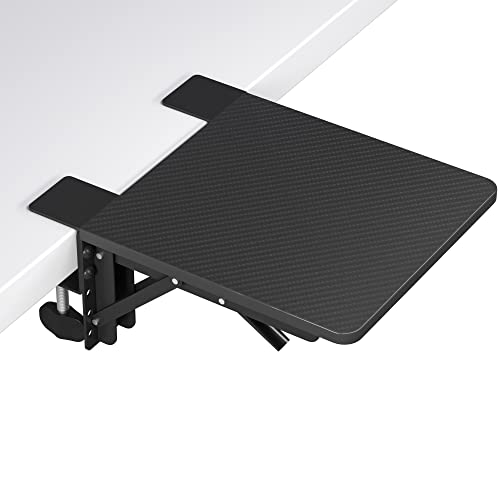
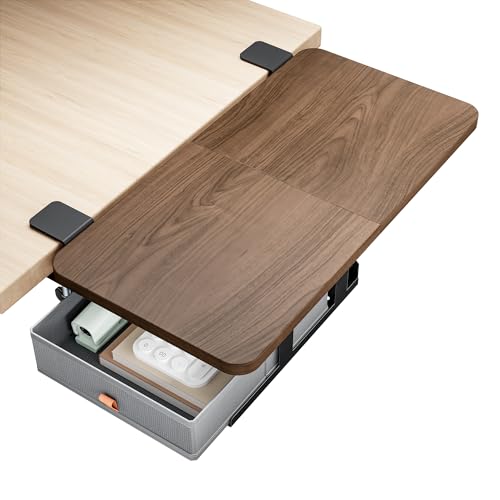
What Is a Desk Extender?
A desk extender is a surface attachment that expands the usable area of your existing desk. It can be a simple shelf that clamps onto the edge, a full-width extension that rests on your desk, or a freestanding unit that sits alongside. Modern desk extenders are designed to blend with your furniture, offering a seamless transition that feels like a natural part of your workspace.
Choosing the right desk extender depends on your needs. If you're looking to add a second monitor or a laptop stand, a monitor riser with an extended platform might be ideal. For those needing more surface for paperwork, a desk shelf organizer can provide both storage and extra space. Many users also pair their extender with a desk mat to protect the surface and create a cohesive look.
Benefits of Using a Desk Extender
- More Surface Area: Instantly add 10–30 inches of depth or width to your desk.
- Better Ergonomics: Position monitors at eye level and keep frequently used items within arm's reach.
- Cost-Effective: Avoid the expense of buying a new desk. Extenders are affordable and easy to install.
- Versatility: Use it as a laptop stand, a writing surface, or a place for your vintage desk clock and plants.
- Improved Organization: Create designated zones for work, writing, and technology, which helps reduce clutter.
Desk Extender Types at a Glance
| Type | Best For | Weight Capacity | Price Range |
|---|---|---|---|
| Clamp-on Extender | Monitors, laptops, light accessories | 15–30 lbs | $30–$80 |
| Freestanding Extension | Additional workspace, multiple devices | 40–70 lbs | $70–$150 |
| Desk Shelf Riser | Elevating monitors, storage underneath | 20–50 lbs | $25–$60 |
| Corner Expander | Maximizing corner desks, L-shaped setups | 30–60 lbs | $50–$120 |
*Prices are approximate and based on current market averages (2026).
How to Choose the Perfect Desk Extender
Before purchasing, consider these key factors to ensure you get the right extender for your workspace:
- Measure Your Desk: Know the depth and width of your current desk. Your extender should not overhang dangerously.
- Assess Your Needs: What do you plan to place on it? Heavy monitors require sturdy materials like steel or solid wood.
- Check Compatibility: Some extenders are designed for specific desk edges. Measure the thickness of your desk's lip for clamp-on models.
- Material Matters: Bamboo, MDF, and tempered glass are popular choices. Bamboo is eco-friendly and stylish, while MDF is budget-friendly and durable.
- Style and Finish: Match the color and finish with your existing desk for a cohesive look.
If you often switch between sitting and standing, consider a height-adjustable desk that integrates seamlessly with a desktop extender. For those with a L-shaped desk, a corner extender can transform an unused corner into a productive nook.
Installation & Setup Tips
Installing a desk extender is usually a straightforward process. Here are some professional tips to ensure a secure and stable setup:
- Read the manufacturer's instructions thoroughly before starting.
- Use a level to ensure your extender is perfectly horizontal.
- If using a clamp-on extender, protect your desk edge with felt pads (often included).
- For heavy items, position them directly over the strongest part of the extender.
- Route cables neatly using cable management solutions to keep your new surface clean.
Once installed, you'll notice an immediate improvement in your workflow. You can now spread out documents, place a second monitor, or even add a large mouse pad without feeling cramped. Many users also use the extra space to incorporate organization trays or a desk blotter for a polished appearance.
Top Accessories to Pair with Your Desk Extender
To get the most out of your expanded workspace, consider these complementary accessories:
- Keyboard & mouse pad – provides a smooth, consistent surface.
- Monitor riser – elevates your screen to eye level, freeing up desk space.
- Adjustable desk lamp – ensures proper lighting for your expanded area.
- Drawer organizer tray – keeps small items like pens and sticky notes tidy.
- Paper organizer – helps manage documents and mail efficiently.
These additions work together with your extender to create a highly functional and visually appealing workspace that will boost your productivity and comfort.