Desk Matted: The Complete Guide to Protecting and Elevating Your Workspace Surface
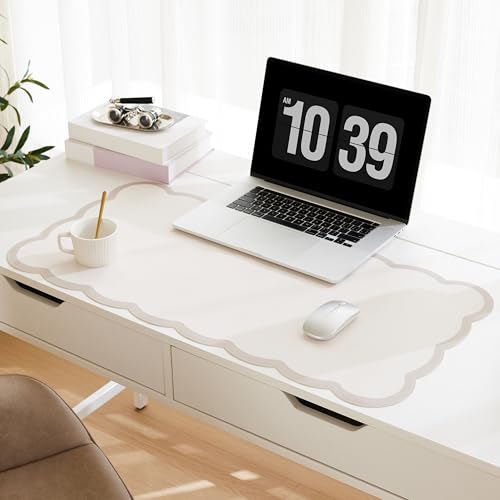
A desk matted surface transforms how your workspace feels, functions, and lasts. Whether you are protecting a solid wood desktop, softening a glass surface, or defining a dedicated work zone in a shared room, a quality desk mat delivers protection, comfort, and visual polish. This guide breaks down everything you need to know about desk matted solutions — materials, sizes, features, and practical selection advice — so you can choose with confidence and buy the right mat the first time.
Why a Desk Matted Surface Matters for Your Workspace
Your desk surface takes constant punishment. Keys scratch. Mugs sweat. Mouse feet grind. Laptop hinges press. Over months and years, these small forces accumulate into visible wear — scuffs, rings, fading, and micro-scratches that dull even premium surfaces. A desk matted layer absorbs that punishment so your actual desk stays pristine. But protection is only part of the story. A well-chosen mat also improves ergonomics by giving your keyboard and mouse a stable, consistent glide, reduces noise by dampening vibrations, and creates a visual anchor that makes your workspace feel intentional rather than improvised.
For anyone who has invested in a quality desktop — solid wood, laminate, veneer, or glass — a mat is the simplest way to extend that investment. It is also the easiest upgrade for renters or anyone working on furniture they do not own. And because mats are portable, they let you personalize a workspace without permanent changes. If you are building out a small desk organizer system or refining a standing desk setup, a mat belongs in the foundation layer of your plan.
Desk Mat Materials Compared: Felt, Leather, Cork, and More
The material determines how a desk matted surface feels, wears, and looks. There is no single best option — only the best match for your habits and your desk. Here is a practical breakdown.
| Material | Best For | Feel & Performance | Maintenance |
|---|---|---|---|
| Felt | Quiet, soft work zones; writing and note-taking | Warm, sound-dampening, gentle on wrists; excellent mouse tracking on hard mice | Spot clean; avoid soaking |
| PU Leather | Professional offices; easy-clean surfaces | Smooth, firm glide; water-resistant; crisp aesthetic | Wipe with damp cloth |
| Genuine Leather | Long-term investment desks; classic styling | Develops patina; durable; premium hand feel | Condition occasionally |
| Cork | Natural, warm aesthetics; grip-heavy setups | Textured, grippy, eco-friendly; slightly firmer | Wipe clean; keep dry |
| Fabric / Microfiber | Gaming and precision mouse work | High tracking accuracy; soft; available in extended sizes | Machine washable (check label) |
Felt is the most popular choice for general office work because it quiets keyboard clatter and feels pleasant under the wrists. PU leather suits anyone who eats at their desk or works in a client-facing space where a crisp look matters. Genuine leather is the premium tier — it ages well and pairs naturally with a wood desktop. Cork appeals to anyone building a natural, tactile workspace. Fabric and microfiber remain the standard for gaming-focused setups where mouse accuracy is the priority.
Choosing the Right Size for Your Desk Matted Setup
Size is where most buyers get it wrong. A mat that is too small leaves your mouse drifting onto bare desk; a mat that is too large overwhelms a compact workspace. Match the mat to your actual work zone, not to the desk's full dimensions.
- Compact pads (approx. 24 × 14 in): Best for laptop-only work, writing desks, and tight spaces. Pair with a small computer desk with monitor stand to keep the surface uncluttered.
- Standard mats (approx. 31 × 16 in): The everyday choice for a keyboard plus mouse. Covers the primary work zone without dominating the desk.
- Extended mats (approx. 36–48 in wide): Ideal for dual-monitor setups, gaming stations, and anyone who wants a unified visual base. Works well on an L-shaped desk for small office space when placed along the main working arm.
- Full-desk mats: For a seamless look on larger surfaces. Measure carefully — the mat should leave a small border of desk visible on all sides.
Also consider thickness. Thin mats (2–3 mm) keep keyboard height low and suit users who are sensitive to wrist angle. Thicker mats (4–5 mm) add cushioning and absorb more vibration but can raise your typing plane slightly. If you use a standing desk converter with dual monitor mount, a thin, firm mat is usually the better pairing because it will not compress unevenly under the converter base.
Features That Separate a Good Desk Mat from a Great One
Beyond material and size, a few construction details determine whether a mat stays flat, stays put, and stays looking good.
- Non-slip backing: Essential. A mat that slides during typing is worse than no mat. Look for natural rubber or textured backing.
- Stitched edges: Prevent fraying and delamination, especially on fabric and felt mats. This is the single biggest durability differentiator in the mid-range tier.
- Water resistance: A spill-resistant top layer buys you time to wipe up coffee before it reaches the desk.
- Low-profile thickness: Keeps the mat from interfering with monitor arms, keyboard trays, and cable routing.
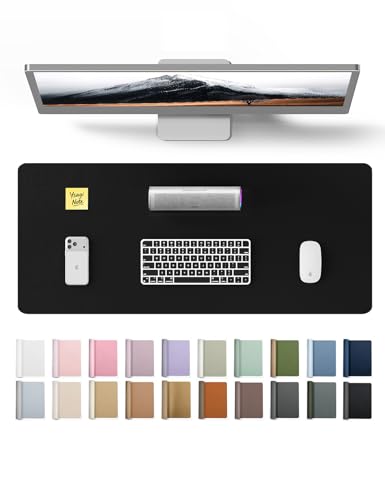
- Color and finish: A mat is a design decision. Neutral tones suit minimalist setups; darker mats hide wear; a mat can also anchor a desk color scheme.
Entry-level mats often skip stitched edges and use thinner backing. Mid-range options typically add stitched borders and better water resistance. Premium and high-end tier mats combine genuine leather or dense wool felt with precision stitching and a backing that grips without leaving residue.
Protecting Your Desk and Caring for Your Mat
A desk matted layer is only effective if it stays clean and flat. Basic care extends its life significantly. Shake out felt mats weekly to remove debris. Wipe leather and PU surfaces with a damp microfiber cloth and dry immediately. Avoid harsh solvents, which can degrade coatings. For fabric mats, follow the manufacturer's wash guidance — most tolerate cold machine washing and air drying. Never put a mat in a hot dryer; heat warps backing and shrinks fabric.
Under the mat, keep the desk surface clean and dry. Grit trapped between mat and desk can scratch both. If you work on a standing desk topper or a desk that goes up and down, check that the mat does not interfere with height adjustment mechanisms or pinch cables. A mat should sit flat and stay flat through the full range of motion.
A Practical Buying Checklist for Desk Matted Surfaces
Before you commit, run through these questions. They will narrow the field quickly and prevent a return.
- What is my primary activity — typing, writing, gaming, or mixed use?
- How much desk width can the mat occupy without crowding my small desk storage or monitor base?
- Do I need water resistance (eating at desk, drinks nearby)?
- Will the mat sit under a keyboard tray, monitor arm, or desk converter?
- Does the mat's color and texture complement my existing desk file organizer and accessories?
- Are the edges stitched, and is the backing non-slip?
- Is the mat easy to clean with supplies I already have?
Answer these honestly and the right mat becomes obvious. The goal is not the most feature-rich mat on the market — it is the mat that fits your desk, your habits, and your aesthetic with the least friction.
Frequently Asked Questions About Desk Mats
What is a desk matted surface?
A desk matted surface is a protective pad placed on top of a desk to shield the underlying surface from scratches, spills, and daily wear while providing a smooth, comfortable work area.
What materials are best for desk mats?
Felt, leather, PU leather, cork, and fabric are the most common. Felt is soft and quiet, leather looks professional and cleans easily, and cork offers natural warmth and grip. The best choice depends on your work style and desk type.
What size desk mat should I choose?
Cover your primary work zone. Compact pads suit laptop work, standard mats fit keyboard and mouse, and extended mats work well for dual-monitor or gaming setups. Measure your desk and leave a small visible border.
Do desk mats damage wood desks?
No — a quality mat with a clean, non-slip backing protects wood from scratches and moisture. Keep both mat and desk clean and dry to avoid trapped grit.
Can I use a desk mat with a standing desk?
Yes. Choose a thin, firm mat that stays flat through height adjustments and does not interfere with cables or mechanisms. A mat works well on a adjustable height standing desk and helps define the work zone.
Final Thoughts: A Small Upgrade with Outsized Impact
A desk matted surface is one of the few workspace upgrades that improves protection, comfort, and appearance at the same time. It costs a fraction of what it protects and takes seconds to install. Choose the material that matches your daily habits, the size that fits your work zone, and the construction details that ensure it stays flat and clean. Do that, and your desk will look better, feel better, and last longer — whether you are outfitting a small corner computer desk or a full home office command center.