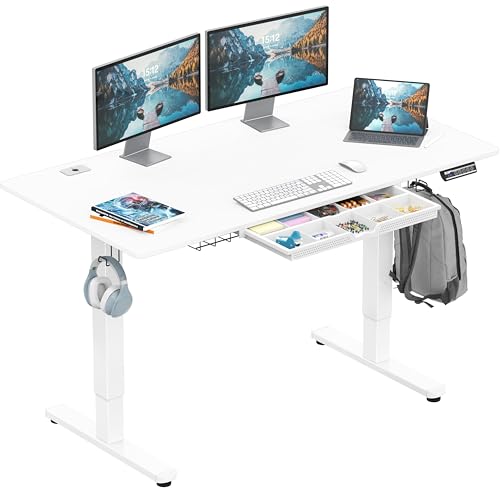
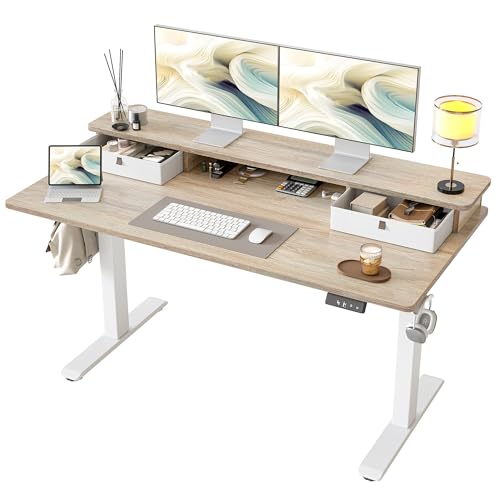
Electric Height Adjustable Standing Desk with Drawer: The Complete Guide
Combine the health benefits of sit-stand ergonomics with built-in storage. Learn how to choose the right electric height adjustable standing desk with drawer for your home office, and what to check before you buy.
Explore Recommended ModelsWhy a standing desk with a drawer? An electric height adjustable standing desk with drawer solves two common home office problems at once: it supports healthy posture transitions throughout the day, and it keeps essential items—pens, notebooks, chargers, and small accessories—within arm's reach without cluttering the desktop. This guide explains the mechanisms, storage options, stability factors, and ergonomic considerations so you can make an informed decision before purchasing.
What Is an Electric Height Adjustable Standing Desk with Drawer?
An electric height adjustable standing desk with drawer is a motorized workstation that transitions between sitting and standing heights at the touch of a button, while integrating one or more storage drawers beneath or alongside the desktop. Unlike standard fixed desks, these models use electric linear actuators—usually driven by a single or dual motor system—to raise and lower the surface smoothly and quietly.
The drawer component varies by design. Some models feature a full-width under-desk drawer, while others use a slim pull-out tray for keyboards and small items. Premium configurations may include lockable drawers, felt-lined interiors, or side-mounted pedestals that move with the desk as it adjusts. If you want a broader comparison of storage-oriented workstations, our guide to desks with storage covers additional configurations worth considering.
Single Motor vs. Dual Motor Systems
Single-motor desks use one actuator to lift both legs through a shared driveshaft. They are common in entry-level models and handle lighter loads. Dual-motor desks drive each leg independently, delivering smoother motion, higher weight capacity, and better stability at taller heights. For a desk with a drawer—which adds weight and shifts the center of gravity—a dual-motor system is generally the safer choice.
If you are specifically comparing frame options, our breakdown of the electric adjustable standing desk frame explains how column design and motor placement affect performance.
How the Drawer Integrates with the Frame
Drawer integration is a critical design decision. Three common approaches exist:
- Under-desk suspension drawer: Mounted directly beneath the desktop and moves with the surface. Ideal for keeping items accessible at both sitting and standing heights.
- Side pedestal drawer: A separate drawer unit beside the desk. It does not move with the desktop, which can be an advantage if you prefer a stationary storage base.
- Clamp-on or add-on drawer: An aftermarket drawer attached to the desk frame. Flexible, but it must respect the desk's weight capacity and frame clearance.
For a deeper look at drawer-focused configurations, explore our collection of electric adjustable desks with drawers.
Key Features to Evaluate Before Buying
Height Range & Memory Presets
Look for a range that accommodates both seated and standing positions for your body height. Memory presets let you switch instantly between saved heights, encouraging regular posture changes.
Weight Capacity
Account for monitors, a desktop tower, speakers, and drawer contents. Mid-range models typically handle 150–250 lbs, while heavy-duty commercial-grade frames support 300 lbs or more.
Drawer Type & Capacity
Decide between a slim accessory drawer and a deep file drawer. Consider whether you need lockable storage for sensitive documents or felt lining to protect devices.
Stability at Standing Height
Wobble increases with height. Reinforced crossbars, thick steel columns, and anti-collision sensors improve stability, especially on desks with added drawer weight.
Motor Noise Level
Premium dual-motor systems operate quietly enough for shared spaces. Check decibel ratings if you take calls or record audio while adjusting the desk.
Cable Management
A drawer helps hide clutter, but cables still need routing. Look for integrated cable trays, grommets, or under-desk channels to keep the workspace clean.
Tier Comparison: Entry-Level to Commercial-Grade
Standing desks with drawers fall into distinct market tiers. The table below summarizes what to expect at each tier without referencing specific figures. Use it to match your needs to a category.
| Tier | Motor System | Drawer Configuration | Best For |
|---|---|---|---|
| Entry-level | Single motor, basic control panel | Slim accessory drawer | Students, light home office use |
| Mid-range | Dual motor, 2–4 memory presets | Under-desk drawer or side pedestal | Daily remote workers, dual-monitor setups |
| Premium | Dual motor, anti-collision, quiet operation | Lockable drawer, felt-lined interior | Professionals needing secure storage |
| Commercial-grade | Heavy-duty dual motor, extended duty cycle | Full pedestal or multi-drawer unit | Shared offices, high-frequency use |
For a closer look at how these tiers map to specific models, browse our selection of electric height adjustable desks.
Advantages and Limitations
✔ Advantages
- Encourages regular sit-stand transitions for better posture
- Built-in storage reduces desktop clutter
- Keeps frequently used items accessible at any height
- Motorized adjustment is faster and more precise than manual cranks
- Memory presets simplify daily ergonomic routines
✖ Limitations
- Added drawer weight can reduce stability at maximum height
- Drawer mechanisms add assembly complexity
- Under-desk drawers reduce legroom for taller users
- Motorized frames require a power outlet nearby
- Premium and commercial-grade tiers carry higher upfront investment
Ergonomic Setup with a Drawer-Equipped Standing Desk
Getting the most from an electric height adjustable standing desk with drawer requires more than pressing a button. Proper monitor placement, keyboard height, and drawer usage all influence comfort.
- Monitor height: The top of the screen should sit at or slightly below eye level when standing. If the drawer reduces available mounting space, consider a monitor arm for flexibility.
- Keyboard and mouse position: Elbows should rest at roughly 90 degrees. A desk with a keyboard tray can help maintain this angle—see our guide to desks with a keyboard tray for options.
- Drawer contents: Keep heavy items in the drawer balanced and avoid overloading it, as uneven weight distribution can affect frame stability.
- Sit-stand rhythm: Aim to alternate between sitting and standing every 30–60 minutes. Memory presets make this habit easier to sustain.
For a broader ergonomic framework, read our guide to ergonomic desks.
Storage Alternatives and Complementary Accessories
Not every workspace needs a drawer built into the desk. If you prefer flexibility, consider these alternatives:
- Under-desk drawer units: Standalone drawers that fit beneath the frame without attaching to it. Browse desktop drawers for compact options.
- Desk organizers with drawers: Desktop caddies and risers that combine shelving with small drawers—see desktop organizer shelf with drawers.
- Lockable drawers: If security matters, explore desks with lockable drawers.
- Storage for small spaces: Compact setups benefit from integrated storage—see desks for small spaces with drawer.
If you are weighing a drawer against other storage formats, our comparison of desks with storage drawers and shelves may help clarify the trade-offs.
Pre-Purchase Checklist
- Measure your space: Confirm the desk footprint including drawer extension and clearance for chair movement.
- Confirm height range: Match the desk's lowest and highest settings to your seated and standing needs.
- Check weight capacity: Add up monitors, computer, accessories, and intended drawer contents.
- Review drawer specifications: Consider depth, lockability, lining, and whether the drawer moves with the desktop.
- Evaluate motor type: Dual-motor systems are preferable for drawer-equipped desks due to added weight.
- Plan cable management: Ensure grommets or trays accommodate your devices and power layout.
- Verify warranty and support: Frame and motor warranties vary by tier—check before committing.
Frequently Asked Questions
Does a drawer affect the stability of an electric standing desk?
A well-designed standing desk with a drawer distributes weight evenly and maintains stability. However, overloading the drawer or placing heavy items unevenly can reduce stability at higher heights. Choose desks with reinforced frames and weight-balanced drawer designs.
What weight capacity should I look for in an electric standing desk with drawer?
Most mid-range to premium electric standing desks offer a weight capacity between 150 lbs and 350 lbs. Account for your monitor setup, computer, and the drawer contents when selecting a model. Heavy-duty models handle dual monitors and desktop towers with ease.
Can I install a drawer on an existing standing desk?
Yes, under-desk drawers and clamp-on drawer units are available as add-ons. Verify the desk frame width and clearance before installation, and ensure the added weight stays within the desk's capacity rating.
How quiet are electric standing desk motors?
Premium dual-motor systems operate below 50 decibels, which is quieter than a normal conversation. Entry-level single-motor desks may produce more noticeable sound during adjustment but remain acceptable for home office use.
Do standing desks with drawers have memory presets?
Most mid-range and high-end electric standing desks include 2 to 4 memory presets. This lets you switch between sitting and standing heights instantly, improving the sit-stand routine's convenience and consistency.
Final takeaway: An electric height adjustable standing desk with drawer is a practical investment for anyone who wants ergonomic flexibility without sacrificing storage. Focus on motor quality, drawer design, and frame stability, and match the tier to your daily usage. When you are ready to compare models, the recommended products below are a strong starting point.