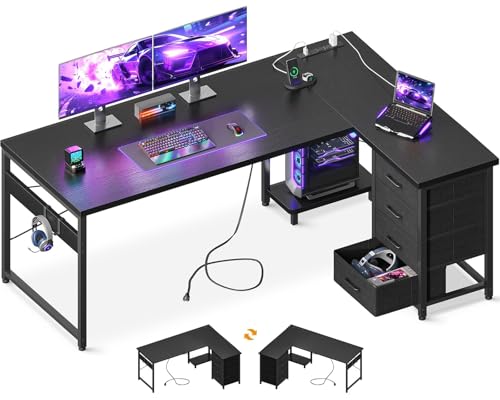
Gaming Desk for 2 Monitors & PC – The Ultimate Setup Guide
Built for serious gamers who demand space, stability, and style. Discover the perfect gaming desk to support a dual‑monitor + PC rig, with expert advice on size, materials, cable management, and ergonomic comfort.
SHOP TOP GAMING DESKS📐 55″+ Width
Ideal span for two 24″–27″ monitors + PC tower
🛡️ Heavy-Duty Frame
Steel or solid wood construction for wobble‑free gaming
🔌 Integrated Cable Mgmt
Built‑in trays, grommets, or channels for clean routing
⚡ Ergonomic Height
Adjustable or standard height for optimal posture
A gaming desk for 2 monitors and a PC is more than just a table – it’s the command center for your gaming experience. Unlike standard desks, it must accommodate dual displays, a full‑size PC tower, peripherals, and often a laptop or console, all while keeping cables organized and providing a comfortable gaming posture. In this guide, we break down the essential features, sizes, and materials so you can choose the perfect desk for your setup.
1. Size & Layout – Fit Your Gear
How wide should your gaming desk be? For two monitors (24″–27″) plus a PC tower, look for a desk at least 55 inches (140 cm) wide. If you use ultrawide or 32″ monitors, consider 60″–72″. Depth is equally important: 28–32 inches provides enough room for your monitors, keyboard, mouse, and wrist rests without crowding your screen.
An L‑shaped gaming desk with power outlet can be a smart choice if you need extra surface for peripherals or a second PC. For tight spaces, a corner computer desk with keyboard tray helps maximise corner real estate while keeping your dual monitors at a comfortable viewing angle.
2. Material & Build – Stability Matters
Choose a desk that won’t wobble during intense gaming sessions.
- Steel frames – offer superior stability and weight capacity (200+ lbs). Ideal for heavy monitors and PC towers.
- Solid wood or bamboo – provides a premium feel and excellent durability, but ensure the frame is thick and well‑supported.
- Laminate or MDF – budget‑friendly and lightweight, but check for reinforced corners and a sturdy base to reduce flex.
If you’re placing a heavy PC case on the desk, look for desks with a weight capacity of 250+ lbs – most high‑quality gaming desks meet this standard. For an upgrade, consider a standing desk for 2 monitors and laptop with a robust lift mechanism.
3. Cable Management & Ergonomics
Clean cables = better focus and airflow. A gaming desk for two monitors and a PC should include cable management features like grommets, under‑desk trays, or built‑in channels. These keep your power bricks, display cables, and USB hubs tidy and accessible. Pair your desk with a under‑desk printer stand on wheels to keep the PC or peripherals off the main surface.
Ergonomics are vital: your monitors’ top bezel should be at or slightly below eye level. A monitor stand for desk with drawer can add storage while lifting screens to the correct height. Also, consider a adjustable keyboard tray under desk to free up surface space and reduce shoulder strain.
4. Storage & Extra Features
Gaming setups accumulate accessories – controllers, headsets, extra mice, and cables. Desks with drawers, shelves, or side pockets help keep your surface clean. Look for models with a headphone hook, cup holder, or controller rack built into the frame. For even more organisation, a desk with file drawer and hutch offers closed storage for documents and gear, while a small desk with lots of storage maximises vertical space.
5. Assembly & Adjustability
Easy assembly and height flexibility add long‑term comfort.
- Many gaming desks ship with clear instructions and all tools included – expect 45–90 minutes for assembly.
- Height‑adjustable desks let you switch between sitting and standing, which is a huge plus for long gaming sessions. Look for electric or manual crank options.
- If you already have a desk but need a standing option, a stand‑up desk converter for 2 monitors is a budget‑friendly alternative.
For a complete gaming room, a 2‑person corner desk can accommodate two gaming stations, perfect for co‑op or streaming setups.
6. Price Range & Value
A quality gaming desk for 2 monitors and a PC typically ranges from $250–$700. Entry‑level models (MDF/laminate) start around $250–$400, while premium steel‑frame or solid‑wood desks with advanced cable management and adjustable height can go from $500–$700+. For a durable, feature‑rich option, expect to invest $400+. Remember, your desk is the foundation of your setup – skimping on stability can lead to monitor wobble and frustration.
🏆 Best Gaming Desk for 2 Monitors & PC – Quick Picks
- • EUREKA ERGONOMIC 55″ – Steel frame, cable tray, height adjustable. ~$380
- • FlexiSpot Comhar – Electric height adjustment, dual monitor support. ~$500
- • Atlantic Gaming Desk Pro – 60″ wide, headphone hook, cup holder. ~$270
- • Need a space‑saving solution? Consider a wall‑mounted desk for small spaces with a fold‑out design.
7. Desk Care & Upkeep
To keep your gaming desk looking and performing great, clean spills immediately, use a microfiber cloth for dust, and avoid placing hot drinks directly on the surface. For wood desks, apply a protective polish every few months. Check screws and bolts quarterly to maintain stability – especially if you frequently adjust height or move the desk.
Ready to upgrade your gaming station? Browse our top‑rated gaming desks for 2 monitors and PC below.
VIEW GAMING DESKS