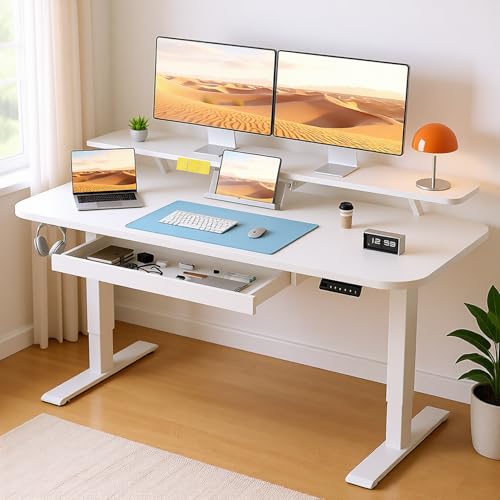
Standing Desk for 2 Monitors and Laptop: Your Complete Workspace Guide
Ready to build a dual-monitor standing desk that also accommodates your laptop? This guide walks you through desk selection, monitor layout, height planning, and the accessories that make a two-monitor-plus-laptop workstation comfortable and productive.
Explore Buying GuidanceWhy a two-monitor-plus-laptop standing desk? A standing desk for 2 monitors and a laptop gives you three screens of real estate, the health benefits of alternating between sitting and standing, and the flexibility to use your laptop as a dedicated communication or reference screen. The challenge is arranging all three displays ergonomically without crowding your work surface. This guide solves that problem step by step.
Understanding the Three-Screen Standing Workstation
Most people who search for a standing desk for 2 monitors and laptop are knowledge workers, developers, traders, or creatives who need multiple windows visible at once. The typical configuration is two external monitors side by side, with the laptop either placed to one side, on a dedicated stand, or closed and tucked away. Each approach changes your desk width, weight capacity, and cable management requirements.
Before choosing a desk, clarify how you intend to use the laptop. If you need its screen for chat, email, or documentation, plan for a third display zone. If you only need its keyboard and trackpad, a laptop stand or a keyboard tray can keep it accessible while the monitors do the heavy lifting. For setups where the laptop is the primary screen, consider a dedicated dual-monitor-and-laptop standing desk configuration that balances all three displays.
Productivity Gains
Two external monitors plus a laptop give you dedicated zones for primary work, reference material, and communication—reducing window switching and context loss.
Ergonomic Flexibility
Alternating between sitting and standing throughout the day helps reduce static load on your spine and supports better circulation during long work sessions.
Space Efficiency
A well-planned dual-monitor standing desk keeps three screens organized without overwhelming your room, especially when you use monitor arms and vertical storage.
Long-Term Investment
A durable electric standing desk with sufficient weight capacity and width can serve your multi-screen workflow for many years with minimal maintenance.
What to Look For in a Standing Desk for 2 Monitors and Laptop
The right desk depends on how much surface area your three-screen layout needs and how much weight it must support. Below are the key criteria to evaluate, using tier descriptors rather than any specific figures.
1. Desk Width and Depth
A two-monitor-plus-laptop setup typically requires a wider surface than a single-screen desk. For side-by-side monitors plus a laptop on a stand, look for a desk that comfortably fits all three displays with breathing room for a keyboard, mouse, and a notebook. A standing L-shaped desk can be an excellent choice because the corner layout naturally separates the laptop from the two main monitors.
Depth matters as much as width. Deeper surfaces let you push monitors back to a comfortable viewing distance while keeping your keyboard close to the front edge. If your room is tight, a standing desk converter for a narrow desk may be a practical alternative to a full-size desk.
2. Weight Capacity and Stability
Two monitors, a laptop, monitor arms, speakers, and accessories add up quickly. Choose a desk rated for a load that exceeds your planned setup by a comfortable margin. Premium and commercial-grade frames typically offer the most robust lifting capacity and the least wobble at standing height. If stability at tall standing positions is your priority, review the frame specifications in our standing desk frame guide.
3. Height Range and Adjustment Mechanism
Your ideal standing height depends on your body proportions and the height of your monitor stands or arms. An electric adjustable-height desk offers the smoothest transitions and lets you save preset positions. For a quick estimate of your target height, use a standing desk height calculator, and for a deeper explanation of how height affects comfort, see our guide on stand-up desk height.
4. Cable Management and Accessory Support
Three screens mean more cables: monitor power, display inputs, laptop charging, and peripheral connections. A desk with integrated cable trays or a compatible standing desk cable management system keeps the surface clean and prevents cables from snagging during height changes. If you plan to mount your monitors on arms, confirm that the desk edge or grommet supports clamp-style mounts.
| Tier | Best For | Typical Strengths |
|---|---|---|
| Entry-level | Light dual-monitor-plus-laptop setups | Basic electric or manual height adjustment; compact footprint |
| Mid-range | Daily multi-screen workflows | Stronger lifting capacity; smoother motors; better stability |
| Premium | Heavy monitor arms and multiple devices | Reinforced frame; quiet dual-motor systems; advanced cable routing |
| Commercial-grade | Shared or high-use workspaces | Heavy-duty construction; long service life; consistent performance |
Quick tip: If you already own a fixed desk and want to test a standing workflow before committing to a full standing desk, a standing desk converter for laptop and monitor is a lower-commitment way to experiment with a dual-screen standing layout.
How to Arrange 2 Monitors and a Laptop on a Standing Desk
Layout is where most three-screen setups succeed or fail. The goal is to keep your primary monitor directly in front of you, your secondary monitor within easy glance, and your laptop positioned so it does not force you to twist your neck.
Option A: Two Monitors Side by Side, Laptop to the Side
Place the primary monitor centered at eye level. Put the secondary monitor immediately to one side, angled slightly toward you. Place the laptop on a stand to the other side, used for chat, email, or reference. This layout works best on a wide desk or an L-shaped surface.
Option B: Two Monitors Side by Side, Laptop Closed or in a Drawer
If the laptop is only needed as a computer rather than a screen, keep it closed on a stand or tucked into a standing desk with drawers. This keeps the visual field clean and reduces screen clutter. Connect an external keyboard and mouse so you never need to reach for the laptop.
Option C: One Monitor Centered, One Monitor Vertical, Laptop as Third Screen
A vertical monitor is excellent for code, logs, or long documents. Pair it with a centered primary monitor and use the laptop screen for messaging. This arrangement can work well on a standing corner desk, where the corner angle naturally separates the vertical display from the main workspace.
Step-by-Step Setup for a Two-Monitor and Laptop Standing Desk
- Measure your reach and viewing distance. Sit and stand at the desk to confirm that all three screens are within comfortable viewing distance and that your keyboard sits at elbow height.
- Set your standing height. Adjust the desk so your elbows are bent at roughly 90 degrees and your forearms are parallel to the floor. Use our stand-up desk height guide for reference.
- Position the primary monitor. Center it at eye level, about an arm's length away. If you use a monitor arm, clamp it to the rear edge or grommet of the desk.
- Add the secondary monitor. Angle it toward you so you can glance at it without turning your whole torso. Keep the top of the screen at or slightly below eye level.
- Place the laptop. Use a stand to raise the laptop screen toward eye level if you use it as a display. Otherwise, keep it closed and connect an external keyboard and mouse.
- Route cables. Use a cable management system to bundle display and power cables so they move freely when you raise or lower the desk.
- Test the full range of motion. Raise and lower the desk several times to confirm that cables have enough slack and that no monitor or laptop is unstable during the transition.
- Add ergonomic accessories. Consider a standing desk mat for comfort and a standing desk accessory such as a headphone hook or under-desk power strip.
Accessories That Make a Three-Screen Standing Desk Work
The right accessories can transform a crowded three-screen desk into a clean, ergonomic station. Focus on monitor arms, laptop stands, cable management, and comfort items.
- Dual monitor arms: Free up surface area and allow precise alignment of both monitors. Look for arms rated for your monitor weight and VESA pattern.
- Laptop stand: Raises the laptop screen to a comfortable height if you use it as a third display. Pair it with an external keyboard and mouse.
- Cable tray or sleeve: Keeps display and power cables bundled and protected during height changes. A standing desk cable management setup is essential for a clean look.
- Anti-fatigue mat: Supports comfort during long standing sessions. See our guide on standing desk matting for options.
- Under-desk power strip: Keeps chargers and adapters off the floor and within reach.
- Headphone hook or side pocket: A small standing desk accessory that keeps your headset and cables organized.
Common Mistakes to Avoid
- Underestimating weight. Two monitors, arms, a laptop, and accessories can exceed the capacity of an entry-level desk. Check the rated load before buying.
- Placing the laptop in front of a monitor. This forces you to look around the laptop screen and ruins the ergonomics of the setup. Use a stand to the side or keep the laptop closed.
- Ignoring cable slack. Cables that are too short can pull monitors or damage ports when the desk rises. Plan for extra length at the highest standing position.
- Skipping the height calibration. A standing desk that is slightly too low or too high causes shoulder and wrist strain. Take time to dial in the correct height.
- Forgetting about stability. At full standing height, a desk with a light frame may wobble. A heavier, reinforced frame or a standing desk frame upgrade can solve this.
Frequently Asked Questions
Can a standing desk converter support two monitors and a laptop?
Yes, many converters are designed for dual monitors, and some accommodate a laptop as well. Look for a standing desk converter for 2 monitors with a wide top platform and a separate keyboard tray. For three screens, a stand-up desk converter for 3 monitors may be more appropriate.
Should I use monitor arms or built-in stands for two monitors?
Monitor arms offer more flexibility and free up desk space. If you prefer a simpler setup, built-in stands work fine, but they reduce the usable surface area and make cable routing less tidy. For a three-screen desk, arms are usually the better long-term choice.
What if my desk is too small for two monitors and a laptop?
Consider a standing desk converter for a small desk or a converter for a narrow desk. Alternatively, use a laptop stand and position the laptop vertically or to the side, or upgrade to a wider desk with an L-shaped or corner layout.
How do I keep cables tidy when the desk moves up and down?
Use a cable tray or sleeve attached to the underside of the desk and leave enough slack for the highest position. Route display and power cables together and secure them with reusable ties. A dedicated standing desk cable management system makes this much easier.
Is a standing desk for 2 monitors and a laptop worth it for home office use?
For anyone who spends hours in front of multiple screens, a standing desk for 2 monitors and a laptop can support better posture, more energy, and a more organized workspace. If you are setting up a home office, review our standing desk for home office guide for room-specific tips.
Final Thoughts
A standing desk for 2 monitors and a laptop is a worthwhile investment for anyone who works across multiple screens. The key is to choose a desk with enough width, depth, and lifting capacity for your setup, then arrange the screens so your primary monitor is centered and your laptop and secondary display sit within comfortable view. With thoughtful cable management and a few ergonomic accessories, your three-screen standing workstation can stay clean, comfortable, and productive for years.
If you are still exploring options, start with the standing desk overview, compare standing desks across categories, and review standing desk converters if you prefer a transitional approach. For a dedicated two-monitor-and-laptop solution, our standing desk for two monitors and laptop guide covers additional configurations.