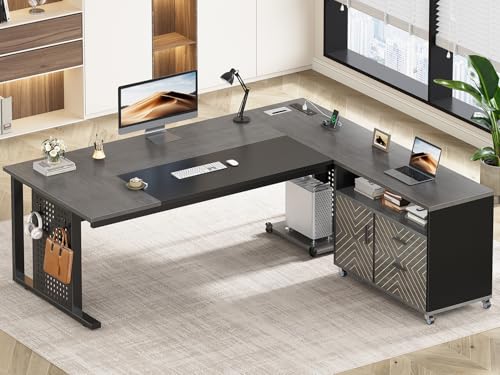
L Shaped Computer Desk With File Cabinet: Complete Buying Guide
Everything you need to know before choosing an L shaped computer desk with a built-in file cabinet — layouts, storage depth, materials, and ergonomic considerations for a productive home office.
Why an L Shaped Computer Desk With File Cabinet Works
An L shaped computer desk with file cabinet combines two essentials of a productive home office: generous work surface and dedicated storage. The L configuration gives you a primary workspace plus a return wing for a second monitor, printer, or reference materials, while the file cabinet keeps documents, folders, and office supplies within arm’s reach without cluttering the desktop.
For researchers and remote workers who are already narrowing down a purchase, the decision usually comes down to four factors: cabinet orientation, file drawer capacity, desk depth on each wing, and material durability. This guide breaks down each one so you can match a model to your room, workflow, and long-term needs.
Layout and Cabinet Orientation
The file cabinet can sit under the return wing, under the main wing, or as a freestanding pedestal beside the desk. Each arrangement suits a different workflow:
- Under the return wing: Keeps the main work surface completely clear. Best for users who spread out documents or use a large monitor.
- Under the main wing: Puts files closest to your chair. Ideal if you reference paperwork frequently during the day.
- Freestanding pedestal: Offers flexibility to reposition the cabinet or move it to another room later. Often the choice for renters or shared spaces.
Left- versus right-side orientation matters too. Right-handed users generally prefer a right-side file pedestal for easy reach, while left-handed users may prefer the reverse. Some models feature a reversible return, which lets you flip the L to fit either corner.
If you need extra drawer storage beyond the file cabinet, models that pair a file pedestal with additional drawers are worth comparing. See the guide to L shaped desk with drawers and file cabinet for layout comparisons that include both storage types.
File Cabinet Capacity and Drawer Quality
File cabinet drawers come in letter, legal, and combined sizes. Letter-size drawers fit standard 8.5 × 11 inch folders and are the most common choice for home offices. Legal-size drawers accommodate longer documents and are useful for legal, architectural, or administrative work.
What to check before buying
- Drawer glides: Ball-bearing slides open smoothly under a full load; basic roller slides are common on entry-level models.
- Locking mechanism: A keyed lock protects sensitive documents — useful in shared or home offices with visitors.
- Weight rating: Mid-range and premium file cabinets typically hold a full drawer of folders without sagging; commercial-grade cabinets are built for daily heavy use.
- Hanging file rails: Pre-installed rails save setup time and keep folders upright.
Desk Surface Depth and Material Choices
The two wings of an L shaped desk often differ in depth. A common configuration pairs a 24-inch-deep main wing with a 20-inch-deep return. If you use a large monitor, a dual-monitor arm, or a printer on the return, confirm that each wing is deep enough for your setup.
Surface materials affect durability, appearance, and maintenance:
- Laminate: Scratch-resistant and easy to clean. A solid choice in the entry-level and mid-range tiers.
- Engineered wood with veneer: Warmer appearance with a real-wood feel. Requires gentle care to avoid moisture rings.
- Solid wood and butcher block: Premium and luxury tiers. Can be refinished over time, making them a long-term investment.
- Metal and glass: Modern aesthetic; glass needs a desk mat to prevent scratches and glare.
For a deeper comparison of surface options, the wood desktops guide covers grain, finish, and care differences across species.
Comparing L Shaped Computer Desks With File Cabinets
The table below groups models by market tier rather than by any numeric figure. Use it to match a tier to your expected use — occasional home office work, daily professional use, or a shared commercial environment.
| Tier | Cabinet Type | Best For | Notable Features |
|---|---|---|---|
| Entry-level | Built-in wood cabinet | Students, light home use | Basic letter-size drawer, laminate surface, simple assembly |
| Mid-range | Metal pedestal or wood cabinet | Daily remote work | Ball-bearing slides, locking drawer, reinforced frame |
| Premium | Full-extension metal file cabinet | Heavy paperwork, multi-monitor setups | Legal-size option, cable management grommets, reversible return |
| Commercial-grade | Heavy-duty steel cabinet | Shared offices, daily high-volume use | High weight rating, durable finish, secure locking system |
If your priority is drawer storage alongside the file cabinet, compare the models in the L shaped desk with file drawers guide. If you want open shelving above the work surface, the L shaped desk with hutch and file cabinet overview covers vertical storage layouts.
Ergonomics and Placement
An L shaped desk lets you position the monitor at the corner or along one wing, with the return reserved for reference materials. For comfortable viewing, the top of the monitor should sit roughly at eye level when you are seated, and the keyboard should keep your elbows near a 90-degree angle.
Placement tips that apply specifically to L shaped desks with file cabinets:
- Put the file cabinet on the side opposite your dominant hand if you frequently write or take notes on paper.
- Leave at least 2 inches of clearance between the cabinet front and the chair’s swivel path.
- Use a cable grommet or under-desk tray if the cabinet sits near a power strip or monitor cables.
- Choose a chair mat if the desk sits on hardwood — see the guide to an under desk chair mat for hardwood floors for sizing.
For height guidance, the office desk height calculator helps you confirm that the seated surface height suits your body proportions.
When the Room Is Small
Not every corner fits a full-size L shaped desk. Compact models with a shorter return wing and a narrow file pedestal work well in bedrooms and studio apartments. Look for these features:
- A return wing of 36 inches or less
- A file cabinet no wider than the return wing
- Open legs or a slim frame that keeps the floor visually clear
- A reversible return so the desk fits either corner
For narrow rooms, the L shaped desk for small home office guide covers footprint measurements and corner placement. If you want an even tighter footprint, compare the L shaped computer desk for small spaces options.
Assembly, Stability, and Long-Term Care
L shaped desks with file cabinets typically ship in two or more boxes. Plan for two people during assembly, especially for models with a metal pedestal. Check that the frame includes cross-bracing or a stabilizing bar — this matters most when one wing is used as a standing support surface.
Care routine:
- Wipe laminate and veneer surfaces with a slightly damp cloth; avoid soaking the edges.
- Vacuum file drawer rails every few months to keep glides smooth.
- Check frame bolts after the first month and once a year thereafter.
- Use felt pads under monitors and speakers to protect the finish.
Frequently Asked Questions
What should I look for in an L shaped computer desk with file cabinet?
Focus on cabinet orientation, file drawer capacity, surface depth on both wings, and frame reinforcement. Also confirm whether the file cabinet is built-in or a separate pedestal, since that affects flexibility and assembly.
Is an L shaped desk with a file cabinet suitable for small rooms?
Yes, when you choose a compact footprint. Look for a shorter return wing and a cabinet tucked under the corner. That keeps walkways clear while still adding storage.
Should the file cabinet be on the left or right side?
Match the cabinet to your dominant hand and workflow. Right-handed users often prefer a right-side pedestal; left-handed users may prefer the reverse. Reversible models let you choose either orientation.
How much weight can an L shaped computer desk with file cabinet support?
Mid-range and premium models typically support well over 100 pounds per wing, while commercial-grade models handle heavier multi-monitor setups. Always check the manufacturer’s weight rating for each surface.
Can I add a monitor arm to an L shaped desk with a file cabinet?
Yes, provided the desktop is at least one inch thick and the edge is reinforced. Clamp-on monitor arms work best on the main wing, away from the file cabinet side. For monitor placement guidance, see the desk monitor stand overview.
Final Buying Checklist
Before you order, confirm:
- Corner footprint fits your room and keeps walkways clear
- Cabinet orientation matches your dominant hand
- File drawer size (letter or legal) matches your folders
- Surface depth on both wings suits your monitor and accessories
- Frame includes cross-bracing or a stabilizing bar
- Material finish matches your care routine and room humidity
With the checklist above, you can compare models in the recommended section below and choose the configuration that fits your workflow. For related storage ideas, the desk file organizer guide covers desktop filing, and the L shaped desk with hutch and storage overview covers vertical storage additions.