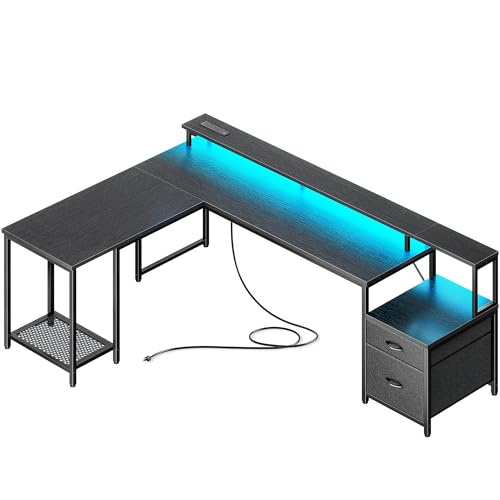
L Shaped Desk with Monitor Stand: The Complete Workspace Guide
An L shaped desk with a monitor stand combines generous corner workspace with ergonomic screen positioning. Discover how this configuration improves posture, frees up surface area, and organizes your home office for productive, comfortable work.
Explore Buying GuideKey Benefits of an L Shaped Desk with Monitor Stand
Ergonomic Screen Height
A monitor stand raises your display to eye level, promoting neutral neck posture and reducing the fatigue that comes from looking down at a screen for hours.
Two-Zone Workflow
The L shape separates active typing from secondary tasks, letting you keep reference materials, a tablet, or a notebook within arm's reach without cluttering your primary work area.
Corner Space Efficiency
L shaped desks make smart use of corner real estate, fitting more usable surface into a room than a straight desk of similar footprint.
Under-Stand Storage
The elevated platform beneath a monitor stand creates room for a keyboard, soundbar, small speakers, or cable management boxes, keeping the surface clear.
Improved Cable Routing
Integrated monitor stands often include cable channels or grommets, simplifying the routing of display, power, and peripheral cables.
Flexible Monitor Layouts
With the added height and corner geometry, you can arrange dual or even triple monitors more naturally, especially when combined with a monitor shelf configuration.
Types of L Shaped Desks with Monitor Stands
Not every L shaped desk with a monitor stand is built the same. The right choice depends on your workflow, room size, and whether you need height adjustability, storage, or a gaming-oriented aesthetic. Below are the most common configurations worth comparing during your research.
| Type | Best For | Notable Features |
|---|---|---|
| Fixed-Height with Monitor Shelf | Traditional office users and students | Sturdy steel frame, integrated raised shelf, generous corner surface |
| Height-Adjustable Standing L Desk | Users alternating sitting and standing | Electric lift mechanism, memory presets, monitor stand compatibility |
| Gaming L Desk with Monitor Stand | Gamers and streamers | RGB lighting, cable management channels, reinforced monitor platform |
| Executive L Desk with Hutch | Home office professionals needing storage | Raised monitor shelf or hutch, drawers, file cabinet integration |
| Compact L Desk with Monitor Riser | Small rooms and apartments | Space-saving footprint, detachable riser, lightweight construction |
If you're comparing specific configurations, it helps to review dedicated guides on an L shaped desk with monitor shelf and an L shaped desk with raised monitor shelf to understand how shelf height affects viewing angle. For users who want both a stand and a keyboard tray, the L shaped desk with keyboard tray and monitor stand combines two ergonomic upgrades in one unit.
Buying Guide: What to Look For
When evaluating an L shaped desk with a monitor stand, focus on build quality, dimensions, and how the stand integrates with the overall desk structure. The checklist below covers the factors that most affect long-term satisfaction.
- Monitor stand height and adjustability: Look for a stand that positions the screen center at or slightly below eye level when seated. Fixed stands work for many users, but adjustable or riser-style stands offer more flexibility.
- Desk depth on the main return: A depth of at least 24 inches on the primary work side gives comfortable keyboard and monitor clearance.
- Weight capacity: Confirm the desk and stand together support your monitor, speakers, and any additional equipment. Reinforced steel frames handle heavier loads with less wobble.
- Frame material and stability: High-grade steel or heavy-duty aluminum frames reduce shake, especially important if you type vigorously or use a standing configuration.
- Cable management provisions: Grommets, under-desk trays, or integrated channels keep the monitor stand area tidy and prevent cable strain.
- Reversible or fixed orientation: Some L desks let you choose whether the return sits on the left or right, which matters for room layout and window placement.
- Storage integration: Drawers, hutches, or file cabinets add utility but affect footprint and assembly complexity.
Ergonomics: Setting Up Your Monitor Stand Correctly
The monitor stand is only as effective as its placement. Follow these principles to get the most from your L shaped desk configuration:
- Eye-level alignment: The top third of your monitor should sit at or slightly below eye level when you're seated upright.
- Arm's-length distance: Position the screen roughly an arm's length away, adjusting for text size and personal comfort.
- Centered on the primary return: Place your main monitor on the longer or primary side of the L, with secondary screens angled on the return.
- Keyboard and mouse at elbow height: Your forearms should be roughly parallel to the floor; a keyboard tray can help if the desk surface is too high.
- Break up static posture: If you use a standing-capable model, alternate between sitting and standing throughout the day to reduce fatigue.
Who Is an L Shaped Desk with Monitor Stand Best For?
Remote Professionals
Two work zones support video calls, document review, and focused typing without constant rearranging.
Gamers and Streamers
A monitor stand lifts the display for better immersion while the corner layout accommodates a second screen for chat or capture software.
Students and Researchers
The extra surface holds textbooks and notes while the raised monitor keeps reference material visible during study sessions.
Creative Professionals
Designers and editors benefit from a clear primary screen position and a secondary area for a drawing tablet or color reference.
Small Home Offices
Corner placement maximizes usable space in compact rooms while the monitor stand frees up surface area.
Multi-Monitor Users
The L geometry and elevated stand support dual or triple display arrangements more naturally than a straight desk.
Explore Related L Shaped Desk Configurations
- L Shaped Desk with Monitor Shelf
- L Shaped Desk with Raised Monitor Shelf
- L Shaped Desk with Keyboard Tray and Monitor Stand
- L Shaped Desk with Standing Option
- L Shaped Standing Desk
- L Shaped Desk with Hutch
- L Shaped Desk with Drawers
- L Shaped Desk with Storage
- L Shaped Gaming Desk with Monitor Stand
- L Shaped Office Desk with Hutch
- L Shaped Desks for Home Office
Frequently Asked Questions
Is an L shaped desk with a monitor stand good for posture?
Yes, when set up correctly. The monitor stand raises your screen to eye level, which helps maintain a neutral neck position. Combined with proper chair height and keyboard placement, it supports healthier posture during long work sessions.
Can I use a monitor arm instead of a built-in stand?
Absolutely. Many L shaped desks with monitor stands also support clamp-on or grommet-mounted monitor arms. An arm offers more adjustability, while a built-in stand provides a stable, furniture-integrated solution.
What size monitor fits on an L shaped desk monitor stand?
Most integrated stands accommodate displays up to 27 to 32 inches. Check the stand's stated width and weight capacity before purchasing, especially if you plan to use an ultrawide or dual-monitor arrangement.
Do L shaped desks with monitor stands work in small rooms?
Yes, corner placement often makes better use of limited floor space than a straight desk. Compact models with detachable monitor risers are particularly well suited to apartments and small home offices.
Should I choose a fixed or height-adjustable L shaped desk?
Fixed-height models are simpler and typically more rigid. Height-adjustable models cost more but let you alternate between sitting and standing, which many users find beneficial for energy and comfort throughout the day.
How do I manage cables with a monitor stand?
Use the stand's integrated cable channels if available, and supplement with under-desk cable trays and hook-and-loop ties. Route power and display cables separately to reduce interference and simplify troubleshooting.
Final Thoughts
An L shaped desk with a monitor stand is a practical upgrade for anyone who wants more usable surface, better screen positioning, and a workspace that adapts to multiple tasks. By focusing on stand height, frame stability, cable management, and your specific workflow, you can choose a configuration that supports both productivity and long-term comfort. Use the buying guide and FAQ above as a checklist when comparing models, and explore the related configurations to find the exact layout that fits your room and routine.