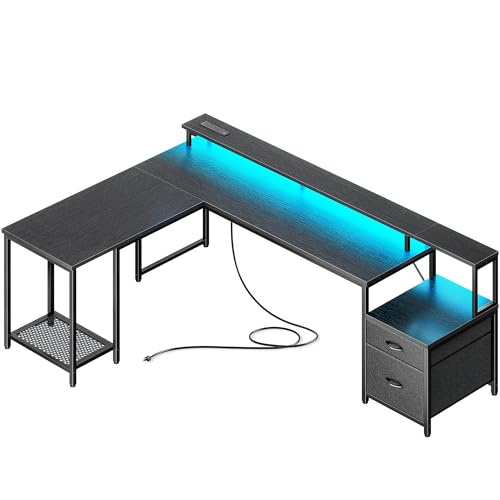
L Shaped Desk with Monitor Shelf: The Complete Workspace Upgrade
An L shaped desk with monitor shelf combines generous corner workspace with elevated screen positioning for a cleaner, more ergonomic setup. This guide explains how the monitor shelf changes your workflow, what to look for across quality tiers, and how to arrange the surface so your monitor, keyboard, and accessories all work together.
Explore Recommended ModelsWhy an L Shaped Desk with Monitor Shelf Works
The L shaped layout gives you two connected work zones, so you can separate active tasks from reference materials or spread a project across both wings. Adding a monitor shelf on top of that footprint solves a common corner-desk problem: the main surface stays open for a keyboard, notebook, and mouse, while the display sits at a height that reduces neck strain. Instead of stacking risers or clamping a separate arm, the shelf is integrated into the desk structure, which keeps the silhouette clean and the footprint predictable.
For anyone researching before purchase, the key question is not simply whether the shelf exists, but how it interacts with monitor size, seating height, and the rest of the desk. A shelf that is too low defeats the purpose; one that is too high forces you to look up. The most satisfying setups place the shelf at a depth and height that let the top third of the screen sit near eye level while leaving enough clearance for speakers, a lamp, or storage beneath it.
Quick insight: The monitor shelf on an L shaped desk is most effective when it doubles as structural storage. Look for models where the shelf depth accommodates your monitor base, and where the space underneath is tall enough for a keyboard tray, cable tray, or a small drawer unit.
Core Benefits of the Monitor Shelf Design
Ergonomic Screen Height
Raises the display so you maintain a neutral neck posture instead of tilting your head downward for hours. Pairs naturally with proper chair and keyboard placement.
Reclaimed Work Surface
Frees the main desktop for writing, drawing, or a second input device. The shelf turns vertical space into functional storage without adding floor footprint.
Better Cable Routing
The shelf creates a natural channel for monitor cables and power leads, making under-shelf cable trays and raceways easier to install and maintain.
Defined Zones
The L shape plus shelf establishes a clear primary workstation and a secondary zone, which helps separate focused work from peripheral tasks.
Acoustic and Visual Balance
A raised shelf can soften the visual weight of large monitors and, with a backing panel, reduce screen glare and desk-level reflections.
Upgrade Path
Many shelf-equipped L desks accept monitor arms, light bars, and additional storage later, so the desk grows with your setup instead of locking you in.
Quality Tiers: What Changes Across the Market
Because this category spans a wide range of construction quality, it helps to think in tiers rather than focusing on any single specification. The table below groups typical L shaped desks with monitor shelves by build quality and intended use. Use it to match the desk to how intensively you plan to work.
| Tier | Typical Construction | Monitor Shelf Characteristics | Best For |
|---|---|---|---|
| Entry-level | Laminate over particle board, light steel legs | Fixed shelf, single-monitor depth, basic cable cutout | Students, light home use, first corner desk |
| Mid-range | Engineered wood with veneer, reinforced frame | Wider shelf, dual-monitor capable, grommets, adjustable feet | Daily home office, hybrid work, dual displays |
| Premium | Solid wood or high-grade engineered core, heavy-duty steel | Deep shelf, integrated cable management, optional riser or hutch | Full-time remote work, creative professionals |
| Luxury / commercial-grade | Hardwood, welded steel frame, commercial hardware | Customizable shelf height, modular storage, reinforced load rating | Executive offices, studio environments, multi-monitor command centers |
Tier differences show up most clearly in the shelf itself. Entry-level shelves are usually a single fixed panel; mid-range shelves add depth and better hardware; premium and commercial-grade shelves often feature height adjustment, removable risers, or integrated power routing. If you plan to mount a heavy ultrawide display or multiple monitors, prioritize the higher tiers where the shelf is reinforced and the load rating is clearly stated.
What to Evaluate Before You Choose
Monitor Size and Shelf Depth
Measure your monitor base and the distance you prefer between your eyes and the screen. A shelf that is too shallow will force the monitor to overhang, which is unstable. A shelf that is too deep pushes the screen farther away than is comfortable. For most users, a shelf depth in the range that comfortably holds the monitor stand, with a few inches of margin, is the practical target.
Shelf Height Relative to Seating
Your seated eye level should align with the upper portion of the display. If the shelf is fixed, confirm its height before buying; if it is adjustable, you gain flexibility for different chairs and users. This is especially important in shared or multi-user households.
Weight Capacity and Reinforcement
A monitor shelf carries concentrated weight at its center. Look for reinforced brackets, a solid back panel, or a design where the shelf is supported along its full width. For dual or triple monitors, confirm the shelf load rating and whether the desk frame is rated for that total load.
Cable Management Integration
The shelf is the natural anchor point for cable routing. Grommets, under-shelf channels, and rear cutouts make a noticeable difference in how clean the final setup looks. If the desk lacks these, plan to add a cable tray or under-desk cable management solution.
Reversibility and Layout Flexibility
Some L desks allow you to choose which side the return sits on. If your room layout may change, a reversible model reduces the risk of buying the wrong orientation. Related options include reversible L shaped desks and models with a left return.
Pre-Purchase Checklist
- Measure the corner footprint and confirm the return length fits your room
- Check the monitor shelf depth against your display base and preferred viewing distance
- Confirm shelf height range if you need adjustability for different users
- Verify the load rating for the shelf and the overall desk frame
- Look for grommets, cable cutouts, or under-shelf routing options
- Decide whether you need a reversible return or a fixed orientation
- Plan storage: drawers, hutches, or open shelving under the shelf
- Check assembly requirements and whether tools are included
Arranging an Ergonomic L Shaped Desk Setup
The monitor shelf is only part of the ergonomic equation. Once the desk is in place, position the primary monitor on the shelf at the corner or along the longer wing, depending on where you sit most often. Keep the keyboard and mouse on the main surface directly in front of you, with elbows near a right angle. If the shelf holds a second monitor, angle it toward your seated position rather than leaving it flat.
Lighting matters as much as geometry. A monitor light bar mounted to the shelf edge reduces glare on the screen and illuminates the keyboard area without casting shadows. If the shelf is deep enough, a small desk lamp can sit beside the monitor. For a full walkthrough of height and placement, see the monitor placement guide and the desk height calculator.
Consider the return wing as a secondary zone. It is a natural home for a printer, reference books, or a charging station. If you need more enclosed storage, pair the desk with a matching filing cabinet or a drawer pedestal. For users who alternate between sitting and standing, a height-adjustable frame is worth considering; compare adjustable L shaped desks and standing L shaped desks.
Materials and Surface Care
The shelf and desktop surfaces take daily contact from monitors, cables, and occasional relocation. Solid wood and high-grade engineered wood resist wear well and can be refinished. Laminate surfaces are practical and easy to clean but are less forgiving of impact. Metal frames should have a rust-proof finish, especially in humid rooms.
If you choose a wood surface, a simple care routine keeps the shelf and desktop looking consistent. Learn how to clean a wood desk, protect the desk surface, and repair scratches before they spread. For a broader comparison of surface options, the desk materials guide covers the trade-offs in detail.
Storage Combinations That Pair Well with a Monitor Shelf
One of the strongest arguments for this desk type is how naturally it accepts storage. Under the shelf, a shallow drawer unit or a set of drawers and shelves keeps supplies within reach. Along the return, a hutch adds vertical storage without taking floor space. If you prefer open access, bookshelf-style L desks and high-storage models expand the options further.
For small rooms, storage can be the deciding factor. Compact configurations such as small-space L desks with drawers and storage-focused L desks keep the corner footprint efficient. If your setup includes a dedicated filing area, compare filing drawer models and locking file cabinet versions for security and organization.
Gaming, Executive, and Specialty Variants
The same shelf concept adapts to different use cases. Gaming-focused desks often add LED lighting and cable routing for peripherals; see gaming L desks with monitor shelves and LED-lit gaming L desks. Executive and professional offices favor heavier construction and larger surfaces; review executive L desks and executive models with hutches.
Height-adjustable versions extend the shelf concept to sit-stand workflows. If you want the monitor shelf to move with the desk, compare raising and lowering L desks and electric height-adjustable L desks. Users who prefer a fixed shelf but want the option to stand occasionally can pair the desk with a standing desk converter, provided the shelf clearance is sufficient.
Who Should Choose This Desk Type
An L shaped desk with monitor shelf is a strong fit if you want a corner workstation with clear separation between screen and work surface, and if you value integrated storage over a minimalist open frame. It suits dual-monitor users, creatives who need reference space beside a primary display, and home-office workers who want cable routing built into the furniture. It is less suitable if you need a completely flat surface for large-format drawing, or if your room cannot accommodate a return wing.
Match the tier to your usage. Entry-level models suit light and occasional work; mid-range desks handle daily hybrid schedules; premium and commercial-grade builds support full-time professional use and heavier monitor loads. If you are still comparing shapes, the home office L desk overview and the broader L shaped desk category provide context for return length, orientation, and storage choices.
Frequently Asked Questions
What is an L shaped desk with monitor shelf?
It is a corner workstation with an integrated raised platform, usually along the back edge or corner, that elevates monitors to a comfortable viewing height while keeping the main work surface open for keyboard and mouse use.
Is a monitor shelf on an L shaped desk ergonomic?
Yes, when positioned correctly. The shelf should place the top third of the screen at or slightly below eye level. Combined with an appropriate chair height and keyboard placement, it supports neutral neck posture.
Can a monitor shelf support multiple monitors?
Many mid-range and premium shelves are rated for dual displays, and some premium models support triple setups. Always confirm the shelf load rating and desk frame capacity before mounting multiple screens.
Does a monitor shelf work with a standing desk converter?
It can, but clearance matters. Choose a shelf high enough to avoid collision with the converter or one that can be removed when the converter is in use.
What materials are best for an L shaped desk with monitor shelf?
Solid wood and high-grade engineered wood offer stability and aesthetics. Metal frames provide heavy-duty support. Laminate and veneer suit entry-level and mid-range options, while hardwood and commercial-grade builds suit premium and luxury tiers.