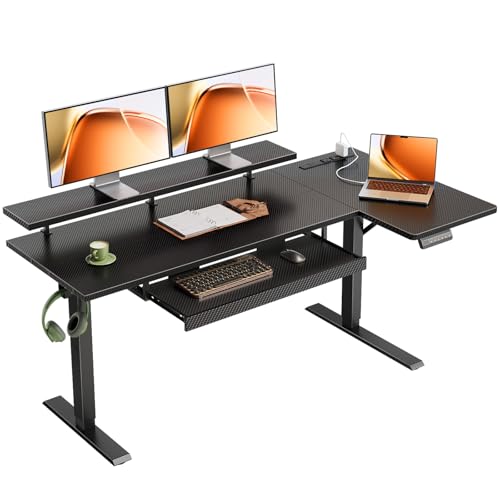
L Shaped Desk with Raised Monitor Shelf: The Complete Workspace Guide
Discover how an L shaped desk with raised monitor shelf combines generous corner workspace with ergonomic screen elevation. Learn the layout benefits, storage options, and buying considerations that help you build a healthier, more productive home office.
Explore Top PicksWhy this setup matters: An L shaped desk with raised monitor shelf solves two workspace challenges at once. The L configuration gives you room for dual monitors, paperwork, and accessories across two connected work zones, while the raised monitor shelf lifts your screen to a comfortable viewing height. Together they support better posture, freer desk space, and a more organized daily workflow.
What Is an L Shaped Desk with Raised Monitor Shelf?
An L shaped desk with raised monitor shelf is a corner-style workstation where one section of the desktop includes an elevated platform designed to hold a monitor, laptop, or all-in-one computer. The raised shelf can be a built-in hutch ledge, a bolt-on riser, or an integrated stand that sits above the main work surface.
This design is popular in home offices because it combines three useful features in a single footprint:
- Corner-friendly layout: The L shape wraps around a corner, making efficient use of room edges and freeing up central floor space.
- Elevated screen position: A raised monitor shelf brings the screen closer to eye level, which can reduce neck strain during long work sessions.
- Extra surface area: The area beneath the shelf remains usable for keyboards, notebooks, or accessory storage.
If you are still comparing layouts, our broader guide to L shaped desks for home office explains how corner desks fit different room sizes and workflows. For models that emphasize screen support without a full shelf, see the L shaped desk with monitor stand collection.
Ergonomic Benefits of a Raised Monitor Shelf
Monitor height is one of the most overlooked parts of desk ergonomics. When a screen sits directly on the desktop, most people end up looking downward, which gradually pulls the head and shoulders forward. A raised monitor shelf addresses this by lifting the screen so the top of the display aligns closer to eye level.
Better Neck and Shoulder Alignment
With the monitor elevated, your gaze stays more horizontal and your neck stays closer to a neutral position. This is especially helpful on an L shaped desk, where the monitor often sits in the corner and you may rotate between the two work zones. A shelf keeps the screen stable and visible from both sides of the desk.
More Usable Desk Depth
Raising the monitor frees the space underneath it. That reclaimed area can hold a keyboard, a writing pad, a small drawer unit, or a charging station. On a corner desk, this extra depth is valuable because the inner corner is often the deepest part of the surface. You can read more about combining these features in our guide to the L shaped desk with keyboard tray and monitor stand.
Cleaner Cable Routing
A raised shelf often includes a gap or grommet behind the monitor, which makes it easier to route display cables down and out of sight. Combined with a corner layout, this keeps the visible work surface tidy and reduces the chance of cables tangling around your keyboard or mouse area.
Ergonomic Tip
Position the raised monitor shelf so the top third of the screen sits at or slightly below eye level when you sit upright. Keep the monitor about an arm's length away, and angle it slightly toward your primary seating position.
Layout Ideas for Your Corner Workspace
The L shape gives you two connected work zones, and the raised monitor shelf helps you decide which zone becomes the primary screen area. Here are practical layouts that work well in most home offices.
Primary Zone in the Corner
Place the raised monitor shelf in the inner corner so the screen faces the center of the room. The long return on one side becomes a writing and paperwork area, while the shorter side can hold a printer, lamp, or storage. This is the most common arrangement and works well for dual-monitor users who want both screens visible from a single seat.
Primary Zone on the Long Side
If you prefer to face a wall or window, put the monitor shelf on the longer section of the desk. The corner then becomes a secondary workspace for a laptop, reference books, or a charging station. This layout suits people who rotate between screen work and hands-on tasks throughout the day.
Dual-Zone Workflow
Some users keep the raised shelf for the main display and use the other leg of the L for a secondary laptop or tablet. This setup is helpful for multitasking, such as referencing documents on one screen while writing on another. For more storage-focused configurations, browse the L shaped desk with monitor shelf options.
Storage and Accessory Options
An L shaped desk with raised monitor shelf can be paired with several storage add-ons. The right combination depends on whether you need filing space, closed drawers, or open shelving.
| Storage Feature | Best For | Notes |
|---|---|---|
| File drawers | Paper-heavy workflows | Keeps documents organized and out of sight; see L shaped desk with file drawer. |
| Hutch | Books, binders, decor | Adds vertical storage without increasing floor footprint; see L shaped desk with hutch. |
| Open shelves | Frequent-access items | Good for plants, reference books, and display items; see L shaped desk with shelves. |
| Keyboard tray | Ergonomic typing height | Keeps keyboard below the monitor shelf for proper arm position; see L shaped desk with keyboard tray. |
| Combined drawers and hutch | Maximum organization | Best for full home-office setups; see L shaped desk with drawers and hutch. |
If you want a model that combines the raised shelf with generous drawer space, consider the L shaped desk with storage category. For tight rooms, the L shaped desk with drawers for small space guide explains how to fit a corner workstation without crowding the room.
How to Choose the Right Model
When comparing L shaped desks with raised monitor shelves, focus on build quality, shelf design, and how the desk fits your room. The following criteria help you narrow the field.
Shelf Construction and Height
Check whether the raised shelf is fixed or adjustable. A fixed shelf is simpler and often more rigid, while an adjustable shelf lets you fine-tune screen height. Look for a shelf depth that comfortably holds your monitor base, and confirm that the shelf can support the weight of your display without flexing.
Desk Frame and Surface Material
Corner desks carry weight across two connected sections, so frame rigidity matters. Steel frames with reinforced joints and thick desktop panels tend to hold up better over time. If you prefer a wood finish, the L shaped wood desk collection covers solid and engineered wood options. Laminate surfaces are also common in this category and are covered in our laminate desks guide.
Return Orientation
L shaped desks come in left-return and right-return configurations. The return is the shorter leg of the L. Choose the orientation that matches your room layout and keeps the monitor shelf in your preferred viewing position. Reversible models let you switch sides during assembly, which is useful if you are unsure about the final room arrangement.
Height Adjustability
If you want the option to stand during the day, look for height-adjustable models. Our guide to L shaped electric height adjustable standing desks explains how motorized frames work and what to check before buying. For a non-electric alternative, see the L shaped desk with standing option.
Buying Tip
Measure your room corner and the intended seating position before ordering. Confirm that the desk's return leg will not block a doorway, closet, or window, and leave enough clearance for your chair to rotate between the two work zones.
Desk Type Comparison
The table below compares common L shaped desk configurations that include a raised monitor shelf or a similar elevated screen platform.
| Configuration | Tier | Best For |
|---|---|---|
| Basic corner desk with fixed monitor riser | Entry-level | Students and light home-office use |
| L shaped desk with raised shelf and drawers | Mid-range | Everyday professional workflows |
| Executive corner desk with hutch and riser | Premium | Full-day use with extensive storage needs |
| Height-adjustable L desk with monitor platform | High-end tier | Sit-stand users who want ergonomic flexibility |
| Reception-style L desk with elevated counter | Commercial-grade | Client-facing or front-desk environments |
For a more formal look, the L shaped executive desk range includes models with integrated risers and premium finishes. Gaming-focused users may prefer the L shaped gaming desk with monitor shelf, which often adds cable channels and RGB-ready surfaces.
Cable Management and Surface Organization
A raised monitor shelf naturally creates a channel behind the screen where cables can be routed. Use that space to gather display cables, power cords, and peripheral wires into a single bundle. Adhesive clips or a short cable sleeve can keep the bundle tidy along the back edge of the shelf.
On the desktop itself, keep the area directly under the raised shelf clear for your keyboard and mouse. Store pens, notebooks, and small accessories in a drawer unit or on the secondary leg of the desk. This separation keeps the primary screen zone uncluttered and makes it easier to switch between focused work and hands-on tasks.
Organization Tip
Assign each leg of the L a purpose. For example, use the monitor shelf leg for screen work and the other leg for writing, printing, or charging devices. This simple rule prevents clutter from spreading across the entire surface.
Frequently Asked Questions
Ready to Build Your Corner Workspace?
Compare top-rated L shaped desks with raised monitor shelves and find the configuration that fits your room and workflow.
View Recommended Models