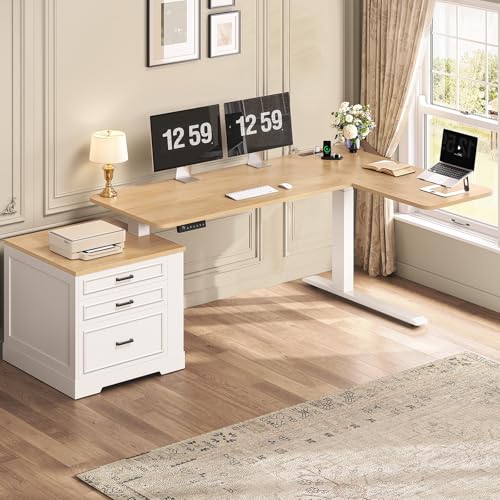
L Shaped Office Desk with Standing Option: The Complete Buyer's Guide
An L shaped office desk with a standing option blends generous corner workspace with the health benefits of sit-stand ergonomics. This guide explains frame types, surface materials, stability, storage, and layout so you can choose the right workstation for your home office.
Explore Recommended ModelsIf you have outgrown a single rectangular desk but still want the freedom to stand while working, an L shaped office desk with a standing option is the natural next step. The L footprint wraps around a corner to give you dedicated zones for a monitor, laptop, and paperwork, while the height-adjustable frame lets you alternate between sitting and standing throughout the day. Buyers researching this category usually already know they want a corner sit-stand desk — what they need is clarity on frame quality, motor configuration, surface materials, and how the extra return arm affects room layout.
This guide walks through the decisions that matter most: choosing between electric and manual height adjustment, understanding frame tiers, matching the desktop material to your workflow, planning storage, and setting up the desk ergonomically once it arrives. By the end, you should feel confident comparing models and selecting the one that fits your space and working style.
Quick orientation: An L shaped standing desk is essentially a corner desk built on a height-adjustable base. The main span holds your primary monitor and keyboard, while the return arm gives you a second work zone or storage surface. The best choice depends on how much you stand, how stable the frame is at full height, and whether the return can be flipped to match your room.
Why Choose an L Shaped Desk with a Standing Option?
The combination of an L footprint and a height-adjustable frame solves two common home-office problems at once. First, the corner layout maximizes usable surface without pushing the desk far into the room. Second, the standing option breaks up long sitting sessions, which many ergonomists associate with better focus and reduced stiffness.
Compared with a straight sit-stand desk, an L shaped model gives you more room for dual monitors, a laptop, reference documents, and accessories without feeling cramped. The return arm also creates a natural boundary between your primary work zone and a secondary area for writing, calls, or storage. If you frequently switch tasks or use more than one screen, the extra surface is a meaningful upgrade.
For buyers who want to compare the broader category first, our guide to L shaped desks for home office covers layout fundamentals, while this page focuses specifically on the standing-option variants. If you are leaning toward a pure electric model, the overview of L shaped electric height adjustable standing desks explains motor and frame differences in more detail.
Understanding the Standing Mechanism
Not every standing option works the same way. The mechanism you choose affects stability, speed, noise, and how much maintenance the desk needs over time.
Electric Sit-Stand Frames
Electric frames use motorized legs to raise and lower the desktop, usually via a control panel with memory presets. Dual-motor and triple-motor designs are common on L shaped desks because the larger surface needs more lifting capacity and better synchronization. Mid-range and premium models typically offer smoother motion, quieter operation, and stronger anti-collision sensors than entry-level single-motor frames.
Electric models are the most convenient for people who genuinely alternate between sitting and standing several times a day. Preset buttons let you return to your preferred seated and standing heights instantly.
Manual Crank and Pneumatic Options
Manual crank desks use a hand crank to adjust height and require no power outlet. They are simpler and often more robust in the long run, but adjusting mid-task is slower. Pneumatic or gas-spring assists appear on some converter-style products but are less common on full L shaped desks. If you plan to change positions frequently, an electric frame is generally the more practical choice.
Desk Converters vs Full Sit-Stand Desks
A desk converter sits on top of an existing desk and raises only the monitor and keyboard area. These are useful if you already own a fixed L shaped desk and want a standing option without replacing it. A full sit-stand L shaped desk, however, raises the entire surface, which is more stable and gives you the full benefit of standing while keeping your storage and accessories at the same relative height.
Frame Tiers: What Changes as You Move Up
Because product positioning varies, it helps to think in tiers rather than specific numbers. The table below summarizes what typically changes between frame classes on L shaped standing desks.
| Tier | Typical Frame Characteristics | Best For |
|---|---|---|
| Entry-level | Single motor, two-stage legs, basic control panel, lighter lifting capacity | Light daily use, occasional standing, smaller L configurations |
| Mid-range | Dual motor, three-stage legs, memory presets, improved stability and speed | Daily sit-stand routines, dual monitors, mixed workloads |
| Premium | Dual or triple motor, reinforced steel frame, anti-collision, low noise, wide height range | Heavy equipment, frequent height changes, shared workspaces |
| Commercial-grade | Heavy-duty lifting capacity, crossbars, extended warranty, tested for continuous use | Professional studios, multi-user offices, demanding daily cycles |
As a rule, mid-range models usually offer a noticeably smoother and quieter experience than entry-level frames, while premium and commercial-grade tiers add stability and durability for heavier setups. The right tier depends on how often you plan to stand and how much weight the desk will carry.
Stability at Standing Height
Stability is the single most important factor separating a good L shaped standing desk from a frustrating one. At full standing height, any wobble is amplified, especially on the return arm where the surface extends outward from the main legs. Look for these indicators of a solid build:
- Dual or triple motors synchronized across legs for even lifting.
- Three-stage legs with wider overlap for rigidity at higher positions.
- Crossbars or a reinforced frame connecting the legs and supporting the return arm.
- Heavy-duty feet with leveling glides to compensate for uneven floors.
- Anti-collision sensors that stop and reverse the desk when it meets an obstacle.
If you plan to mount monitors on arms or place heavy equipment on the return, prioritize a premium or commercial-grade frame. Entry-level frames are fine for laptops and light accessories but may feel less planted under heavy loads.
Choosing the Desktop Surface
The standing mechanism is only half the desk. The surface material affects durability, appearance, and how comfortable the desk feels during long sessions. For a deeper comparison, see our overview of L shaped wood desks and the general guide to laminate desks if you want a low-maintenance finish.
Solid Wood and Butcher Block
Solid wood and butcher block surfaces offer warmth, repairability, and a premium feel. They are heavier, which can reduce the effective lifting capacity of the frame, so pair them with a mid-range or higher frame. Regular oiling or sealing keeps the surface protected.
Laminate and Engineered Surfaces
Laminate tops are durable, easy to clean, and resistant to scratches and spills. They are lighter than solid wood and work well with entry-level and mid-range frames. Modern laminate finishes can convincingly mimic wood grain or matte stone.
Bamboo and Reclaimed Wood
Bamboo is a sustainable option with a clean, modern look and good hardness. Reclaimed wood adds character but varies in flatness and finish quality, so inspect the top carefully if you choose this route.
Storage and Return-Arm Layout
The return arm is what makes an L shaped desk useful — and it is also where storage decisions happen. Many buyers want drawers, a file cabinet, or a hutch on the return side, but adding storage to a height-adjustable desk requires planning. Fixed cabinets placed under the desk will not move with the surface, so they must be positioned where the frame does not collide with them.
Options to consider:
- Under-desk drawer units that sit beside the frame rather than beneath the moving surface.
- Mobile pedestals that roll out of the way when the desk rises.
- Hutch or shelf units mounted on the rear edge of the return, provided they clear the frame's travel.
- Monitor risers and shelves that add vertical storage without blocking the height range.
If storage is a priority, review models like the L shaped sit stand desk with drawers and the L shaped standing desk with storage for configurations that integrate drawers and shelving with the adjustable frame. Buyers who need a hutch should check the L shaped standing desk overview for hutch-compatible designs, while those who want a simpler footprint can compare the L shaped desk with standing option page.
Ergonomic Setup for an L Shaped Sit-Stand Desk
Once the desk is in place, the way you arrange it determines how much benefit you get from standing. A few principles apply to every L shaped standing desk:
- Monitor height: The top of the screen should be at or slightly below eye level in both seated and standing positions. A monitor arm with a wide height range makes this easier than a fixed stand.
- Keyboard and mouse: Keep elbows at roughly 90 degrees with wrists neutral. A keyboard tray can help on deeper surfaces, but on a standing desk it must be mounted so it does not collide with the frame.
- Distance: Sit or stand about an arm's length from the primary monitor. The return arm is best reserved for secondary tasks rather than the main screen.
- Anti-fatigue mat: A mat reduces strain during longer standing sessions and encourages subtle movement.
- Transition rhythm: Alternate between sitting and standing every 30–60 minutes rather than standing for hours at a time.
For a broader ergonomic reference, the L shaped height adjustable executive desk page discusses posture and monitor placement in executive layouts, and the L shaped office desk with keyboard tray guide covers tray-specific ergonomics.
Cable Management on a Moving Desk
Cable management is more important on a sit-stand desk than on a fixed one because every cable must accommodate the full height range. A cable tray mounted under the desktop keeps power strips and adapters out of sight, while cable sleeves or a vertical raceway along the leg allow slack to move freely as the desk rises.
Leave a service loop of slack near the control box and at the wall outlet. Avoid zip-tying cables tightly to the frame at multiple points, as this restricts movement and can strain connectors over time. If you use monitor arms, route their cables through the arm's channel and down the back of the desk rather than across the surface.
Room Layout and Footprint Planning
An L shaped desk occupies two walls or a corner, so measure the room before committing. Consider these practical points:
- Return orientation: A reversible L shaped desk lets you place the shorter arm on the left or right, which is useful in rooms with doors or windows on one side.
- Standing clearance: When the desk is raised, you need room to step back and move. Leave at least a meter of clear floor behind the primary seating position.
- Window placement: Avoid placing the monitor directly in front of a bright window; side lighting is easier on the eyes.
- Power access: Confirm an outlet is reachable without stretching cables across walkways. A desk with a built-in power outlet simplifies this.
For small rooms, a compact corner model or a desk with a shorter return may fit better than a full-size L. The L shaped desk with one side shorter guide explains how asymmetric layouts work, and the L shaped office desk with storage page covers designs that use the return for vertical storage instead of extending outward.
Buyer's Checklist Before You Decide
- Confirm the height range covers both your seated and standing comfort zones.
- Check the lifting capacity against your monitor, accessories, and any desktop equipment.
- Verify the frame tier matches how often you will change positions.
- Measure the return arm against your room's available wall space.
- Decide whether the return must be reversible.
- Plan storage that will not collide with the moving frame.
- Budget for a monitor arm and cable tray if they are not included.
- Check warranty length and motor replacement policy.
Related L Shaped Desk Guides
Exploring adjacent configurations can help you narrow down the right model. These guides cover the most common variations buyers compare against a standing-option L desk:
Frequently Asked Questions
What is an L shaped office desk with standing option?
It is a corner-style workstation whose surface can rise and lower, allowing you to alternate between seated and standing work. It combines the generous layout of an L shaped desk with the health benefits of a height-adjustable sit-stand frame.
How stable are L shaped standing desks?
Stability depends on the frame design. Premium and commercial-grade models use dual or triple motors, reinforced steel legs, and crossbars, which minimize wobble at standing height. Entry-level single-motor frames can be stable for light use but may wobble more when fully raised.
Can I use an L shaped standing desk in a small room?
Yes, if you choose a compact corner model or a reversible L shaped desk that lets you flip the shorter return to either side. Measure your room carefully and consider models with adjustable width and a short return arm.
Do I need a monitor arm for an L shaped sit-stand desk?
A monitor arm is highly recommended. It keeps your screen at eye level as the desk rises, frees up surface space, and helps maintain ergonomic posture. Choose an arm with enough height range to match your standing height.
How do I manage cables on an L shaped standing desk?
Use a cable tray mounted under the desk, cable sleeves for the rising frame, and a cable management column or raceway along the leg. Leave enough slack in cables to accommodate the full height range without strain.
Final Thoughts
An L shaped office desk with a standing option is a long-term investment in both workspace capacity and daily comfort. The right choice comes down to three decisions: pick a frame tier that matches how often you stand, choose a surface material that suits your workflow, and plan the return arm so storage and layout work together. Buyers who prioritize a stable mid-range or premium frame, a durable top, and a reversible return usually end up with a desk that serves them for years.
If you are still weighing alternatives, revisit the L shaped office desk with drawers and L shaped office desk with hutch guides to see how storage-heavy designs compare with cleaner standing-option layouts. Once you have a shortlist, use the checklist above to compare features side by side.