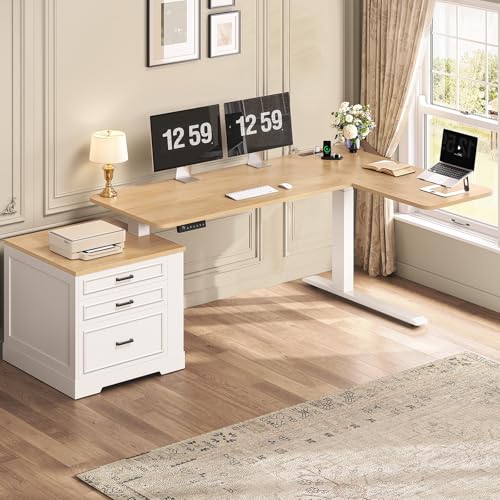
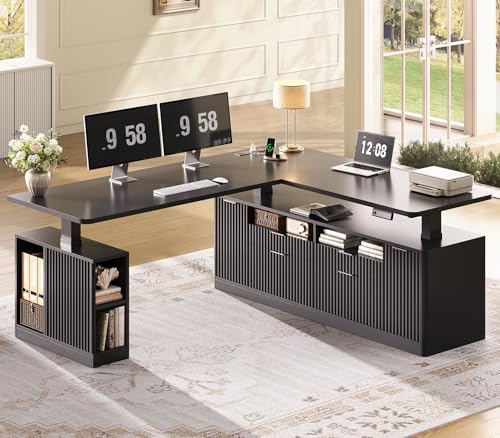
L-Shaped Desk That Raises and Lowers: The Complete Buyer's Guide
If you want the generous surface of a corner workstation plus the posture benefits of sit-stand switching, an L-shaped desk that raises and lowers is the answer. This guide walks you through lift mechanisms, frame tiers, ergonomic setup, and the practical details that help you choose with confidence.
Why an L-Shaped Desk That Raises and Lowers Makes Sense
An L-shaped desk that raises and lowers combines two powerful ideas: a corner footprint that uses your room efficiently, and a lift system that lets you alternate between seated and standing work. The result is a workstation that supports focus, reduces long stretches of static posture, and gives you room for multiple monitors, a laptop, and accessories without crowding.
More usable surface, less wall space wasted
A corner desk follows the walls of a room, so the work surface wraps around you rather than jutting into the middle of the floor. This makes it ideal for bedrooms, small home offices, and shared spaces. If you are working with limited square footage, a height-adjustable corner layout often fits better than two separate straight desks pushed together.
Posture variety without sacrificing workspace
Standing periodically during the day helps break up long sitting sessions and can support better energy and circulation. A desk that raises and lowers lets you switch heights without clearing your surface. That convenience matters: the easier the transition, the more likely you are to actually do it.
Room for serious multi-monitor setups
The long run of an L-shaped surface accommodates a primary monitor plus a secondary screen, and the return section can hold a laptop, reference materials, or a printer. If you are building a multi-screen workflow, you may also want to review guidance on standing desk setups for three monitors to plan your layout.
Electric vs. Manual Lift Mechanisms
The lifting mechanism determines how smoothly and how often you will actually change positions. There are two main families: electric motorized frames and manual hand-crank or gas-spring systems.
Electric motorized frames
Electric frames use one or more motors to drive the legs up and down, usually with a preset control panel. Many models let you save preferred seated and standing heights so you can return to them with one touch. If you plan to switch positions several times a day, electric is the more convenient path. For a deeper comparison of powered frames, see this guide on double motor standing desks.
- Single-motor frames: one motor drives linked legs. These are common in entry-level and mid-range models and usually handle lighter loads.
- Dual-motor frames: each leg has its own motor, giving smoother travel and higher load capacity. Mid-range and premium models frequently use this design.
- Three-stage legs: provide a wider height range and often better stability at tall settings.
Manual lift systems
Manual options include hand-crank desks and gas-spring counterbalance systems. They do not require power, which can be useful in rooms without convenient outlets. The trade-off is that changing height takes more effort, so they suit users who switch positions a few times a day rather than hourly. If you are comparing frame-only options, stand-up desk frames are worth reviewing alongside complete desks.
Which mechanism suits you?
| Mechanism | Best For | Considerations |
|---|---|---|
| Single-motor electric | Entry-level to mid-range setups, occasional to moderate switching | Lighter load capacity; check stability at max height |
| Dual-motor electric | Daily sit-stand routines, multi-monitor setups | Smoother travel, higher load rating, more consistent leveling |
| Hand-crank manual | Power-free rooms, infrequent height changes | Requires physical effort; slower transitions |
| Gas-spring counterbalance | Quick lift-and-lock converters and compact frames | Load range must be matched to your equipment |
Corner Configuration and Surface Area
Not every L-shaped desk is built the same way. The two most common configurations are the fixed L and the reversible L.
Fixed vs. reversible L-shape
A fixed L has a predetermined long and short side. A reversible L lets you choose which side the return section sits on, which is helpful when you are fitting the desk around a window, door, or radiator. Reversible models give you more flexibility during layout planning.
How much surface do you need?
Think about your actual equipment rather than a generic number. A primary monitor, a secondary monitor, a keyboard, a mouse, speakers, and a notebook all compete for space. The long run should comfortably hold your main display array, while the return section handles reference items or a laptop. If you need more storage, consider models with built-in organization, such as an L-shaped desk with drawers and a file cabinet.
Fitting into small rooms
Compact L-shaped models exist for tighter spaces. Measure the corner you intend to use, then check the desk's footprint on both wings. Leave clearance for a chair and for the desk to travel up and down without hitting shelving. For more space-planning ideas, see L-shaped desks for a small home office.
Quality Tiers and What Separates Them
To help you compare without getting lost in specifications, it helps to think in market tiers rather than individual labels. The table below summarizes what you can generally expect at each tier.
| Tier | Typical Characteristics | Best For |
|---|---|---|
| Entry-level | Single-motor or lighter frames, simpler control panels, moderate load ratings | First sit-stand setup, lighter equipment, occasional switching |
| Mid-range | Dual-motor options, three-stage legs, memory presets, sturdier crossbars | Daily use, dual monitors, hybrid work routines |
| Premium | Heavy-duty frames, reinforced leveling, quieter motors, refined controls | Multi-monitor professional setups, shared workspaces |
| Professional-grade / commercial-grade | High load ratings, extended warranties, robust construction for frequent use | Full-time remote work, design studios, office environments |
Frame construction matters most
The lift frame is the heart of any height-adjustable desk. Look for reinforced steel legs, a solid crossbar, and leveling feet. A premium frame paired with a modest top often outperforms a decorative top on a flimsy frame, especially in corner configurations where both wings must stay level.
Controls and memory presets
Memory presets are a small feature with a large practical impact. Being able to return to your exact seated and standing heights with one touch removes friction and encourages regular switching. Entry-level models may offer only up/down buttons, while mid-range and premium frames usually include programmable presets.
Buying Checklist Before You Commit
Use this checklist to evaluate any L-shaped desk that raises and lowers before you make a decision.
- Height range: confirm the seated and standing heights fit your body. A desk height calculator can help you set targets.
- Load capacity: add up the weight of monitors, arms, laptop, accessories, and anything else on the surface.
- Stability at tall settings: check reviews for wobble at maximum height, especially with dual-monitor arms.
- Reversible or fixed: decide based on your room layout and where outlets and windows sit.
- Frame tier: match the motor and frame quality to how often you will switch positions.
- Cable management: a lifting desk needs slack-managed cables. Look for integrated trays or plan to add them.
- Assembly requirements: L-shaped frames have more parts; check whether assembly is manageable for you.
- Warranty: frame and motor warranties vary by tier and are a useful signal of expected durability.
Setup, Ergonomics, and Cable Management
Once the desk is in place, the quality of your setup determines how much you actually benefit from it. A few deliberate choices make a large difference.
Dial in your heights
Seated height should let your forearms rest roughly parallel to the floor with shoulders relaxed. Standing height should keep your elbows at about a right angle with wrists neutral. Save both positions as presets if your desk supports them. A desk height calculator is a useful starting point, and you can fine-tune from there.
Monitor placement
Place your primary monitor at eye level when you are seated, then check that it still works when you stand. If the monitor sits too low when standing, a monitor arm can raise it independently of the desk. If you prefer a fixed riser, a desk monitor stand can lift the display while freeing surface space underneath.
Chair and floor comfort
When standing, an anti-fatigue mat reduces strain on hard floors. When seated, make sure your chair height pairs with the desk height. If you are choosing a chair for a sit-stand routine, this guide on an adjustable height desk chair for a standing desk explains the key adjustments.
Cable management on a moving surface
Every cable that connects to the desk must have enough slack to travel through the full height range. Route cables through a tray or sleeve, leave a service loop near the floor, and secure loose runs with clips. Tidy routing prevents strain on connectors and keeps the desk looking clean.
Build a switching routine
The benefit of a raise-and-lower desk comes from regular transitions. Start with a simple pattern such as standing for part of the morning and part of the afternoon, and adjust based on comfort. A structured routine, like the one described in this sit-stand routine guide, helps you build the habit gradually.
Accessorize with purpose
Good accessories remove friction rather than adding clutter. A phone stand, a headphone hook, and a small organizer keep essentials within reach. For inspiration, explore standing desk setup ideas and small desk organizer options.
Frequently Asked Questions
What is an L-shaped desk that raises and lowers?
It is a corner-configured workstation with a lift mechanism that switches between seated and standing heights. The L-shape gives you surface area along two walls, while the adjustment supports posture variety during the day.
How much weight can a height-adjustable L-shaped desk support?
Capacity varies by tier. Entry-level models typically handle a dual-monitor setup and a laptop, while mid-range and professional-grade frames support multiple monitors, a desktop tower, and accessories. Always verify the rated load before placing heavy equipment.
Do L-shaped standing desks wobble at tall heights?
Stability depends on frame design, leg thickness, and motor count. Premium dual-motor frames with reinforced crossbars generally stay steadier at maximum height than single-motor entry-level frames. A level floor and proper assembly also help.
Can I fit an L-shaped height-adjustable desk in a small room?
Yes. Compact models with shorter return sections fit small home offices and bedrooms. Measure your corner carefully and choose a reversible configuration so the longer run sits where you need it.
Is an electric or manual lift better for an L-shaped desk?
Electric is more convenient for frequent switching and is the more common choice for daily sit-stand routines. Manual crank systems suit rooms without convenient power or users who change height infrequently. Match the mechanism to your habits.
What else should I consider before buying?
Check the height range against your body, the load capacity against your equipment, and the frame tier against how often you will switch positions. Also plan cable management and confirm that assembly is manageable for the frame you choose.