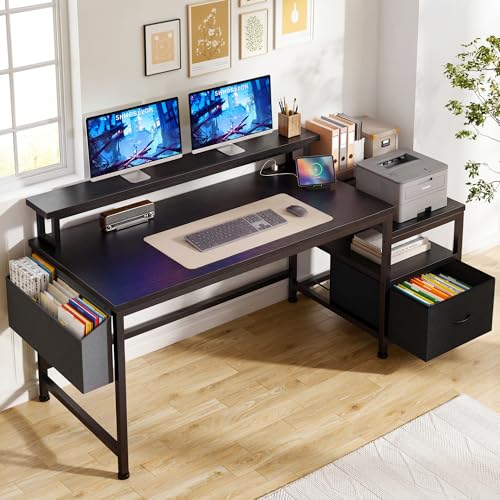
Office Desk Large Enough for 3 Monitors
Everything you need to know about choosing, setting up, and maximizing a desk that comfortably fits three monitors for peak productivity and comfort.
If you're running a triple-monitor setup for trading, coding, video editing, or gaming, you already know that space is premium. A standard 48-inch desk simply won't cut it. You need an office desk large enough for 3 monitors — one that provides the width, depth, and weight capacity to support your gear while keeping your workspace organized and comfortable. This guide covers everything from minimum dimensions and weight limits to the best desk types and accessories for a flawless triple-screen command center.
What Makes a Desk Suitable for 3 Monitors?
Before you buy, understand the three critical factors: width, depth, and weight capacity. Here's what you need:
Minimum Width
Recommended Depth
Weight Capacity
Monitor Mount Type
Best Desk Types for a Triple-Monitor Setup
Not all desks are created equal. Here are the top styles that work best for three monitors:
- L-Shaped Desks – Perfect for corner placement, gives you extra surface area for monitors and peripherals. Great for L-shaped desks with monitor stands.
- Standing Desks – Height-adjustable options like adjustable standing desks for 3 monitors let you switch between sitting and standing.
- Rectangular Executive Desks – Wide, sturdy, and professional – ideal for large offices.
- Gaming Desks – Often wide with built-in cable management and heavy-duty frames.
- Corner Desks – Maximize space in smaller rooms while supporting a triple-monitor layout.
Why Width Matters: Finding the Right Size
A desk large enough for 3 monitors typically starts at 55 inches wide. However, if you're using 27-inch monitors or larger, we recommend 60 to 72 inches for a comfortable layout. This gives you enough room to position each monitor at an ergonomic angle without overlapping or crowding your mouse and keyboard.
Depth is equally important. A 30-inch deep desk allows you to place monitors at a safe viewing distance (arm's length) while leaving space for a keyboard, mouse, and documents. If you're using monitor arms, you can reclaim some depth and push monitors further back, giving you more surface area for other tasks.
For those with limited floor space, consider a wall-mounted desk for small spaces or a corner computer desk with a keyboard tray to maximize your footprint without sacrificing monitor real estate.
💡 Pro Tip: Use Monitor Arms
A dual monitor arm desk mount (or a triple mount) is the single best investment for a triple-monitor desk. It frees up valuable desk space, lets you adjust height and angle, and keeps cables organized. For thicker desktops, ensure you get a mount with a compatible clamp – like the dual monitor mount for 6-inch thick desks.
Top Desk Sizes for 3 Monitors – Comparison
| Desk Width | Recommended Depth | Best For | Monitor Setup |
|---|---|---|---|
| 55–60" | 28–30" | Three 24" monitors or ultra-slim bezels | Side-by-side or slight angles |
| 60–72" | 30–36" | Three 27" or larger monitors + PC case on desk | Flexible: side-by-side, curved, or stacked |
| 72" and above | 30–36" | Triple-monitor + studio equipment or multiple PCs | Ample space for any configuration |
Must-Have Desk Features for Triple-Monitor Users
Beyond size, consider these features to enhance your triple-monitor experience:
🔌 Built-in Power & USB
Desks with built-in power outlets and USB ports reduce cable clutter and make charging devices effortless.
🧰 Cable Management
L-shaped desks with cable management or built-in channels keep your triple-monitor setup looking clean and professional.
📦 Storage & Drawers
Look for desks with file drawers and hutches or adjustable-height desks with drawers to keep essentials organized.
🪑 Ergonomic Chair Compatibility
Pair your desk with a comfortable desk chair under $300 or a big and tall desk chair for all-day comfort.
What If You Have Limited Space?
Not everyone has room for a 60-inch desk. If you're in a smaller home office or apartment, don't worry. You can still support three monitors with clever solutions:
- Monitor Mounts with Vertical Stacking – Place one monitor above the other two to save width.
- Corner Desks – A corner desk setup can fit three monitors in a smaller footprint.
- Standing Desk Converters – If you already have a desk, a stand-up desk converter for 3 monitors can add a second tier.
- Wall-Mounted Desks – Wall-mounted desks for small spaces can fold down when not in use.
- Small Computer Desks – Consider a small computer desk with slide-out keyboard tray to maximize surface area.
Frequently Asked Questions
Ready to Upgrade Your Workspace?
Browse our top recommendations below for the best office desks that comfortably fit three monitors. Each option is selected for quality, durability, and value.
Shop Desks for 3 Monitors ↓