Stand Up Desk Converter With Adjustable Keyboard Tray: Guide
Discover how a stand up desk converter with an adjustable keyboard tray supports sit-stand work, keeps wrists neutral, and fits a range of desk sizes.
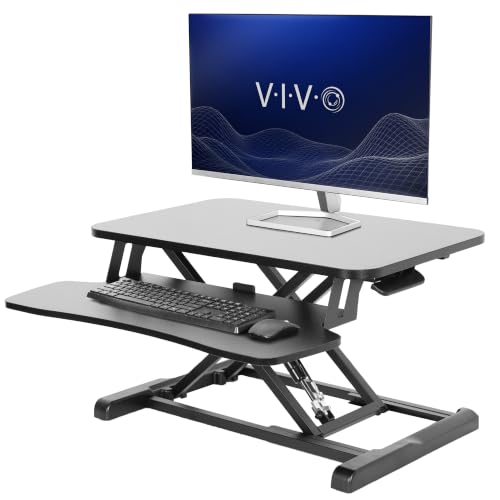
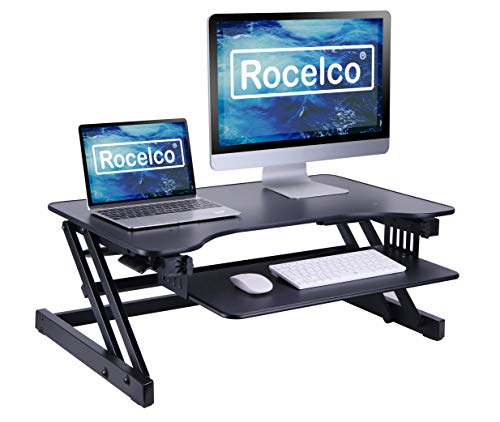
EXPLORE CONVERTER OPTIONSAll About Desks Insight: An adjustable keyboard tray transforms a desk converter. Without one, the keyboard sits at the same level as the monitor, forcing wrists into awkward angles. With one, the keyboard and mouse sit lower, keeping the wrists neutral while the monitor stays at eye level.
Why the Adjustable Keyboard Tray Matters
Most desk converters lift the entire workspace to standing height. If the keyboard and mouse stay on the main platform, the wrists angle up, the shoulders rise, and the user ends up in a rounded posture after a short time. An adjustable keyboard tray brings the keyboard and mouse down to a natural position, allowing the shoulders to relax while the monitor remains at eye level.
The tray also gives flexibility across users of different heights. Taller users can raise the tray slightly; shorter users can drop it. That adjustability matters even more in shared home offices where the same converter serves multiple people. Our guide to a standing desk with keyboard tray covers the same ergonomic reasoning applied to a full desk.
Common Converter Configurations
Converters with keyboard trays vary by lift mechanism and tray adjustment. The table below groups the most common configurations by how they support sit-stand work.
| Converter Type | Best For | Tier |
|---|---|---|
| Z-lift converter with fixed tray | Basic sit-stand setups on compact desks | Entry-level tier |
| X-lift converter with adjustable tray | Users who switch between keyboard heights | Mid-tier |
| Gas-spring converter with adjustable tray and monitor riser | Smooth height transitions with frequent adjustments | Mid-tier |
| Electric converter with memory settings | Shared setups with multiple users | Premium tier |
| Dual-monitor converter with depth-adjustable tray | Large screens combined with a lower keyboard | Top-tier |
What to Check Before You Choose
Small details in the tray and lift mechanism affect how usable the converter feels day to day.
- Tray depth: Confirm there is enough depth for both the keyboard and a wrist rest.
- Tray height range: The tray should drop far enough below the monitor platform to keep the wrists neutral.
- Weight capacity: Check the maximum weight for the tray separately from the main platform.
- Tilt adjustment: Slight tilt support can help users find a comfortable wrist angle.
- Monitor riser: Some converters include a monitor riser that lifts the screen above the keyboard tray.
- Lift mechanism stability: The tray should stay level when the converter is at full height.
- Overall footprint: Verify the base fits the existing desk.
Pro tip: Sit-stand converters with adjustable trays work best when the monitor platform sits several inches above the tray. That separation keeps the monitor at eye level while the keyboard stays low. If the platform and tray sit at similar heights, the setup is usually not ergonomic.
Matching the Converter to the Desk
The converter should fit the existing desk without overhang or wobble. On compact desks, a converter with a smaller base and a narrower tray is easier to fit. Reviewing a stand up desk converter for small desk guide helps narrow the field if the desk is short on depth.
For users with a laptop as the primary screen, a standing desk converter for laptop often includes a dedicated tray that lifts the laptop screen while keeping the keyboard low. Users with two screens should consider a standing desk converter for dual monitors with a tray that spans the full width of the setup.
Ergonomics With the Tray Raised
At standing height, the keyboard tray should sit at or slightly below elbow height. The monitor platform should place the top of the screen near eye level. If the tray cannot reach those positions with the converter raised, the user will compensate by bending the wrists or dropping the head. An ergonomic desk setup guide covers how to check elbow, wrist, and eye positions after the tray is adjusted.
Some users benefit from pairing the converter with a height adjustable keyboard tray if the tray on the converter feels limited. A separate tray can add more flexibility but changes how the converter fits the desk. On smaller setups, a sit-to-stand desk with adjustable keyboard tray is often a cleaner alternative because the tray and lift are integrated.
Routing Cables Around the Converter
Converters move, and cables move with them. Route power and monitor cables along one side of the converter with a small amount of slack. A cable management box under the desk keeps the loose ends tidy and prevents cables from catching on the lift mechanism. Reviewing a cable management desk guide helps plan the routing for the whole setup.
If the tray moves independently of the main platform, verify the tray's cables have enough slack to follow its movement. Keyboard and mouse cables are usually short, so a small loop attached to the tray frame prevents them from pulling free at maximum height.
Maintenance and Longevity
Converters with gas springs or electric lifts need occasional inspection. Listen for unusual noises, and check that the tray and platform stay level at every height. Tighten any visible screws if the platform begins to wobble. For gas-spring models, slow or uneven lifting indicates the spring is losing pressure and may need replacement. For electric models, keep the power adapter clear of moving parts.
Final Checklist Before You Choose
Run through this list to confirm the converter fits your desk and routine:
- Confirm the tray is deep enough for the keyboard and a wrist rest.
- Verify the tray height range keeps the wrists neutral.
- Check the weight capacity for both tray and platform.
- Ensure the monitor platform sits several inches above the tray.
- Plan cable routing so the lift mechanism stays clear.
- Trial the converter at both seated and standing heights.
With the right stand up desk converter with adjustable keyboard tray, the workspace supports standing work without compromising posture. The products below cover tray adjustability, lift stability, and cable routing, and each is selected for value within its tier so you can compare options with confidence.