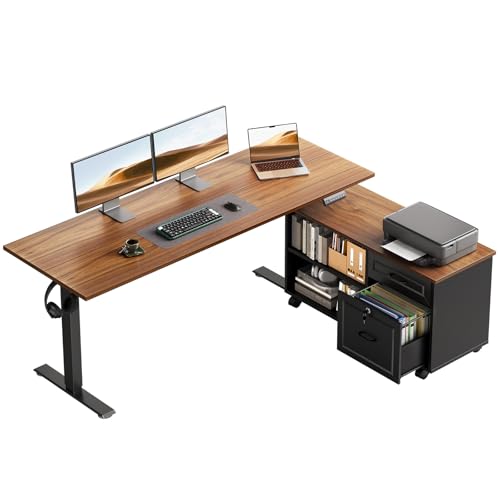
Standing Desks for Office: The Complete Guide to an Ergonomic Sit-Stand Workspace
Everything you need to choose, configure, and live with a standing desk at work — frame types, height ranges, stability, workspace integration, and the accessories that make the switch worthwhile.
Jump to the Buyer's ChecklistWhy standing desks for office use are worth the research: A desk is the single piece of furniture you interact with for the majority of your working day. Choosing the right height-adjustable frame — one that is stable at full extension, quiet enough for shared spaces, and integrated with your monitor, keyboard, and cable setup — determines whether you actually use the sit-stand habit or quietly abandon it after the first month. This guide walks you through every decision point so you can buy once, configure well, and work comfortably.
Why Offices Are Moving to Sit-Stand Desks
The shift toward standing desks for office environments is driven by a simple observation: the human body is not designed to hold one posture for eight hours. Alternating between seated and standing work distributes load across different muscle groups, reduces prolonged compression on the lower spine, and keeps circulation moving through the legs and hips. The goal is not to stand all day — it is to break up long static sitting sessions with short, frequent standing intervals.
For employers and office managers, height-adjustable desks also solve a practical problem: a single desk can be shared or reassigned between people of different heights. Memory presets let each user recall their preferred seated and standing positions instantly, which matters in hot-desking and hybrid office layouts. Combined with a properly fitted office chair and a monitor positioned at eye level, a standing desk becomes the foundation of an ergonomic workstation rather than a novelty.
Electric vs Manual: Which Standing Desk Suits an Office?
The first major decision is the adjustment mechanism. Each type carries different trade-offs in speed, noise, maintenance, and how often you will realistically change position during a workday.
Electric Height-Adjustable Desks
Electric standing desks use motorized legs — typically single-motor or dual-motor — to raise and lower the surface. Dual-motor frames move both legs independently and in sync, which produces smoother travel, higher load capacity, and better stability at standing height. Most mid-range and premium office models include memory presets, anti-collision sensors, and quiet operation suitable for open-plan or shared rooms.
- Best for: daily sit-stand routines, shared desks, and anyone who changes posture several times per day.
- Trade-offs: requires a power outlet near the desk and occasional motor or control-panel service over the long term.
- Look for: dual-motor frames, at least three or four memory presets, and a control panel that can be locked to prevent accidental movement.
Manual and Crank Standing Desks
Manual standing desks rely on a hand crank or a pneumatic lift. They are mechanically simple, have no electronics to fail, and do not require a power source — useful in temporary offices, warehouses, or rooms where cable routing to a desk is inconvenient. The trade-off is speed and consistency: cranking a loaded desk takes time, so users tend to adjust less frequently.
- Best for: occasional adjustments, lightweight setups, and spaces without reliable desk-level power.
- Trade-offs: slower adjustment and more physical effort, which reduces the likelihood of frequent posture changes.
- Look for: a smooth crank mechanism, a stable column lock, and a frame rated well above your actual load.
Desk Converters and Sit-Stand Toppers
If you already have a fixed office desk, a standing desk converter offers a lower-commitment path to sit-stand working. These units sit on top of your existing desk and raise your monitor and keyboard together. They are easy to move between desks and require no assembly of a full frame, but they reduce usable surface area and typically offer a narrower height range than a full standing desk. For a lighter, laptop-focused version, a compact standing desk converter for laptop setups can be a practical starting point.
Key Specifications That Matter for Office Use
Standing desks are not interchangeable. Two frames that look similar in a product photo can behave very differently once loaded with dual monitors at full standing height. These are the specifications worth comparing side by side.
| Specification | What to Look For | Why It Matters in an Office |
|---|---|---|
| Height range | Roughly 28–48 inches for most users | Covers seated and standing positions for users from about 5 ft to 6 ft 5 in; shared desks need the widest range. |
| Load capacity | At least 200–300 lbs for mid-range and premium frames | Handles dual monitors, monitor arms, speakers, and accessories with a safety margin at full extension. |
| Motor configuration | Dual-motor for daily use | More stable travel, smoother motion, and quieter operation in shared spaces. |
| Stability at standing height | Wide feet, reinforced crossbar, low wobble | Reduces monitor shake while typing and prevents the "sway" that makes standing work uncomfortable. |
| Memory presets | Three or four programmable positions | Instant recall of seated and standing heights — the single biggest factor in whether the habit sticks. |
| Noise level | Quiet motor, ideally under typical office background noise | Prevents distracting colleagues in open-plan or shared rooms during frequent adjustments. |
| Cable management | Integrated tray or routing channel | Keeps cables from snagging during travel and preserves a clean desk surface. |
Height is the specification people check first, but it is only useful when matched to the user and to the rest of the workstation. A desk set at the correct standing height will still cause strain if the monitor sits too low or the keyboard is too far forward. Use a structured approach — for example the principles in this standing desk height guide — to align desk, monitor, and keyboard before you commit to a frame.
Office Standing Desk Tiers Explained
Standing desks for office use fall into recognizable market tiers. Instead of comparing absolute figures, it helps to understand what each tier typically delivers relative to the others — build quality, motor smoothness, stability, and feature depth all scale up as you move between tiers.
| Tier | Typical Characteristics | Best For |
|---|---|---|
| Entry-level | Single-motor or basic dual-motor frames, two memory presets, lighter load rating, modest stability at full height | Occasional sit-stand use, light single-monitor setups, secondary workstations |
| Mid-range | Dual-motor frames, three to four presets, better crossbar rigidity, quieter travel, integrated cable tray | Daily office sit-stand routines, dual-monitor workstations, hybrid and shared desks |
| Premium | Reinforced dual-motor legs, anti-collision sensors, near-silent operation, high load capacity, wide height range | Full-time office use, heavy multi-device setups, users who adjust position many times per day |
| Commercial-grade | Heavy-duty frame, extended warranty, tested for continuous multi-user operation | Office fit-outs, hot-desking floors, meeting and collaboration rooms |
As a rule of thumb, a mid-range dual-motor frame is the point where stability, quiet operation, and preset memory become reliable enough for daily office use. Entry-level frames are perfectly usable for lighter routines, but a mid-range model usually delivers smoother travel and less monitor sway — differences you feel every time you adjust the desk. For a broader overview of frame construction and motor options, the desk frame guide covers the mechanics in more depth.
Configuring the Rest of the Workstation
A standing desk is a platform, not a complete ergonomic solution. The surrounding accessories determine how comfortable the desk actually is at standing height, and they are the most common reason people abandon sit-stand working.
Monitors and Display Placement
At standing height, the monitor needs to move up with the desk and stay at eye level. A monitor arm or a stable riser makes this easier than stacking books. If you use two screens, choose a frame and arm setup that keeps both panels at a consistent height — a standing desk with monitor mount is a common integrated solution. For smaller offices, a monitor arm desk mount frees surface space and reduces the load that shifts as the desk rises.
Keyboard and Wrist Position
Standing work keeps the elbows at roughly 90 degrees only if the keyboard sits at the right height. A keyboard tray can lower the typing surface beneath the desk top, which is especially useful for users who prefer a lower standing position or who share the desk across different heights. An under-desk keyboard tray mount keeps the typing surface aligned with the elbows as the desk moves. Ergonomic keyboards and a desk mat with wrist rest reduce strain during longer standing sessions.
Seating and Floor Comfort
Standing desks work best when the seated half of the routine is equally well supported. A chair with adjustable seat height and lumbar support — such as an ergonomic desk chair for standing desk setups — lets you drop into a proper seated position without moving the desk far. For the standing intervals, an anti-fatigue mat makes a noticeable difference to foot and lower-leg comfort; a desk matting option with a cushioned surface is a sensible addition for hard office floors.
Cable Management and Power
Because the desk moves, every cable attached to it must have enough slack to travel without snagging. Integrated trays and routing channels are the cleanest solution; if your frame lacks them, a cable management box or a desk with built-in routing — like a desk with cable management — keeps the workspace tidy and prevents strain on connectors. Power strips mounted to the underside of the desk top keep outlets within reach at both seated and standing heights.
Standing Desks for Small Offices and Compact Rooms
Not every office has room for a full-width sit-stand frame. Compact standing desks are designed for tighter footprints and often pair well with corner or wall-mounted layouts. If space is limited, a compact standing desk keeps the height-adjustable benefit without dominating the room. For very small rooms, a corner desk for small space configuration can combine an L-shaped footprint with a height-adjustable frame or converter. Where a full frame is impractical, a stand-up desk converter for small desk offers a lighter alternative.
If the office is a spare room or a bedroom corner, the layout principles in these small office desk ideas and home office desk setup ideas help you position the desk, monitor, and storage so the sit-stand routine still works in a confined area.
Building a Sustainable Sit-Stand Routine
The health benefit of a standing desk comes from frequency, not duration. Standing for hours at a time introduces its own fatigue, and the most sustainable pattern is short, regular alternation: roughly 20 to 40 minutes seated, then 10 to 20 minutes standing, repeated through the day. Memory presets make this effortless; without them, most people adjust once in the morning and once in the afternoon.
Pair the routine with the fundamentals of workstation ergonomics — monitor at eye level, elbows near 90 degrees, feet flat, and the keyboard close to the body. The broader principles in this ergonomic desk setup guide apply equally to seated and standing positions. Small additions help as well: a monitor light bar reduces eye strain in dim offices, and a desk mat with wrist rest cushions the forearms during longer typing sessions.
Buyer's Checklist: Standing Desks for Office
Before you choose a frame, confirm these points
- Measure your seated and standing elbow heights — the desk's height range must cover both with a small margin.
- Confirm the frame's load rating against your full setup: monitors, arms, speakers, laptop dock, and accessories.
- Prefer a dual-motor frame for daily use; it travels more smoothly and stays quieter in shared spaces.
- Check stability at maximum standing height with weight on the front edge — this is where entry-level frames separate from mid-range and premium ones.
- Look for at least three memory presets and a child-lock or control-panel lock on shared desks.
- Verify cable routing: trays or channels prevent snagging as the desk travels.
- Plan the accessories up front — monitor arm, keyboard tray, anti-fatigue mat, and cable box.
- Measure the room and doorways; compact and corner layouts change which frame sizes will fit.
- Check the warranty on motors and control panels, not just the frame.
- Match the frame to the office chair — the seated position should be comfortable without lowering the desk to an awkward height.
Frequently Asked Questions
What height range should an office standing desk have?
A practical office standing desk should cover roughly 28 to 48 inches in height, which accommodates most seated and standing positions for users between about 5 feet and 6 feet 5 inches. Dual-motor frames with a wider range and memory presets are preferred for shared or multi-user offices.
Are electric or manual standing desks better for office environments?
Electric dual-motor standing desks are generally the better choice for office use because they adjust quickly, quietly, and with memory presets that encourage frequent position changes. Manual crank or pneumatic models suit lighter use, temporary setups, or spaces where power access is limited.
How much weight should an office standing desk support?
Look for a frame rated to carry at least your monitor setup, peripherals, and accessories plus a safety margin. Mid-range and premium office frames commonly support 200 to 300 pounds, which is more than enough for a dual-monitor workstation, and heavy-duty commercial-grade frames go higher for multi-device setups.
Can a standing desk reduce back pain in an office setting?
Alternating between sitting and standing can reduce the static load on your spine and help relieve discomfort associated with long sitting sessions. The benefit depends on correct height, monitor placement, and a routine that shifts positions every 30 to 60 minutes rather than standing all day.
What accessories should accompany a standing desk for office use?
An anti-fatigue mat, cable management system, monitor arm or riser, and an adjustable chair that supports both seated and standing heights make the biggest difference. Adding a keyboard tray or desk mat with wrist support further improves comfort during long work sessions.
Ready to Choose Your Office Standing Desk?
The right standing desk for office use is the one that fits your height range, supports your full monitor and accessory load, and has memory presets that make posture changes effortless. Start with the tier that matches how often you adjust, confirm the frame's stability at standing height, and plan the monitor arm, keyboard tray, and cable routing as part of the same purchase. Explore the curated options below to compare office-ready frames side by side.