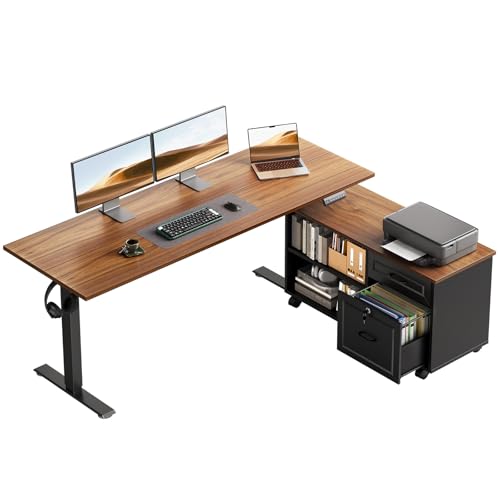
Workstation Desk Guide: Choose the Perfect Work Surface
Find a workstation desk that boosts productivity, fits your space, and supports your health. Compare materials, sizes, and features to make the right choice.
What is a Workstation Desk? A workstation desk is more than just a table—it's the command center for your productivity. Whether you're a remote worker, a creative professional, or a gamer, the right desk can transform your workflow. This guide covers everything from ergonomics to materials, helping you find the best workstation desk for your needs.
Key Features of a Quality Workstation Desk
🪑 Ergonomics
Proper height and adjustable options reduce strain and improve posture during long work sessions.
📏 Surface Area
Ample space for monitors, keyboards, documents, and other essentials without feeling cramped.
🏗️ Material & Build
Durable materials like solid wood, metal, or high-grade laminate ensure stability and longevity.
🔌 Cable Management
Built-in trays or grommets keep cords tidy, reducing clutter and improving aesthetics.
⚡ Weight Capacity
Supports multiple monitors, heavy equipment, and accessories without wobbling.
🎨 Style & Finish
Matches your office decor and personal taste, from modern minimalist to classic wood.
Workstation Desk Comparison: Find Your Match
| Feature | Standing Desk | L-Shaped Desk | Compact Desk | Executive Desk |
|---|---|---|---|---|
| Best For | Health-conscious users | Multitaskers with corner space | Small rooms & apartments | Professional & spacious offices |
| Surface Area | Medium to Large | Large (2 surfaces) | Small to Medium | Very Large |
| Adjustability | Height-adjustable (electric/manual) | Fixed or adjustable | Usually fixed | Usually fixed |
| Price Range | $400–$1,200 | $500–$1,500 | $150–$500 | $800–$2,500 |
| Ideal For | Those who alternate sitting/standing | Users with multiple monitors & devices | Minimalists or students | Managers or home office professionals |
Workstation Desk Buying Checklist
- Measure Your Space: Ensure the desk fits comfortably in your room with room to move.
- Check Height & Ergonomics: Your elbows should be at 90° when typing. Consider an adjustable standing-sitting desk for flexibility.
- Assess Weight Capacity: Add up the weight of your monitors, PC, and accessories.
- Examine Material Quality: Solid wood or high-quality MDF with a durable finish.
- Look for Cable Management: Built-in grommets or trays keep your workspace clean.
- Think About Storage: Do you need drawers that lock or open shelving?
- Consider Assembly & Delivery: Check if it comes assembled or requires DIY.
- Read Reviews: See what other users say about stability and durability.
Ergonomics: Why Your Workstation Desk Matters for Health
Spending hours at a desk can take a toll on your body. A well-designed workstation desk supports proper posture, reduces back and neck pain, and can even boost energy levels. Key ergonomic factors include desk height, monitor placement, and the option to stand or sit. For those who want the best of both worlds, a standing desk allows you to alternate positions throughout the day.
Combine your desk with an ergonomic chair and a monitor arm for the ultimate setup. Remember, your desk is the foundation of your workspace—investing in quality pays off in productivity and well-being.
Workstation Desk Materials: Which One Should You Choose?
The material of your desk affects its appearance, durability, and price. Here are the most common options:
- Solid Wood: Classic, durable, and beautiful. Oak, walnut, and maple are popular choices. A wood office desk adds warmth and sophistication.
- Laminate: Affordable, scratch-resistant, and available in many colors. Great for budget-conscious buyers.
- Metal: Modern, sleek, and incredibly sturdy. Often used for industrial-style desks.
- Glass: Elegant and easy to clean, but can show fingerprints and may not be as durable.
For a balance of cost and quality, many people prefer a wood top desk with a metal frame—offering the best of both worlds.
Choosing the Right Size for Your Workstation Desk
Size is one of the most critical factors when selecting a workstation desk. Too small, and you'll feel cramped; too large, and it might overpower your room. Measure your available floor space and consider the following:
- Desk Depth: At least 24 inches to fit monitors and a keyboard comfortably.
- Desk Width: 48–60 inches for a single monitor setup; 72+ inches for multiple monitors.
- Height: Standard height is 29–30 inches, but adjustable options are ideal.
If you have a corner space, an L-shaped desk can maximize surface area without wasting floor space. For smaller rooms, consider a wall-mounted desk that folds away when not in use.
Boost Productivity with the Right Workstation Desk
Your desk setup directly impacts your workflow efficiency. A clutter-free, organized surface helps you focus and reduces mental fatigue. Consider these productivity-enhancing features:
- Built-in Power Outlets: Keep your devices charged without reaching for wall sockets.
- Monitor Mounts: Free up desk space and achieve optimal screen height.
- Under-desk Storage: Use under-desk storage drawers to keep supplies organized.
Remember, a productive workspace is one that adapts to your workflow—not the other way around. Experiment with layout and accessories until you find what works best for you.
Ready to Find Your Perfect Workstation Desk?
Browse our curated selection of high-quality desks that combine style, durability, and ergonomic design. We've handpicked options for every budget and workspace.
Shop Workstation Desks ↓