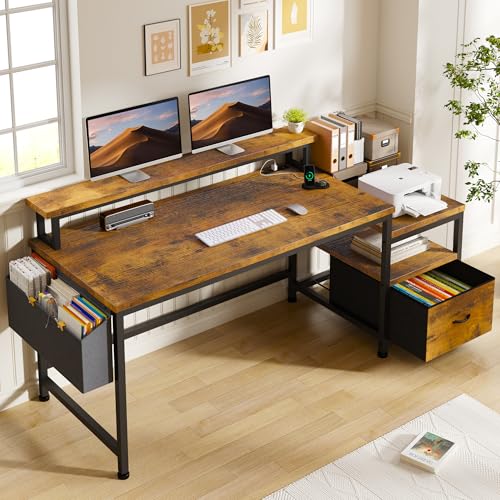
Computer Desk with Monitor Shelf: The Complete Buyer's Guide
Everything you need to know about choosing a computer desk with a built-in monitor shelf — from ergonomic benefits and shelf designs to material durability and workspace layout.
Jump to Buying GuideWhy a Monitor Shelf Matters: A computer desk with a monitor shelf is one of the most practical upgrades for any home office. By elevating your screen to eye level, it supports healthier posture, reduces neck and shoulder strain, and frees up the main desktop surface for your keyboard, mouse, and everyday accessories. This guide explains how these desks work, what to look for, and how to match one to your body and workflow.
What Is a Computer Desk with Monitor Shelf?
A computer desk with a monitor shelf is a workstation that includes a raised platform — either built into the desk structure or attached as a separate tier — designed to hold one or more monitors at a higher viewing position. Unlike a flat writing desk, this design separates the monitor zone from the typing zone, creating a layered surface that improves both ergonomics and organization. The shelf can be a full-width riser, a compact corner platform, or an adjustable unit that slides or tilts. Some models combine the shelf with storage cubbies, cable routing channels, or a pull-out keyboard tray.
Key Benefits of a Monitor Shelf Desk
Better Ergonomics
Raising the monitor to eye level encourages a neutral neck position, reducing strain during long work sessions.
More Usable Surface
The shelf separates screen space from typing space, keeping the main desktop clear for keyboard, mouse, and notes.
Built-In Storage
Many designs include cubbies, drawers, or open compartments beneath the shelf for small accessories and office supplies.
Cleaner Cable Routing
Elevated shelves often include grommets or channels that keep monitor and power cables organized and out of sight.
Types of Monitor Shelf Designs
Monitor shelf desks come in several configurations, each suited to different room sizes and workflows. Fixed full-width shelves offer maximum stability and are ideal for dual-monitor arrangements. Corner shelf desks make efficient use of tight spaces and angle the screen toward the user. Adjustable or tiered shelves let you fine-tune screen height and accommodate different monitor sizes. Compact riser shelves sit on top of a standard desktop and can be moved or removed later, which suits renters or anyone who likes to reconfigure their setup. When comparing options, consider how the shelf integrates with the desk frame — a bolted or welded shelf is more rigid, while a removable shelf offers flexibility. If you work with a laptop and an external display, a stand-up desk converter with adjustable keyboard tray can complement a shelf-based desk by adding height flexibility.
Materials and Build Quality
The material of both the desk and the monitor shelf affects durability, stability, and appearance. Engineered wood with a laminate finish is common in entry-level and mid-range models and offers good resistance to everyday wear. Solid wood and bamboo shelves provide a premium feel and strong load-bearing capacity, making them a solid choice for heavier displays. Metal frames and reinforced steel shelves are typical in professional-grade and commercial-grade desks, where stability under load is the priority. Check that the shelf is rated for the weight of your monitor — large ultrawide or professional displays can be significantly heavier than standard screens. If you plan to use a separate riser instead, a dedicated small monitor shelf can be a practical add-on for a standard desk.
Ergonomics: Getting the Height Right
The correct monitor height depends on your seated eye level. As a general rule, the top of the screen should sit at or slightly below eye level, with the monitor tilted back slightly to reduce glare. A fixed monitor shelf typically raises the screen four to eight inches above the desktop, which suits most average-height users. Taller users may prefer an adjustable shelf or a desk with a height-adjustable frame. Pairing a monitor shelf with an adjustable height desk chair for home office lets you dial in the relationship between seat height, desk height, and screen position. For a more precise starting point, an office desk height calculator can help you estimate the right dimensions for your body.
Comparison: Monitor Shelf Desk Configurations
| Tier | Configuration | Best For |
|---|---|---|
| Essential tier | Compact riser shelf on a standard desktop | Small rooms, renters, single-monitor setups |
| Balanced tier | Full-width fixed shelf with open storage | Home offices, dual-monitor workflows |
| High-end tier | Corner shelf with cable management and drawers | Tight spaces, organized multi-device setups |
| Professional-grade | Reinforced metal shelf with adjustable height | Heavy monitors, long daily sessions, shared workspaces |
Buying Checklist
- Confirm the shelf weight capacity matches your monitor or monitors.
- Measure your seated eye level and compare it with the shelf height.
- Check whether the shelf is fixed, adjustable, or removable.
- Look for cable management grommets or channels.
- Verify the desk footprint fits your room and doorway access.
- Consider storage needs — drawers, cubbies, or open shelving.
- Check assembly requirements and whether tools are included.
- Review the desk frame material for stability under load.
Related Desk Guides
Frequently Asked Questions
What are the benefits of a computer desk with a monitor shelf?
A monitor shelf raises your screen to eye level, improving posture and reducing neck strain. It also frees up valuable desktop space for your keyboard, mouse, and accessories, while providing additional storage underneath for small items or a keyboard tray.
How high should a monitor shelf be?
The top of your monitor should sit at or slightly below eye level when you are seated. A monitor shelf typically raises the screen four to eight inches above the desktop, which suits most average-height users. Adjustable or tiered shelves offer more flexibility for different body types.
Can a monitor shelf support a heavy monitor?
Most dedicated monitor shelves are rated for standard monitor weights. Check the manufacturer's weight capacity before purchasing, especially for large ultrawide or professional-grade displays. Solid wood and reinforced metal shelves generally offer the highest load ratings.
Is a desk with a built-in monitor shelf better than a separate shelf?
A built-in shelf creates a cohesive, stable look and is often more secure for heavier monitors. A separate shelf offers flexibility to reposition or remove it later. Both work well; the choice depends on whether you prioritize permanence and stability or adaptability.