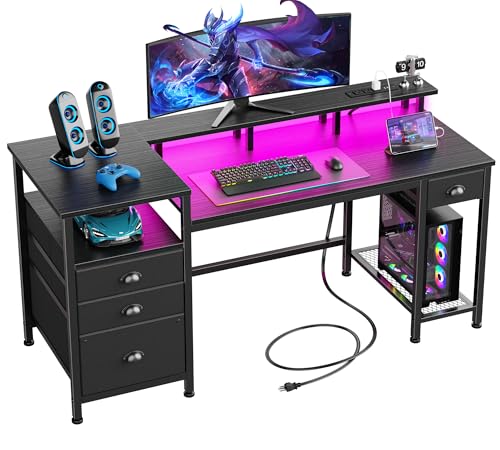
Computer Desk with Printer Shelf: The Complete Workspace Solution
Discover why a computer desk with a dedicated printer shelf is one of the smartest workspace investments you can make. This guide breaks down layouts, storage designs, material choices, ergonomic considerations, and setup strategies so you can choose with confidence.
Jump to Buying FactorsWhat Exactly Is a Computer Desk with Printer Shelf?
A computer desk with a printer shelf is a workspace designed with a specific secondary surface — usually a raised platform, a side extension, or a lower compartment — intended to hold a printer, scanner, or multifunction device. Unlike a generic desk where the printer is an afterthought, these models integrate the device into the structure so it stays connected, ventilated, and within reach while keeping the primary work area clear.
These desks come in several configurations. Some place the printer shelf above the main surface on a hutch or riser. Others dedicate a lower side platform so the printer sits beside your legs rather than in front of you. A third common design uses an open shelf beneath the desktop, keeping the printer accessible from a seated position while preserving the full top surface for monitors, keyboard, and paperwork.
Common Layouts and Shelf Configurations
Understanding the layout options is the fastest way to narrow your shortlist. Each configuration serves a different room shape and workflow.
Side Printer Platform
A dedicated extension to the left or right of the main desktop. Ideal for wider rooms and keeps the printer at desktop height for easy loading. Often pairs well with drawer storage underneath.
Under-Desk Printer Shelf
A lower open shelf beneath the work surface. Saves horizontal space and suits compact rooms. Look for models with enough clearance for paper trays and ventilation.
Hutch-Mounted Printer Shelf
An upper shelf integrated into a hutch or riser. Keeps the device visible and accessible while freeing the entire desktop. Best for taller rooms and users who print frequently.
Corner Printer Shelf
Uses the dead zone of an L-shaped or corner desk for the printer. Maximizes floor space and creates a natural separation between work and output zones.
If your room is tight, a corner layout often works best because it converts unused space into functional storage. You can explore related corner configurations in our guide to a small corner computer desk. For those who prefer a wider, more spread-out workspace, an L-shaped desk with drawers provides room for a side printer platform without crowding the typing area.
Materials and Build Quality
The shelf that holds your printer must support consistent weight without sagging over time. Printers are denser than they appear, and a multifunction unit can stress a thin shelf. Material choice directly affects longevity and stability.
- Engineered wood with reinforced shelving: The most common construction. Mid-tier models typically use thicker panels and metal supports on the printer shelf. Check that the shelf is rated for the weight of your device.
- Solid wood and butcher block: Premium and luxury tiers offer superior rigidity and a warm appearance. These surfaces resist sagging and hold up well under frequent use.
- Metal frame with wood or laminate surfaces: Professional-grade and commercial-grade options often combine a steel frame with engineered panels. The metal frame prevents the shelf from flexing and keeps the entire desk stable.
- Glass and acrylic: Visually light but require careful weight rating. Best suited to compact printers and lighter devices.
For a deeper look at surface options, see our overview of wood desktops. A solid or thick engineered top is the safer choice when the printer shelf shares the same material as the main desktop.
Comparing Desk Tiers by Category
Rather than focusing on numbers, use this classification to understand where each tier sits in the market and what it typically delivers.
| Tier | Best For | Typical Shelf Construction | Durability Notes |
|---|---|---|---|
| Entry-Level | Light printing, students, occasional use | Thin engineered panels, basic brackets | Suited to compact printers; check weight limits |
| Mid-Range | Regular home office printing | Thicker panels with metal reinforcement | Solid build for daily use; resists mild flex |
| Premium | Frequent multifunction use, mixed materials | Solid wood or heavy engineered core | Excellent rigidity; long-term investment |
| Professional-Grade | Heavy printers, shared workspaces | Steel frame with reinforced shelves | Commercial-grade stability; minimal sag |
Tier placement is relative, not absolute. A well-specified mid-range model can outperform a poorly built premium desk in shelf stability. Focus on construction details rather than labels alone.
Ergonomic and Workflow Considerations
Adding a printer shelf changes how you move around the desk. A few practical checks prevent frustration later:
- Reach distance: You should be able to load paper and retrieve prints without standing up or twisting awkwardly. A side or lower shelf within arm's reach is ideal.
- Ventilation: Printers generate heat. Ensure the shelf has open sides or a gap behind it so air circulates freely.
- Cable routing: The printer needs power and often a data connection. Choose a desk with a cable cutout or route cables along the frame. Our desk file organizer guide covers related storage and routing ideas.
- Monitor placement: If the printer shelf is elevated, confirm it does not block your screen or create glare from a window. A computer desk with monitor shelf can complement a printer shelf by separating display and output zones.
- Desk height: Adding a shelf does not change the typing height, but bulky printers underneath can reduce legroom. Verify knee clearance if you choose an under-desk configuration.
Setting Up Your Printer Shelf for Productivity
Once the desk is in place, a few adjustments make the workflow smoother:
- Position the printer on the side of your dominant hand so loading and retrieving feels natural.
- Keep paper storage nearby but off the main surface — a lower shelf or a small bin next to the printer works well.
- Use a cable sleeve or tray to bundle the printer's power and data cables along the desk frame.
- Leave breathing room around the device; do not press it against a wall or hutch panel.
- Test the shelf under load before filling it with other items. A stable shelf is the foundation of a reliable setup.
If your workspace also needs better overall organization, our small desk organizer recommendations pair naturally with a printer-shelf desk.
Related Desk Designs Worth Considering
Depending on your room and storage needs, a few adjacent categories may fit better than a standard printer-shelf model:
- A desk with storage drawers and shelves offers broader organization beyond the printer alone.
- A corner computer desk with keyboard tray and storage combines ergonomic typing with integrated storage.
- A small office desk with drawers suits compact rooms where every inch counts.
- For a fully modular approach, consider a stand-up desk converter with adjustable keyboard tray paired with a separate printer stand.
Frequently Asked Questions
Can a printer shelf hold a heavy multifunction printer?
It depends on the shelf construction. Mid-range and premium desks with reinforced panels or metal brackets handle most home multifunction printers comfortably. Always check the manufacturer's weight guidance for the specific shelf and avoid exceeding it. Professional-grade models are the safest choice for larger devices.
Is an under-desk printer shelf better than a side platform?
An under-desk shelf saves horizontal space and suits compact rooms, but it can reduce legroom and make loading paper slightly awkward. A side platform keeps the printer at desktop height for easy access but requires a wider footprint. Choose based on room dimensions and how often you print.
How do I manage cables from a printer on a shelf?
Use a cable tray or sleeve attached to the desk frame, and route the printer's power and data cables along the back edge. If the desk has a grommet or cutout, pass the cables through it to keep the surface clean. Wireless printing eliminates the data cable entirely on supported models.
Will a printer shelf interfere with my monitor setup?
Only if the shelf is positioned at eye level or blocks your viewing angle. Side and under-desk shelves generally do not affect monitor placement. Hutch-mounted shelves sit above the desktop, so confirm they do not cast shadows or block airflow around your screen.
Ready to Choose Your Printer-Shelf Desk?
Review the recommended models below, compare shelf layouts, and pick the configuration that matches your room and printing habits.
View Recommended Desks