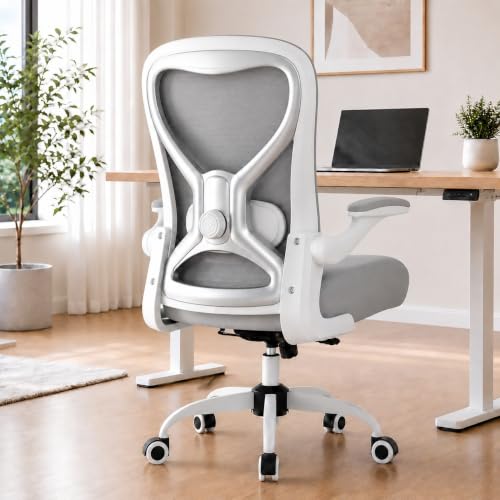
Desk Chair to Help With Back Pain — Ergonomic Support Guide
Choosing the right desk chair for back pain starts with understanding lumbar support, adjustability, and seat geometry. This guide explains what to look for so you can sit comfortably and protect your spine during long work sessions.
EXPLORE CHAIR FEATURESWhy this matters: Poor chair setup is one of the most common causes of work-related back discomfort. A well-matched ergonomic chair distributes pressure evenly, supports the natural curve of your spine, and keeps your hips and knees aligned — reducing fatigue and strain throughout the day.
What You'll Learn
Why an Ergonomic Chair Helps Back Pain
Back pain during desk work usually comes from three factors: sustained poor posture, lack of lumbar support, and a seat that does not match your body proportions. An ergonomic chair addresses all three. It encourages a neutral spine position, keeps your pelvis supported, and lets you adjust key dimensions — seat height, seat depth, armrest height, and recline tension — to fit your frame.
When your chair fits properly, your feet rest flat on the floor, your thighs are roughly parallel to the ground, and your lower back stays in contact with a supportive curve. That reduces the load on your lumbar discs and the muscles that otherwise work overtime to keep you upright. If you alternate sitting with standing, a standing desk routine can complement your chair and further reduce strain.
Key Features to Prioritize
Adjustable Lumbar Support
The most important feature for back pain. Look for a lumbar pad that moves up and down, and ideally in and out, so it matches the curve of your lower spine.
Seat Depth Adjustment
A sliding seat pan lets you set the depth so there is a two-to-three finger gap behind your knees. This prevents pressure behind the thighs and supports the lower back.
Armrest Alignment
Height-adjustable armrests should sit at desk height so your shoulders relax. Avoid armrests that push your shoulders up or force you to lean forward.
Seat Height Range
Your feet must rest flat on the floor. A chair with a broad height range fits more body types and pairs well with adjustable desks.
Recline and Tilt Tension
A slight recline with adjustable tension encourages movement and takes pressure off the spine. Lock the back upright for focused tasks if needed.
Breathable Back Material
Mesh backs keep you cool and often conform better to the spine. Contoured foam is also supportive but can run warmer during long sessions.
If you prefer a chair without casters, a fixed-base adjustable chair can work well in tight rooms. For shared desks or multi-user setups, a chair with adjustable arms makes it easier to fit different body sizes.
Chair Types Compared
Not every chair suits every back. Here is how the main categories compare for back-pain relief:
- Ergonomic task chairs: The most versatile option. Look for adjustable lumbar support, seat depth, and armrests. These are the best all-round choice for desk work and long hours.
- Executive chairs: Often more padded and reclined. High-end models include lumbar support and tilt lock. Choose one with firm rather than overly soft cushioning for better spinal alignment. See executive desk chairs for cushioned support options.
- Mesh-back chairs: Breathable and often more contouring. Good for warm rooms and long sessions, provided the lumbar support is adjustable.
- Kneeling chairs: Shift the pelvis forward and keep the spine more upright. Helpful for some users with lower back pain, but best for shorter sessions. A kneeling desk chair is worth testing before committing.
- Cross-legged chairs: Wider seats allow a cross-legged posture. Useful if you change positions often; a chair designed for cross-legged sitting can reduce hip pressure for some users.
If comfort during long sessions is your priority, compare chairs built for long hours and comfort-focused desk chairs. For home offices where back support is the main concern, see desk chairs for home office back support.
Buying Guide by Tier
Chairs vary widely in build quality and adjustability. Use this tier comparison to match your needs — no numbers, just relative positioning within the market.
| Tier | Best For | What to Expect |
|---|---|---|
| Entry-level | Light daily use, short sessions | Basic height adjustment and a fixed lumbar curve. Suitable for occasional desk work; expect simpler mechanisms. |
| Mid-range | Regular home office use | Adjustable lumbar support, seat depth slider, and height-adjustable arms. Smoother recline and better cushioning than entry-level. |
| Premium | Long daily sessions, back-pain focus | Multi-directional lumbar support, synchronized tilt, breathable mesh, and reinforced build. More precise fit for different body types. |
| Professional-grade | All-day professional use | Heavy-duty construction, extensive adjustability, and durable materials. Designed for sustained daily use and frequent position changes. |
Entry-level chairs can relieve mild discomfort, but mid-range and premium models generally offer the adjustability that makes a real difference for persistent back pain. The right tier depends on how many hours you sit and how much fine-tuning your body needs.
Setup and Posture Tips
Even a well-built chair needs correct setup. Follow these steps when you first use a new chair:
- Set seat height first: Adjust until your feet are flat and your knees are at roughly hip height.
- Set seat depth: Leave a two-to-three finger gap between the seat edge and the back of your knees.
- Position lumbar support: Place the curve at the small of your back, not higher on the mid-back.
- Adjust armrests: Set them so your elbows rest at roughly 90 degrees and your shoulders stay relaxed.
- Tune recline: Use a slight recline with tension that lets you move without feeling unstable.
Pair your chair setup with a desk height check and take breaks every 30 to 45 minutes. If you use a standing desk, an anti-fatigue mat can improve comfort during standing intervals. For floor protection under casters, consider a chair mat for carpet.
Frequently Asked Questions
What type of desk chair is best for back pain?
An ergonomic chair with adjustable lumbar support, seat depth adjustment, and armrests that align with your desk height is generally best. Mesh-back chairs offer breathability, while contoured foam seats provide pressure relief. The key is adjustability so the chair fits your body.
How long should I sit in an ergonomic chair each day?
Even the best ergonomic chair is not a substitute for movement. Aim to stand, stretch, or walk for a few minutes every 30 to 45 minutes. Pair your chair with a sit-stand routine and regular breaks to reduce strain on your back.
Do I need a headrest for back pain relief?
A headrest can help if you tend to lean back or recline during long sessions, as it supports the neck and upper spine. However, for desk work where you sit upright, a well-placed lumbar support is usually more important than a headrest.
Can a kneeling chair help with back pain?
Kneeling chairs shift your pelvis forward and keep your spine more upright, which can reduce lower back pressure for some users. They work best for short sessions and may not suit everyone, so test one before committing if possible.
Ready to Find Your Supportive Chair?
Explore our recommended ergonomic chair options below to compare features, adjustability, and support levels before you decide.
VIEW RECOMMENDED CHAIRS