
L Shaped Computer Desk with Cable Management: The Complete Guide
Discover how an L shaped computer desk with cable management transforms your corner workspace into a clean, organized, and productive command center. Learn the features that matter, how to route cables, and which tier suits your setup.
Explore Top PicksWhy this guide matters: An L shaped computer desk with cable management solves two problems at once — it gives you a generous corner work surface and keeps power, data, and peripheral cords neatly organized. Whether you are upgrading a home office or configuring a gaming station, understanding cable routing, grommet placement, and tray capacity helps you choose a desk that stays clean for years.
What Is an L Shaped Computer Desk with Cable Management?
An L shaped computer desk with cable management is a corner workstation built with integrated routing features — cable trays, grommets, raceways, and mounting points — that hide and organize the cords powering your monitors, PC, chargers, and peripherals. Instead of a flat surface where cables pile up behind the monitor, the desk provides dedicated channels that run power and data lines away from the work zone.
The L shaped layout gives you two connected work surfaces: a primary wing for your monitor and keyboard, and a secondary wing for a laptop, printer, or reference materials. This dual-zone design is ideal for multi-monitor arrangements, creative workflows, and home offices that need to separate tasks. When cable management is built in, the corner footprint becomes an advantage rather than a hiding place for tangled wires.
If you are weighing corner layouts generally, our guide to a small corner computer desk covers space planning, while this article focuses specifically on how cable management changes the experience of owning an L shaped desk.
Key Cable Management Features to Look For
Not every L shaped desk handles wires well. The best models treat cable management as a first-class design element. Here are the features that make the biggest difference in daily use.
Under-Desk Cable Trays
Open troughs or enclosed trays mounted beneath the surface hold power strips, adapters, and slack cable. Enclosed trays with lids offer the cleanest look and keep dust off your cables.
Desktop Grommets
Pre-drilled holes with removable covers let monitor and keyboard cables drop directly below the surface. Position grommets near the inner corner for the shortest, neatest routes.
Leg Raceways & Cable Channels
Channels built into the legs route cords from the desktop to the floor. Integrated raceways are cleaner than adhesive clips and survive desk height adjustments.
Power Strip Mounts
Dedicated brackets or velcro straps hold a power strip under the desk. Keeping the strip off the floor protects it and gives every device a short, tidy run to power.
Cable Sleeves & Ties
Included or recommended sleeves bundle monitor and peripheral cords into a single manageable line. Velcro ties allow re-routing without cutting zip ties.
Modesty Panels
A rear or side panel hides the tangle from view and stops cables from sagging against the wall. Removable panels make access easy during upgrades.
Which Features Matter Most by Setup Type
- Dual-monitor productivity: grommets near the inner corner plus a wide under-desk tray for two monitor cables and a dock.
- Gaming setups: leg raceways for RGB and peripheral cables, plus a power strip mount for console and PC power.
- Small home offices: a modesty panel that hides wires from the room, with a compact tray sized for a laptop charger and router.
- Height-adjustable L desks: extra slack loops and a tray that moves with the frame, so cables do not strain during transitions.
For users who want the flexibility of a sit-stand corner configuration, an L shaped desk that raises and lowers pairs well with cable management because height changes put extra stress on cords. Routing slack properly is essential in that scenario.
How to Route Cables on an L Shaped Desk
Good cable management follows a simple principle: separate power from data, run everything to a central point, and leave slack where the desk moves. Here is a practical routing sequence that works for most L shaped setups.
- Plan zones. Assign the main wing to monitors and keyboard, the secondary wing to laptop, printer, or charging. Decide which corner grommet serves each zone.
- Mount the power strip. Attach a surge protector under the desk near the inner corner using a bracket or velcro. This becomes your power hub.
- Route power first. Run monitor, PC, and charger cords through the nearest grommet and along the underside to the power strip. Use a tray or raceway to keep them off your knees.
- Route data separately. Keep USB, ethernet, and display cables in their own sleeve or channel. Separation reduces interference and makes troubleshooting easier.
- Bundle and label. Group cables with velcro ties every 30–40 cm and label both ends. Future you will thank present you during the next upgrade.
- Leave service loops. Coil 10–15 cm of slack at each device so you can pull equipment forward without unplugging everything.
If your desk is height-adjustable, add a second loop near the frame joint. Cables that are too tight will fray or unplug when the desk rises. A flexible sleeve running from the desktop to the floor is the most durable solution.
L Shaped Desk Layout Ideas That Support Cable Management
The shape of an L desk creates natural cable routes. Use them deliberately.
The Corner Command Center
Place the primary monitor in the inner corner with cables dropping through a centered grommet. The two wings become satellite zones for a laptop and a printer, each with its own short cable run to the shared power strip. This layout minimizes total cable length and keeps the visible surface clear.
The Dual-Zone Office
Dedicate one wing to focused computer work and the other to paperwork, calls, or a charging station. Route the work wing's cables along its rear edge and the charging wing's cords through a side grommet. A modesty panel hides both runs from the doorway.
The Gaming and Streaming Corner
Keep console, PC, and lighting power on one circuit routed through a leg raceway, and run peripheral and capture-card cables in a separate sleeve. Mount the power strip high enough to stay clear of feet and chair casters.
For a broader look at arranging a corner workstation, see our L shaped desk for small home office guide, which covers footprint planning alongside cable routing.
Comparing Tiers: Which L Shaped Desk Fits Your Needs?
L shaped desks with cable management span several market tiers. Instead of focusing on numbers, compare what each tier typically delivers in build quality and integrated features.
| Tier | Typical Cable Management | Build & Surface | Best For |
|---|---|---|---|
| Entry-level | One or two grommets, basic velcro ties, optional add-on tray | Laminate or particle board top, steel frame | First home office, student setups, light daily use |
| Mid-range | Integrated under-desk tray, grommets, leg channels, power strip mount | Reinforced frame, thicker laminate or engineered wood | Dual-monitor productivity, hybrid work, gaming |
| Premium | Enclosed cable trays, modesty panel, labeled routing paths, height-adjust compatible | Solid wood or high-grade engineered top, heavy-duty frame | Professional home office, creative studios, sit-stand corner setups |
| Commercial-grade | Full raceway system, removable panels, dedicated power and data separation | Commercial laminate, welded steel, high weight capacity | Team offices, shared workspaces, heavy equipment |
In practice, a mid-range L shaped desk with cable management offers the strongest balance of routing flexibility and durable construction for most home users. Premium and commercial-grade models make sense when you need height adjustment, heavy monitors, or a fully concealed wire system.
Mistakes to Avoid with L Shaped Desk Cable Management
- Routing power and data in the same bundle. Keep them separated to reduce interference and simplify troubleshooting.
- Ignoring the desk's movement. On height-adjustable models, tight cables fail fast. Always leave service loops.
- Overloading a single grommet. Spread cables across grommets and trays so no single opening is packed tight.
- Skipping labels. Unlabeled cables turn a five-minute swap into an hour of tracing.
- Forgetting floor-level routing. Cables that reach the floor should run along a wall or baseboard cover, not across walking paths.
- Buying a tray that is too small. Measure your power strip and adapter bricks before choosing an under-desk tray.
Retrofitting is always possible. If your current corner desk lacks routing, aftermarket trays, adhesive raceways, and grommet kits deliver most of the benefit of a built-in system. Pair them with a desk mat to protect the surface and a small desk organizer to keep small items from crowding your cable exits.
Frequently Asked Questions
What is an L shaped computer desk with cable management?
It is a corner-style desk designed with built-in cable trays, grommets, and raceways that organize and conceal the cords for monitors, computers, and peripherals. The L shape provides two connected work surfaces, while the cable management keeps the setup clean and safe.
Why choose an L shaped desk with cable management for a home office?
The L layout maximizes corner space and supports multi-zone work, while integrated cable management reduces clutter, improves safety, and makes cleaning easier. It is especially useful for dual-monitor setups and hybrid work arrangements.
What cable management features should I look for?
Prioritize under-desk trays, desktop grommets, leg raceways, a power strip mount, and a modesty panel. These features provide multiple routing paths and keep both power and data cables organized.
Can I add cable management to an existing L shaped desk?
Yes. Aftermarket cable trays, adhesive raceways, grommet kits, velcro ties, and under-desk power strip mounts can be installed on most desks. The result is close to a built-in system when installed carefully.
How do I route cables when the desk has two work zones?
Assign each wing a routing path to a shared under-desk power strip, keep data cables in a separate sleeve, and leave slack loops at each device. Label both ends and avoid bundling power with data.
Ready to Build a Cleaner Corner Workspace?
Explore our curated selection of L shaped computer desks with cable management features, chosen for routing flexibility, sturdy construction, and clean design.
View Recommended DesksFinal Thoughts
An L shaped computer desk with cable management is one of the most practical upgrades you can make to a home office. The corner layout gives you room to work, and the routing features keep that room usable. Focus on trays, grommets, and raceways rather than cosmetic promises, plan your cable routes before you plug anything in, and leave slack for any desk movement. With those basics covered, your corner workspace stays clean, safe, and ready for productive days.
If your setup is still growing, pair your desk with an office desk height calculator to dial in ergonomics, and browse related corner configurations such as an L shaped desk with drawers and file cabinet when storage becomes the next priority.
Recommended L Shaped Computer Desks with Cable Management
⚠️ AFFILIATE DISCLOSURE: This website contains affiliate links. As an Amazon Associate, we earn from qualifying purchases. If you make a purchase through these links, we may receive a small commission at no additional cost to you. Read our full affiliate policy.

Huuger 63 Inch L Shaped Desk with Power Outlets & 0.95 Inch Thicker Desktop | Reversible Computer Desk, Larger Office Corner Gaming Desk, Metal Frame, for Home Office, Study, Rustic Brown
Check price on Amazon
Vividwood 71" Executive Desk with Storage Cabinet, Modern L-Shaped Office Desk with Bookshelf, Storage Shelves, CPU Stand & Cable Management, Large Computer Workstation for Home Office (Brown)
Check price on Amazon
SimpArt Executive Desk L Shaped Office Desk with Storage Cabinet, CEO Desk with Cable Management Box, Large Computer Desk 47"-87", Reversible Left/Right Setup, Modern Workstation for Office Business
Check price on Amazon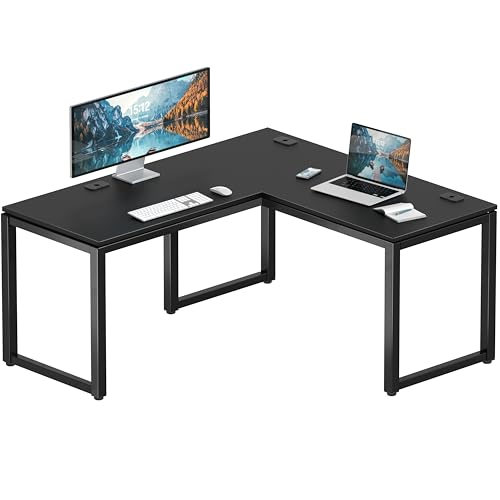
SHW 55 x 60 Commercial-Grade L-Shape Corner Office Computer Desk, Black | 10-Year Limited Warranty
Check price on Amazon
PRAISUN 61" L Shaped Desk with Power Outlets & 4 Drawers | Reversible Computer Desk with 2 Storage Shelves, Large Corner Office Desk for Gaming Writing Work Study, Rustic Brown
Check price on Amazon
SEDETA 70.9" L Shaped Executive Desk with Drawers, Corner Computer Desk with File Drawer & Storage Cabinet, Power Outlets & USB-C Charging Station, CPU Stand, Home Office Workstation, Black + Brown
Check price on Amazon