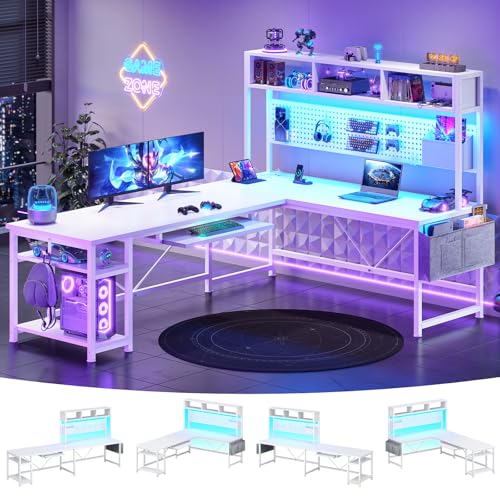
L-Shaped Gaming Desk with Keyboard Tray: The Ultimate Corner Command Center
Transform your gaming setup with an L-shaped gaming desk with keyboard tray. This comprehensive guide covers everything from ergonomic benefits and stability considerations to cable management and multi-monitor configurations — helping you choose the perfect corner gaming station for your space and playstyle.
EXPLORE TOP PICKSWhy an L-Shaped Gaming Desk with Keyboard Tray? The L-shape wraps around your corner, giving you room for multiple monitors, speakers, and gaming peripherals without crowding. A dedicated keyboard tray keeps your primary input area ergonomically positioned while freeing up valuable desktop real estate for collectibles, streaming gear, or a second display. Together, they form a gaming station that's immersive, organized, and tailored to long sessions.
What to Look for in an L-Shaped Gaming Desk with Keyboard Tray
Before diving into specific recommendations, understanding the core features that define a great L-shaped gaming desk with keyboard tray will help you evaluate options with confidence. This isn't just about having two surfaces — it's about how those surfaces work together to support your posture, your gear, and your gameplay.
Stability and Frame Construction
The best L-shaped gaming desks use reinforced steel frames with cross-bracing to prevent wobble during intense gaming moments. A heavy-duty build is essential — especially if you plan to mount monitors on arms or use a racing wheel. Look for desks with adjustable leveling feet to compensate for uneven floors, and consider whether you need a fixed frame or a height-adjustable version. If you're exploring adjustable options, our guide on L-shaped gaming desks with adjustable height covers the nuances of sit-stand corner setups.
Keyboard Tray Design and Ergonomics
A keyboard tray isn't just an accessory — it's a critical ergonomic component. The tray should glide smoothly on ball-bearing slides, support both your keyboard and mouse (or have a separate mouse platform), and position your wrists at a neutral angle. Some trays are fixed, while others swivel or tilt for flexible positioning along either wing of the L-shape. For a broader look at tray-equipped desks, see our roundup of desks with keyboard trays.
Surface Space and Monitor Capacity
The L-shape naturally accommodates multi-monitor setups — one display on each wing, or an ultrawide on the main span with a secondary screen angled on the return. Consider the depth of each surface: deeper wings (24 inches or more) give you room for monitor arms and still leave space for a keyboard tray below. If you're planning a serious multi-display battlestation, pairing your desk with a dual monitor desk stand can maximize vertical and horizontal space.
Ergonomic Benefits of a Corner Gaming Setup
Gaming sessions can stretch for hours, and ergonomics directly affect your comfort, focus, and long-term health. An L-shaped desk with a keyboard tray addresses several ergonomic pain points simultaneously.
First, the keyboard tray lowers your input surface to a height that encourages a neutral wrist position, reducing strain on your forearms and shoulders. Second, the corner orientation lets you angle your body toward either wing, so you can shift position naturally throughout the session without leaving your seat. Third, the expanded surface means your monitor can sit at the correct viewing distance without being pushed to the edge. For more on optimizing your seating, explore our guides on comfortable desk chairs for long hours and desk chairs that help with back pain.
Cable Management for a Clean Corner Gaming Station
An L-shaped desk has more surface area, which means more potential for cable chaos — monitor cables, peripheral wires, charging cords, and streaming gear all compete for space. A well-designed L-shaped gaming desk often includes integrated cable management features like grommets, under-desk trays, or raceways.
If your chosen desk lacks these, plan for aftermarket solutions. A cable management kit with adhesive clips, sleeves, and under-desk trays can transform a messy corner into a clean, professional-looking station. For a deeper dive into taming the wire jungle, read our full guide on desk cable management. And if you're building a complete setup, consider pairing your desk with a KVM switch to manage multiple devices from a single keyboard and mouse.
Tier Comparison: Entry-Level to Premium L-Shaped Gaming Desks
To help you navigate the market without focusing on arbitrary numbers, here's a tier-based comparison of what you can expect at each quality level. This framework lets you align your expectations with the desk's position in the market.
| Tier | Best For | Typical Features |
|---|---|---|
| Entry-Level | Casual gamers, first-time buyers | Basic steel frame, fixed keyboard tray, laminate surface, limited cable management |
| Mid-Range | Dedicated gamers, multi-monitor users | Reinforced frame, adjustable or swiveling keyboard tray, cable grommets, carbon-fiber or textured surface |
| Premium | Enthusiasts, streamers, long-session players | Heavy-duty steel with cross-bracing, full-featured keyboard tray, integrated power outlets, RGB lighting, ergonomic curves |
| Top-Tier / Professional-Grade | Competitive gamers, content creators | Height-adjustable frame, commercial-grade stability, modular accessories, premium surface materials, advanced cable routing |
Setup Inspiration: Making the Most of Your L-Shaped Gaming Desk
Once you've chosen your desk, the fun begins — building the setup. Here are a few configuration ideas to spark inspiration:
- Dual-Monitor Corner: Place your primary gaming monitor on the main wing and a secondary display (for chat, streaming controls, or strategy guides) on the return. The keyboard tray keeps your input area clean and centered.
- Ultrawide Focus: An ultrawide monitor on the main span with a vertical monitor on the side wing for Discord or system monitoring. The L-shape gives you room to angle the vertical screen without crowding.
- Streaming Station: Use one wing for your gaming rig and the other for a streaming setup — microphone, capture device, and lighting controls. The keyboard tray keeps your main desk clear for a dedicated stream deck or mixer.
- Console + PC Hybrid: Dedicate one wing to your PC monitor and keyboard, and the other to a console connected to a smaller TV or monitor. The L-shape naturally separates the two ecosystems without sacrificing cohesion.
For more layout ideas, browse our collection of L-shaped gaming desks with monitor shelves and L-shaped gaming desks with shelves for vertical storage options that keep the corner organized.
Frequently Asked Questions
What makes an L-shaped gaming desk with keyboard tray better than a standard desk?
An L-shaped gaming desk with keyboard tray offers expanded surface area for multi-monitor setups, dedicated keyboard storage that frees up desktop space, and corner placement that maximizes room usage while providing an immersive gaming experience. The keyboard tray also improves ergonomics by positioning your wrists at a neutral angle.
How do I choose the right keyboard tray for an L-shaped gaming desk?
Look for a keyboard tray with smooth gliding mechanisms, adjustable height settings, sufficient width for your keyboard and mouse, and sturdy construction that can handle intense gaming sessions. Consider whether you prefer a fixed tray or one that swivels for flexible positioning along the L-shape.
Is an L-shaped gaming desk with keyboard tray suitable for small rooms?
Yes, corner L-shaped desks actually maximize small room layouts by utilizing dead corner space. The keyboard tray further frees up desktop area, making even compact L-shaped models feel spacious and functional for gaming. If space is tight, explore our guide on desks for small spaces.
Can I use a monitor arm with an L-shaped gaming desk?
Absolutely. Most L-shaped gaming desks have thick enough surfaces and sturdy frames to support monitor arms. Just ensure the desk's edge is compatible with clamp-style mounts, or choose a grommet-mounted arm if your desk has cable holes. For more on monitor positioning, see our L-shaped gaming desk with monitor stand recommendations.