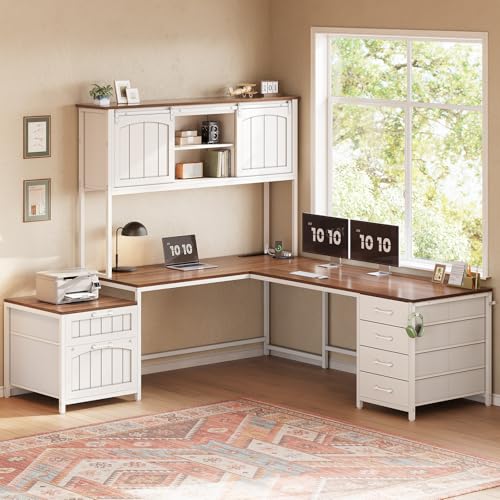
L Shaped Office Desk with Hutch and Drawers: The Complete Buyer's Guide
Everything you need to know about choosing, arranging, and living with an L shaped office desk that combines a hutch and drawers. Compare storage layouts, materials, ergonomics, and setup strategies — then decide with confidence.
Explore Recommended OptionsWhy this guide matters: An L shaped office desk with a hutch and drawers is one of the most storage-dense home office configurations available. The corner footprint maximizes usable surface area, the hutch adds vertical shelving without eating floor space, and the drawers keep daily items out of sight. But the combination only works when the layout, return side, and material quality match your workflow.
This guide walks you through the exact decisions that separate a desk that feels cramped from one that feels effortless — including how to position the hutch, how much drawer storage you actually need, and which materials hold up over years of daily use.
What Exactly Is an L Shaped Office Desk with Hutch and Drawers?
This configuration combines three elements into one integrated workstation:
- The L shaped work surface — two connected desktop sections that wrap around a corner, giving you a primary writing or monitor zone plus a secondary return for paperwork, a second monitor, or a printer.
- The hutch — an overhead shelving unit that sits on top of the desk surface (usually along the back edge or on one return). It adds open shelves, cubbies, or enclosed cabinets without consuming additional floor area.
- The drawers — built-in or pedestal-mounted storage, typically including a mix of shallow utility drawers, a file drawer, and sometimes a locking drawer for documents or devices.
The result is a single footprint that delivers a large work surface, vertical storage, and enclosed storage at the same time. That density is exactly why this layout is so popular in home offices, but it is also why the details matter: a poorly chosen hutch can block sightlines, and oversized drawers can crowd legroom on the return.
If you want to compare this configuration against simpler alternatives, our guide to the broader category of L shaped office desks covers the full range of layouts without hutches or drawer stacks.
Why Choose an L Shaped Desk with Hutch and Drawers?
Buyers in the research stage usually have one of three priorities: maximizing storage, protecting a small room, or separating work zones. This configuration addresses all three better than most straight desks.
1. Maximum storage in a corner footprint
The hutch uses vertical space that would otherwise be empty wall, and the drawers replace the need for a separate filing cabinet or storage cart. For rooms where every square foot counts, that consolidation is the main advantage.
2. Natural zoning for different tasks
The primary leg of the L works well for your monitor and keyboard, while the return becomes a dedicated zone for writing, reviewing documents, or placing a laptop. The hutch can sit above the return to keep reference materials within arm's reach without cluttering the main surface.
3. Concealed storage keeps the surface calm
Drawers hide cables, chargers, stationery, and paperwork that would otherwise pile up. Combined with open hutch shelves for display or frequently used books, you get a balance between accessibility and visual calm.
4. Strong fit for dedicated home offices
This is a workstation that assumes a dedicated room or a clearly defined office corner. If your space is tighter or you need the desk to disappear when not in use, a compact L shaped desk with drawers for small spaces is a more realistic starting point.
Types of L Shaped Desks with Hutch and Drawers
Not every "hutch and drawers" desk is built the same way. The four configurations below cover the majority of what you will encounter, and each suits a different room and workflow.
| Configuration | Best For | Trade-Off to Know |
|---|---|---|
| Hutch on the return, drawers under the return | Users who want the main leg clear for a large monitor or dual-monitor setup | Return leg becomes storage-heavy; plan legroom carefully |
| Hutch centered above both legs | Symmetrical rooms and buyers who want maximum shelf space | Can feel visually heavy; needs good task lighting |
| Hutch on one side with a file cabinet pedestal | Document-heavy work and users who need a locking file drawer | Pedestal reduces knee space on that side |
| Reversible return (left or right) | Renters and rooms where the corner orientation may change | Confirm the hutch side matches your dominant hand and outlet placement |
If you already know the hutch should sit on a specific side, our guides to the L shaped desk with hutch on the left side and the L shaped desk with hutch on the right side break down the ergonomic implications of each orientation.
For buyers who want the hutch paired with a full file cabinet rather than standard drawers, the L shaped desk with hutch and file cabinet guide covers the heavier-duty options. And if you prefer a hutch with open shelving plus drawers in a more traditional style, the L shaped office desk with hutch and drawers overview is a useful cross-check.
The Hutch: What to Look For
The hutch is the element that most affects how the desk feels day to day. A well-designed hutch keeps essentials visible without shadowing your work surface; a poorly designed one blocks light and makes the desk feel like a cubicle.
Open shelves vs. enclosed cabinets
Open shelves suit books, binders, and decor, and they are easier to reach. Enclosed cabinets hide clutter but add visual bulk. Many buyers choose a mix: open cubbies in the center and a small enclosed section on one end.
Height and clearance
Measure the distance from the desktop to the lowest hutch shelf. You need enough clearance for your monitor height plus a comfortable viewing angle. A hutch that sits too low forces you to crane your neck or push the monitor forward, which defeats the purpose of the L shape.
Lighting interaction
A hutch casts a shadow on the desk surface directly beneath it. Plan for a task lamp or a monitor light bar so the primary work zone stays evenly lit. Our guide to desk lamps covers clamp and base options that fit under hutches.
Attachment and stability
Hutches are either integrated into the desk frame or mounted on top as a separate unit. Integrated hutches are more stable on large L shaped desks, while bolt-on hutches are easier to remove if you reconfigure later. Either way, check that the hutch is anchored or weighted so it does not shift when you load the top shelves.
The Drawers: How Much Storage Do You Actually Need?
Drawer count is not the goal — the right drawer mix is. Most L shaped desks with hutches and drawers include a combination of three drawer types:
- Shallow utility drawers for pens, chargers, sticky notes, and small tools.
- Deep or file drawers for letter- and legal-size folders, binders, and devices.
- Locking drawers for documents, passports, or expensive peripherals.
If document security matters, look specifically for models with a locking drawer or a locking file pedestal. Our guide to the L shaped desk with locking drawers explains how locking mechanisms are typically integrated and what to check for durability.
Drawer glides and build quality
Ball-bearing or metal roller glides feel smoother and last longer than basic plastic slides. Soft-close drawers are a worthwhile upgrade on a desk you will open dozens of times a day. On heavier file drawers, look for full-extension glides so you can reach the back of the drawer without bending awkwardly.
Drawer placement and legroom
Drawers on the return leg are usually fine because you sit primarily at the main leg. Drawers directly under your keyboard side, however, can reduce knee clearance and push you away from the desk. If you are tall or use a keyboard tray, favor desks with drawers concentrated on the return.
For a desk where the drawers and keyboard tray need to coexist, the L shaped desk with drawers and keyboard tray guide shows how manufacturers balance the two.
Materials and Surface Quality
The surface material determines how the desk ages, how easily it cleans, and how it feels under your hands and keyboard. Three families dominate the market:
Engineered wood with laminate or veneer
The most common construction for L shaped desks with hutches and drawers. Engineered cores resist warping, and laminate finishes are easy to wipe clean and resist minor scratches. High-quality laminate can look convincingly like wood grain. The trade-off is that deep scratches and chips are difficult to repair invisibly.
Solid wood and bamboo
Solid wood and bamboo offer a premium feel, a warmer surface, and the ability to refinish after years of use. Bamboo is dense, stable, and a solid choice for a sustainable build. Solid wood desks are usually heavier and require more careful humidity control, especially in rooms with dramatic seasonal swings.
If you want the warmer look without losing the hutch-and-drawer storage, explore the L shaped wood desk with hutch options. For a lighter, airier aesthetic, the L shaped white desk with hutch works well in bright rooms and pairs naturally with monitor light bars and neutral accessories.
Metal frames and reinforcement
On larger L shaped desks, the frame matters as much as the surface. Steel frames with cross-bracing keep the desk rigid, especially when the hutch adds weight to one side. Powder-coated finishes resist rust and scratches. Check the desk's weight capacity and confirm that the frame supports the hutch load, not just the desktop.
Ergonomics: Making the L Shape Work for Your Body
An L shaped desk gives you more surface area, but it does not automatically give you better posture. The corner is the crux: you either sit into the corner and use both legs, or you sit at the main leg and treat the return as secondary space.
Monitor placement
Place the primary monitor at the main leg, centered on your seated position, with the top of the screen roughly at eye level. If you use a second monitor, angle it on the return rather than placing it flat against the back edge — an angled second screen reduces neck rotation. Our monitor placement guide covers the exact distances and angles.
Keyboard and mouse zone
Keep the keyboard and mouse on the main leg, directly in front of you, with elbows at roughly 90 degrees. If the hutch overhangs the keyboard area, make sure there is enough clearance for your forearms and for a wrist rest. A pull-out tray can help, but it reduces the usable surface depth — the L shaped desk with pull-out keyboard tray guide explains the trade-offs.
Desk height and the standing option
Standard desk height suits seated work, but if you alternate between sitting and standing, a height-adjustable L shaped desk is the more future-proof choice. Our guide to the L shaped desk that moves up and down covers the mechanics and stability considerations. For a hutch-and-drawer desk, confirm that the hutch is designed to move with the frame — a fixed hutch on a standing desk will not work.
Reach zones
Treat the hutch shelves above shoulder height as long-term storage, and keep the shelves between eye level and desk level for daily items. Drawers should open without forcing you to twist; if a drawer is behind your seated position, it will rarely get used.
Setup and Organization Tips for an L Shaped Desk with Hutch
Once the desk is in place, the goal is to keep the large surface from becoming a catch-all. A simple zoning approach works well:
- Main leg: monitor, keyboard, mouse, and the items you touch every hour.
- Return: paperwork, notebook, tablet, and a task lamp.
- Hutch: reference books and binders on upper shelves, frequently used items at eye level, decorative pieces on the top shelf.
- Drawers: stationery and chargers in shallow drawers, documents in the file drawer, valuables in the locking drawer.
Cable management is the difference between a clean setup and a visible tangle. Route cables behind the hutch uprights, use adhesive clips along the back panel, and place a cable tray under the return for power bricks and the surge protector. Our cable management guide covers trays, sleeves, and raceways in detail.
For a more comprehensive walkthrough of arranging the full workspace, the L shaped desk with hutch and drawers setup guide pairs well with this page. If you want to expand the storage further, the L shaped desk with hutch and storage guide covers add-on shelving and pedestals.
Quick tip: Before you buy, measure the distance from the corner to the nearest door, window, and wall outlet. The return side should not block access, and the hutch should not cover the outlet you need for your monitor and charger.
Pre-Purchase Checklist
Confirm these before you commit to a model:
- Measure the corner footprint and confirm the return side (left or right) matches your room.
- Check hutch clearance above the desktop for your monitor height and a task lamp.
- Confirm the drawer mix includes the file and locking storage you need.
- Verify the frame weight capacity and whether the hutch load is included.
- Check legroom on the side where you will sit — drawers should not crowd your knees.
- Confirm cable pass-throughs or grommets exist on both legs.
- Decide whether you need a height-adjustable frame now or in the future.
- Review the surface material for cleanability and repairability.
Frequently Asked Questions
What is an L shaped office desk with hutch and drawers?
It is a corner workstation that combines an L shaped work surface with an overhead hutch for vertical storage and built-in drawers for enclosed storage. The layout maximizes surface area and storage within a single corner footprint.
Is an L shaped desk with hutch and drawers good for small home offices?
Yes, provided the room has a usable corner. The hutch adds vertical storage without expanding the footprint, and the drawers eliminate the need for a separate filing cabinet. Just confirm the return side does not block a door or window.
Should the hutch be on the left or right side?
Place the hutch on the side that keeps your primary monitor wall and dominant hand free. Right-handed users often prefer the hutch on the left return; left-handed users often prefer the right. The deciding factor is usually the room layout and outlet placement.
What materials are best for an L shaped desk with hutch and drawers?
Engineered wood with a laminate or veneer finish is the most common and easiest to maintain. Solid wood and bamboo offer a premium feel and can be refinished. Steel frames add rigidity on larger models, especially when the hutch is heavy.
How do I keep cables organized on a desk with a hutch?
Route cables behind the hutch uprights, use adhesive clips along the back panel, and add an under-desk cable tray for power bricks and surge protectors. A grommet or pass-through hole keeps the main bundle tidy and out of sight.
Can I use a standing desk converter with an L shaped desk and hutch?
Only if the hutch does not block the converter's height range. Most fixed hutches are incompatible with converters because the converter raises the keyboard and monitor into the hutch space. For sit-stand flexibility, choose a height-adjustable L shaped desk with a hutch designed to move with the frame.