
Standing Desk for 3 Monitors: The Complete Buyer's and Setup Guide
A triple monitor workstation demands far more from a standing desk than a single-screen setup. Learn exactly what frame, surface, and ergonomic specs matter before you commit to a three-monitor desk.
Explore Recommended ModelsWhy this guide exists: Most standing desks are marketed for one or two monitors. A standing desk for 3 monitors needs wider surface area, a reinforced lifting mechanism, and a frame that resists side-to-side wobble under asymmetric load. This guide walks you through every specification that actually affects a three-monitor experience, so you can compare models with confidence and choose one built for the job.
What a Triple Monitor Setup Actually Requires
Three monitors change the physics of a desk. The total weight is higher, the center of gravity shifts outward, and the surface must span a wider footprint than a standard 48-inch desk. Before comparing any specific standing desk model, understand the four core requirements that separate a comfortable triple monitor workstation from a frustrating one.
- Width and depth: Three monitors arranged side by side typically need a surface at least 60 inches wide, and 71 inches or more if you want breathing room between the screens and the desk edges. Depth matters too — 28 to 30 inches allows monitors to sit at a comfortable viewing distance.
- Weight capacity: Three 27-inch monitors plus arms or stands can add up to a substantial load before you even place a keyboard, speakers, or a laptop on the desk. Always calculate monitor weight plus mount weight plus accessories, then compare that total against the desk's rated capacity with a healthy margin.
- Frame stability: A triple monitor arrangement amplifies wobble. When the desk rises, any lateral sway becomes visible on all three screens at once. Dual-motor frames with crossbars and wider feet handle this load far better than single-motor entry-level frames.
- Height range and lift speed: A wide desk needs enough height adjustment to serve both seated and standing postures, and a lifting mechanism strong enough to move a heavy surface smoothly without straining.
If you are still deciding between a full standing desk and a converter approach, the standing desk converter with dual monitor mount is worth understanding — though for three monitors, a dedicated full desk is almost always the better long-term choice. For a broader overview of frame options, see our guide to standing desk frames.
Key Specifications at a Glance
Surface Width
Aim for 60 inches minimum, ideally 71 inches or more. Wider surfaces let three monitors sit without crowding the keyboard and mouse zone.
Dual-Motor Lift
Two motors distribute the load evenly across both legs, reducing strain and improving stability on wide, heavy surfaces.
Crossbar Frame
A rear crossbar dramatically reduces lateral wobble — critical when three screens are visible at once during height transitions.
Monitor Arm Compatibility
Clamp-mounted arms free up surface space, but the desktop must be thick enough and the frame clear of the clamp zone.
Cable Management
Three monitors mean at least three power cables, three display cables, and often a hub. Integrated trays keep the surface clean.
Height Range
Confirm the range covers your seated elbow height and your standing elbow height, accounting for any monitor riser or arm height.
Standing Desk Tiers for Triple Monitor Workstations
Not every standing desk is built for three monitors. The table below groups desks by market tier and describes what each tier typically delivers for a triple monitor user, so you can match your needs to the right class of product.
| Tier | Best For | Typical Strengths | Trade-offs |
|---|---|---|---|
| Entry-level | Occasional sit-stand use, lighter monitors | Single-motor simplicity, narrower frames, essential tier feature set | More lateral wobble; surface width often limited |
| Mid-range | Daily triple monitor use in a home office | Dual-motor lift, crossbar stability, wider surfaces, balanced tier build quality | Slightly slower lift speeds on some models |
| Premium | Heavy monitors, frequent height changes | Reinforced legs, high-grade steel, smooth quiet motors, top-tier stability | Bulkier frame footprint in small rooms |
| Professional-grade | Full-time workstations, multi-user offices | Commercial-grade durability, extended height ranges, heavy-duty lifting | Requires more floor space and careful assembly |
Stability: The Single Most Important Factor
Triple monitor users consistently report that wobble — not weight capacity — is the specification they wish they had prioritized. A desk can technically hold three monitors while still feeling unsteady at standing height. The issue compounds because three screens magnify every movement: a small lateral sway on a single monitor becomes a visible shift across the entire array.
When evaluating a standing desk for three monitors, look for these structural signals:
- Dual motors: Two synchronized motors lift the surface more evenly than one, reducing flex in the frame under load.
- Rear crossbar or stabilizer bar: A crossbar connecting both legs near the floor or behind the surface resists lateral movement far better than an open frame.
- Wide, heavy feet: Larger foot plates spread the load and increase the contact footprint, improving balance at full height.
- Thick desktop: A 1-inch or thicker top resists flexing in the middle, which matters on wide 71-inch surfaces.
- Weighted base design: Heavier frames feel more planted; a solid build is generally more stable than a minimal one.
If you plan to pair your desk with a heavy ergonomic chair, our guide to the adjustable height desk chair for standing desk explains how chair height interacts with desk height for seamless transitions.
Practical tip: Before buying, measure the combined weight of all three monitors plus their arms or stands. Add the keyboard, mouse, speakers, and any other surface accessories. Compare that total to the desk's rated capacity and aim to stay well below the maximum — a desk operating near its limit is more likely to wobble and wear out faster.
Arranging Three Monitors on a Standing Desk
How you position three monitors affects both ergonomics and the desk specifications you need. There are three common configurations, each with different surface and frame implications.
- Side-by-side flat: The most common arrangement. Requires the widest surface — typically 71 inches or more — and benefits most from a crossbar frame because the monitors span the full width and amplify any sway.
- Curved arc: The side monitors angle inward toward the user. This reduces the total width needed slightly and improves viewing angles, but the outer monitors can protrude toward the desk edge, so depth becomes important.
- Stacked or portrait plus landscape: One monitor above another, or one in portrait orientation beside two landscape screens. This configuration saves horizontal space but adds vertical load and raises the center of gravity, making frame stability even more critical.
Monitor arms are strongly recommended for triple setups because they eliminate three separate stands and free the surface for keyboard and mouse. Just confirm the desktop is thick enough for a clamp and that the frame does not obstruct the mounting area. Our desk monitor stand guide covers riser and arm options in more detail.
Cable Management for a Triple Monitor Desk
Three monitors generate a surprising amount of cable clutter: power cords, DisplayPort or HDMI cables, USB connections for peripherals, and often a hub or dock. On a standing desk, cable management is not just cosmetic — loose cables can snag on the lifting frame, and excess slack can pull on connectors as the desk rises and falls.
A practical approach for a standing desk for 3 monitors:
- Route all monitor cables into a single under-desk tray or channel, leaving enough slack for the full height range.
- Use a cable sleeve to bundle the display and power cables together, reducing the number of loose lines.
- Mount a power strip to the underside of the desk so the entire workstation moves as one unit — this eliminates the classic problem of cables stretching when the desk rises.
- Label each cable at both ends for easier troubleshooting when you swap monitors or add a device.
A desk file organizer can double as a cable-routing station for smaller accessories, and if you are building a multi-device workspace, our standing desk setup guide covers broader layout planning.
Ergonomic Setup for a Standing Triple Monitor Workstation
A standing desk only delivers health benefits when it is set up correctly. With three monitors, ergonomic errors become more noticeable because your head and eyes travel across a wider field of view. Use these guidelines as a starting point.
- Top of the screens at or slightly below eye level: When standing, the top bezel of each monitor should sit at roughly eye height so you look slightly downward at the center of the screen.
- Center monitor straight ahead: The middle screen should be directly in front of you, with side monitors angled inward at roughly 30 degrees.
- Viewing distance of 20 to 30 inches: Adjust the desk depth and monitor arm reach so no screen sits closer than about 20 inches or farther than 30 inches from your eyes.
- Elbows at approximately 90 degrees: Set the standing height so your forearms are parallel to the floor when typing. Our office desk height calculator helps you find the right range.
- Alternate postures: Rotate between sitting and standing through the day. A double motor standing desk makes transitions smoother and encourages you to change posture more often.
Pair the desk with an adjustable height standing desk with wheels if you want to reposition the workstation for different tasks, and consider a under desk chair mat for hardwood floors to protect the floor beneath your seating position.
Buying Checklist: Standing Desk for 3 Monitors
Use this checklist to evaluate any candidate desk before you commit. It focuses on the specifications that matter most for a triple monitor workload.
- Surface width of at least 60 inches, ideally 71 inches or more.
- Depth of 28 to 30 inches for comfortable viewing distance.
- Dual-motor lifting mechanism for even load distribution.
- Rear crossbar or stabilizer for lateral wobble reduction.
- Weight capacity comfortably above your total monitor and accessory load.
- Height range covering both your seated and standing elbow heights.
- Thick desktop (1 inch or more) for flex resistance on wide spans.
- Integrated or add-on cable management tray.
- Clamp-compatible desktop if you plan to use monitor arms.
- Wide, heavy feet for stability at full height.
If you are comparing frame-only options, our standing desk legs and wood desktops guides explain how to assemble a custom triple monitor workstation from separate components.
Frequently Asked Questions
How wide should a standing desk be for three monitors?
For three monitors side by side, aim for at least 60 inches of width, and 71 inches or more if you want comfortable spacing between screens, a keyboard zone, and room for accessories. Depth of 28 to 30 inches keeps the monitors at a healthy viewing distance.
Do I need a dual-motor standing desk for three monitors?
A dual-motor frame is strongly recommended for triple monitor setups. Two synchronized motors lift a wide, heavy surface more evenly than a single motor, which reduces frame flex and improves stability during height transitions.
Can I use monitor arms on a standing desk for three monitors?
Yes, and it is often the best arrangement. Monitor arms eliminate three separate stands and free up the surface. Confirm that the desktop is thick enough for a clamp and that the frame does not block the mounting area, and choose arms rated for your monitor weights.
How do I stop my triple monitor desk from wobbling?
Choose a desk with a rear crossbar, dual motors, and wide heavy feet, and avoid operating near the maximum weight capacity. Place heavier monitors toward the center of the desk and ensure the frame is fully tightened during assembly. A thick desktop also reduces flex on wide spans.
Is a standing desk converter enough for three monitors?
A converter can work for lighter setups, but three monitors usually exceed the surface area and weight limits of most converters. For a stable, comfortable triple monitor workstation, a dedicated full standing desk is the better long-term choice.
What height should I set my standing desk for triple monitors?
Set the desk so your elbows rest at approximately 90 degrees with forearms parallel to the floor when typing, and position the top of the monitors at or slightly below eye level. The correct height varies by body proportions, so adjust incrementally and use a height calculator as a starting point.
Recommended Standing Desks for 3 Monitors
⚠️ AFFILIATE DISCLOSURE: This website contains affiliate links. As an Amazon Associate, we earn from qualifying purchases. If you make a purchase through these links, we may receive a small commission at no additional cost to you. Read our full affiliate policy.

Mount-It! Triple Monitor Electric Standing Desk Converter - 3 Screens Stand Up Desk Riser - Height Adjustable Desktop & 3 Mounts for Screens up to 32", Sit-Stand Convertor for Home, Office, School
Check price on Amazon
VERSADESK PowerPro 40 Inch Electric Standing Desk Converter – Push-Button Height Adjustable Sit to Stand Desk Riser for Triple Monitors & Laptop – Motorized Desktop Workstation with Wide Keyboard Tray
Check price on Amazon
Rocelco 46" X-Frame Standing Desk Converter, Black, R DADRB-46 | Desk riser for standing, 3-monitor capacity, dual gas-spring lift, retractable sliding keyboard tray and vertical adjustment
Check price on Amazon
Rocelco 46" Large Height Adjustable Standing Desk Converter - Quick Sit Stand Up Triple Monitor Riser - Gas Spring Computer Workstation - Retractable Keyboard Tray - Teak Wood Grain (R DADRT-46)
Check price on Amazon
VIVO Standing Desk Converter, 48" Black Top | Holds 33 lbs, Manual Height Adjustable, Stand Up Laptop and Monitor Desk Riser, Wide Keyboard Tray, Black Frame, DESK-V048KB
Check price on Amazon
VERSADESK PowerPro 48 Inch Electric Standing Desk Converter – Push-Button Height Adjustable Sit to Stand Desk Riser for Multiple Monitors – Motorized Desktop Workstation with Wide Keyboard Tray, Black
Check price on Amazon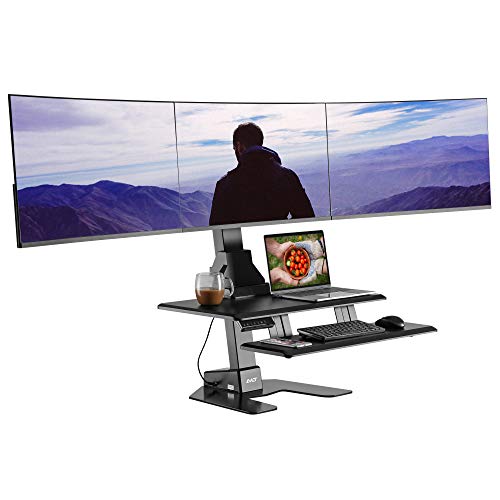
AVLT Electric Standing Desk Converter for Triple 32" Monitors Motorized | Sit to Stand Riser with 28"x16" Tabletop, Large Keyboard Tray, Height Adjustable, Sturdy Base, Small Footprint
Check price on Amazon