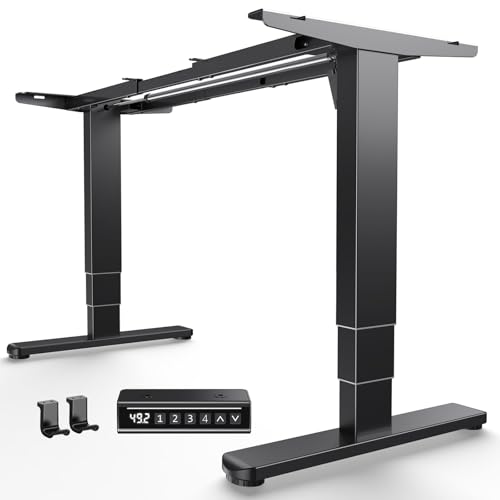
Double Motor Standing Desk: The Complete Guide
Discover how dual-motor frames deliver smoother lifts, stronger stability, and a more reliable sit-stand routine for your home office.
Explore Recommended ModelsIn This Guide
Quick Summary: A double motor standing desk uses two independent electric motors, one per leg, to raise and lower the desktop. Compared to single-motor designs, dual-motor frames generally offer faster and quieter height adjustment, higher weight capacity, and better long-term durability. They are the preferred choice for anyone building a serious sit-stand workspace with multiple monitors, heavy equipment, or daily use.
What Is a Double Motor Standing Desk?
A double motor standing desk — also called a dual motor standing desk — is an electric sit-stand desk equipped with two separate motors, one housed in each telescoping leg column. When you press the up or down button, both motors work in sync to raise or lower the desktop while keeping the surface perfectly level.
This is different from a single-motor desk, where one motor drives both legs through a mechanical connecting rod running under the desktop. That rod transfers power from one leg to the other, which works but introduces more friction, more moving parts, and a slightly less refined motion.
Dual-motor frames are now the mainstream choice in the mid-range and premium segments of the sit-stand market. If you are comparing options and want a broader overview of motorized models, the adjustable height standing desk guide is a useful companion read. For a wider lens on the category, see the full collection of sit-stand desks for home office setups.
How Dual-Motor Frames Work
Inside each leg of a double motor desk you will find a telescoping column driven by its own electric motor. A control box mounted under the desktop coordinates both motors so they move at the same speed and stop at the same height. Most frames include:
- Two motors — one per leg, each driving a threaded rod or spindle inside the column.
- Control box — the brain that synchronizes the motors and prevents one leg from running ahead of the other.
- Handset or keypad — where you trigger height changes, save presets, and access anti-collision settings.
- Anti-collision sensor — detects obstacles and reverses direction to protect the desk and whatever is underneath.
- Memory presets — most mid-range and premium handsets store two to four height positions for quick switching.
The synchronized control is what makes a dual-motor desk feel smooth. Because each leg has its own power source, there is no torque lost through a connecting rod, and the frame can support heavier loads without straining.
Key Benefits of Dual-Motor Desks
Smoother, Quieter Adjustment
Two motors sharing the load means each one works less hard. The result is a quieter lift with less vibration, which matters if you share a room or take calls while adjusting your desk.
Higher Weight Capacity
Most mid-range dual-motor frames are rated for roughly 220 to 350 lbs of evenly distributed load. That comfortably covers dual monitors, a desktop PC, speakers, and accessories. High-end tier and commercial-grade frames push that ceiling even further.
Faster Travel Speed
Because each leg has dedicated power, dual-motor desks typically move faster than single-motor equivalents — often around 1.2 to 1.6 inches per second. Faster travel makes it easier to switch between sitting and standing throughout the day.
Better Stability at Standing Height
A well-built dual-motor frame with a sturdy crossbar and quality feet is noticeably more stable at full extension. That translates to less wobble when you type, write, or lean on the desk.
Long-Term Durability
Sharing the workload between two motors reduces wear on each component. For daily sit-stand users, a dual-motor frame is a sensible long-term investment compared with an entry-level single-motor model.
If you prefer a desk you can move around the room, a adjustable height standing desk with wheels combines mobility with the dual-motor advantage. And if you want storage built in, the sit-stand desk with storage guide covers models that integrate drawers and shelves.
Single Motor vs. Double Motor vs. Triple Motor
| Tier / Type | Motors | Best For | Typical Trade-offs |
|---|---|---|---|
| Entry-level single motor | 1 motor + connecting rod | Light setups, occasional use, starter tier | Slower travel, lower capacity, more vibration |
| Mid-range dual motor | 2 motors, one per leg | Daily sit-stand users, dual monitors, balanced tier | Higher upfront investment than single motor |
| Premium dual motor | 2 high-torque motors | Heavy setups, triple monitors, professional-grade | Heavier frame, needs sturdy floor |
| Triple motor / four-leg | 3–4 motors | Very wide desktops, commercial-grade use, top-tier | Bulkier footprint, highest investment tier |
The takeaway is straightforward: for most home offices, a mid-range double motor standing desk is the sweet spot. It delivers the smoothness and capacity people actually notice in daily use, without the bulk or investment tier of a commercial-grade four-leg frame.
Buying Checklist: What to Look For
1. Weight Capacity
Add up your monitor weight, PC, speakers, and accessories, then leave a healthy margin. A mid-range dual-motor frame with a 250–300 lb rating gives most users plenty of headroom.
2. Height Range
Check both the lowest and highest positions against your own body height. Short users need a low starting point; tall users need a high maximum. Use the office desk height calculator to find your ideal sitting and standing heights before you buy.
3. Stability and Frame Build
Look for heavy-duty steel columns, a reinforced crossbar, and adjustable feet. A solid build is what separates a premium frame from an entry-level one, especially at standing height.
4. Speed and Noise
Mid-range and premium models typically move at 1.2–1.6 inches per second and run under 50 dB. If you take calls at your desk, quieter is better.
5. Handset Features
Memory presets, anti-collision, and a child lock are worth having. Four presets are ideal if multiple people share the desk.
6. Desktop Compatibility
If you plan to pair a frame with your own top, check supported widths and weight ratings. A solid surface such as wood desktops pairs well with a dual-motor frame, and the stand-up desk top guide explains what to look for in a compatible surface.
7. Warranty and Support
Frame warranties of 5–10 years are common in the mid-range and premium tiers. Longer coverage usually signals a manufacturer's confidence in the motors and control box.
If you are building the frame separately, the standing desk frames and standing desk legs guides cover the component side in more detail. For a complete layout walkthrough, see the standing desk setup guide.
Setup & Cable Management Tips
A dual-motor desk moves, and that changes how you should plan your cables. Here is a practical routine:
- Assemble on a soft surface. Build the frame upside down on a rug or cardboard to protect the finish.
- Set the crossbar before mounting the top. Follow the frame's width guidance for your desktop size.
- Leave slack in every cable. When the desk rises, cables need room to travel. Use a service loop at the control box.
- Route cables along the frame. Adhesive clips or a cable tray keep cords from hanging and snagging.
- Test the full height range with everything plugged in before you load the desk. Watch for cables pulling taut at the top position.
- Set your memory presets for sitting and standing, then confirm anti-collision is active.
If your workspace is tight, a standing desk for small desk layout may suit you better than a full-size frame. If you already own a fixed desk, a stand-up desk converter for laptop and monitor is a lighter alternative to a full dual-motor replacement.
Pair your new desk with an adjustable height desk chair for standing desk so your seated position matches the frame's low range. An under desk chair mat for hardwood floors protects your flooring from chair casters and desk feet.
Frequently Asked Questions
What is a double motor standing desk?
A double motor standing desk uses two separate electric motors, one in each leg, to raise and lower the desktop. This design provides smoother operation, higher weight capacity, and better stability compared to single-motor models.
Is a dual motor standing desk worth it?
A dual motor desk is a worthwhile investment for anyone who uses a sit-stand routine daily. The twin-motor design offers faster adjustment, quieter operation, and greater lifting capacity, making it a solid choice for heavy monitor setups and long-term durability.
How much weight can a double motor standing desk hold?
Most mid-range and premium double motor standing desks support between 220 lbs and 350 lbs of evenly distributed weight. High-end tier frames may support even more. Always check the manufacturer's rated capacity before loading your desk.
What is the difference between single motor and dual motor standing desks?
A single motor desk uses one motor to drive both legs through a connecting rod, while a dual motor desk has one motor per leg. Dual motor models generally offer smoother motion, higher weight capacity, faster speed, and less strain on the frame.
Can I install a double motor standing desk frame on my existing desktop?
Yes, many dual motor standing desk frames are sold separately and can be paired with a compatible desktop, such as a solid wood or butcher block surface. Check the frame's supported width and weight rating before pairing it with your top.
Recommended Double Motor Standing Desks
Below is a curated selection of dual-motor standing desks worth considering for a home office. Each entry focuses on frame build, motor configuration, and the kind of setup it suits best. Compare the tier and category columns, then explore the details that match your workspace goals.