Standing Desk Legs: The Complete Guide to Frames & Bases
Everything you need to know about standing desk legs — electric vs manual frames, lift capacity, stability, materials, and how to choose the right base for your dream sit-stand workspace.
Why standing desk legs matter: The legs and frame are the foundation of any standing desk. They determine stability, height range, lift capacity, and how smoothly you transition between sitting and standing. If you already know you want a sit-stand setup, this guide helps you understand the frame options so you can make a confident, informed decision before buying.
What Are Standing Desk Legs?
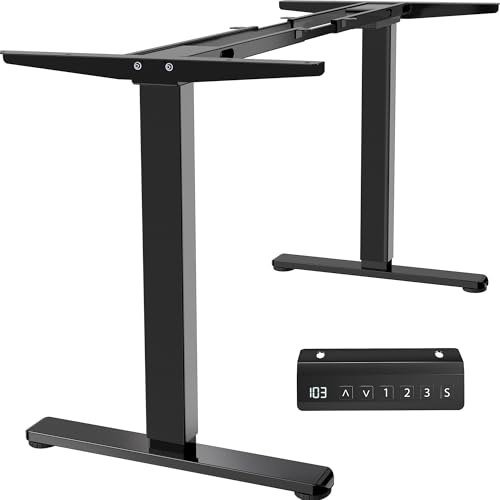
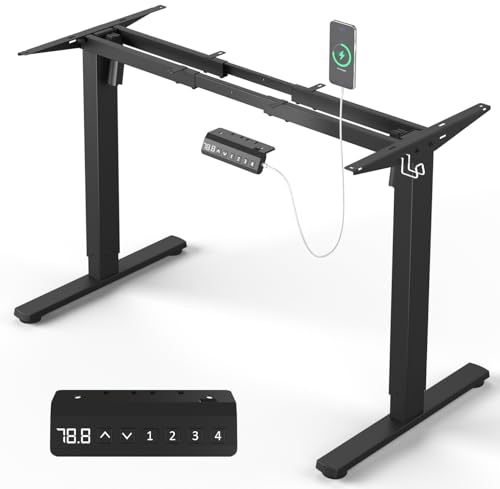
Standing desk legs are the height-adjustable support structure beneath a desktop. They come as a complete frame system — typically two or three telescoping columns connected by a crossbar and mounting brackets. The legs attach to your chosen tabletop, allowing you to raise and lower the work surface between seated and standing positions.
Most frames use a telescoping design with two or three stages. Two-stage legs offer a shorter height range and simpler build, while three-stage legs extend further, accommodating taller users and wider sit-stand ranges. The leg material is usually high-grade steel with a powder-coated or rust-proof finish for durability.
Electric vs Manual Standing Desk Legs
The two main categories are electric and manual frames. Each suits different users and workflows.
Electric Standing Desk Legs
- Motorized height adjustment at the push of a button
- Memory presets for saved sitting and standing heights
- Dual-motor designs offer smoother, faster, and quieter operation
- Best for users who switch positions frequently throughout the day
- Requires a power source near the desk
Manual Standing Desk Legs
- Hand-crank or pin-and-lock height adjustment
- No electricity needed, fewer electronic components
- Simpler build with fewer potential points of failure
- Best for users who adjust their desk occasionally
- Typically lighter and easier to relocate
If you value effortless transitions and saved presets, an electric frame is the natural choice. If you prefer a simpler, low-maintenance setup, a manual frame can serve you well. For a deeper look at how electric frames perform, see our guide to double motor standing desks.
Key Specifications to Compare
When comparing standing desk legs, focus on these core specifications:
| Specification | What to Look For | Best For |
|---|---|---|
| Lift Capacity | Entry-level: ~150 lbs; Mid-range: 200–250 lbs; Commercial-grade: 300+ lbs | Heavier monitors, multi-monitor setups, and desktop accessories |
| Height Range | Two-stage: shorter range; Three-stage: wider range | Taller users and full sit-stand range |
| Motor Type | Single motor vs dual motor | Dual motor for smoother, faster, quieter adjustment |
| Stability | Reinforced steel, thicker gauge tubing, crossbar design | Minimizing wobble at standing height |
| Frame Width | Adjustable width to match your desktop | Custom or oversized desktops |
| Number of Legs | 2-leg standard; 3-leg for wide or L-shaped surfaces | Wide desktops and corner setups |
For guidance on matching height to your body, use our office desk height calculator to find your ideal sitting and standing positions.
What Makes Standing Desk Legs Stable?
Stability is the most common concern for first-time sit-stand buyers. Wobble at standing height usually comes down to frame design and materials:
- Steel gauge and tubing thickness: Thicker, heavier-gauge steel resists flex and side-to-side movement.
- Telescoping stage count: Three-stage legs extend further but can introduce more flex; premium three-stage designs use reinforced inner tubes to compensate.
- Crossbar and foot design: A solid crossbar and wide, leveling feet improve lateral stability on uneven floors.
- Weight distribution: Heavier desktops and balanced loads reduce sway. Keep heavy items centered over the legs.
- Assembly quality: Properly torqued bolts and correct leg alignment make a noticeable difference.
A stable frame paired with a quality top is the foundation of a reliable workspace. If you're building a complete setup, explore our guide to standing desk frames for a fuller picture of frame options.
Materials and Finishes
Nearly all standing desk legs are steel-based. The differences lie in the grade and finish:
- High-grade steel: The standard for durability and load-bearing strength.
- Powder-coated finish: Scratch-resistant and available in white, black, gray, and custom colors.
- Rust-proof coating: Important for humid environments and long-term durability.
- Reinforced joints: Welded or bolted reinforcement at the mounting brackets reduces stress points.
Some premium frames use aluminum accents or alloy components for lighter weight without sacrificing strength. For most home offices, a high-grade steel frame with a powder-coated finish is the durable, long-term investment.
2-Leg vs 3-Leg Frames
Most standing desks use a two-leg frame, which suits standard rectangular desktops up to about 60–72 inches wide. A three-leg frame adds a center support column, which is useful for:
- Extra-wide desktops (72 inches and above)
- L-shaped and corner configurations
- Heavy multi-monitor or studio setups
If you're planning a corner workspace, our guide to L-shaped desks that raise and lower covers how three-leg frames support corner surfaces. For a straightforward rectangular desk, a two-leg frame is usually sufficient.
How to Choose the Right Standing Desk Legs
Use this checklist to narrow down your options:
- Measure your space: Confirm the frame width range fits your room and desktop.
- Check your height needs: Verify the height range covers your seated and standing positions. Three-stage legs suit taller users.
- Estimate your load: Add up monitor weight, desktop weight, and accessories. Choose a frame with headroom above your total.
- Decide on electric or manual: Frequent switchers benefit from electric with memory presets.
- Consider your desktop: If you already own a top or plan a DIY build, buy legs separately. Our guide to wood desktops helps you pair the right surface with your frame.
- Plan cable management: Electric frames need power routing. A clean setup starts with planning cable paths early.
If you're weighing a full conversion, read our overview of sit-stand desks for home office to see how legs fit into a complete setup.
DIY and Custom Standing Desk Builds
Buying legs separately is a popular route for DIY builders. You can pair a frame with a butcher block, reclaimed wood, or a custom-cut top. This approach gives you full control over surface size, finish, and material. Key considerations for DIY builds:
- Match the frame's width range to your top's dimensions.
- Use mounting screws appropriate for your desktop thickness and material.
- Add a crossbar or center support for wide tops.
- Route cables along the frame to keep the surface clean.
For inspiration and step-by-step ideas, see our collection of IKEA desk hacks and stand-up desk frame guides.
Common Mistakes When Buying Standing Desk Legs
- Ignoring height range: A frame that doesn't reach your standing height is a daily frustration.
- Underestimating load: Multi-monitor arms and heavy tops add up quickly. Choose headroom.
- Overlooking stability: A three-stage frame with thin tubing can wobble. Prioritize reinforced steel.
- Skipping desktop compatibility checks: Confirm the frame's width range and mounting pattern fit your top.
- Forgetting cable planning: Electric legs need power and cable routing planned before assembly.
Final Thoughts
Standing desk legs are the backbone of a healthy, flexible workspace. Focus on lift capacity, height range, stability, and motor type — then match the frame to your desktop and room. Whether you choose an electric dual-motor frame or a simple manual base, the right legs make every sit-stand transition smooth and secure.
Ready to complete your setup? Explore our standing desk setup guide for assembly tips, cable routing, and ergonomic placement. If you're comparing complete desks, our sit-stand desks for home office overview puts frames in context.
Frequently Asked Questions
What are standing desk legs made of?
Most standing desk legs are made from high-grade steel, often with powder-coated or rust-proof finishes. Premium models use reinforced steel with thicker gauge tubing for greater stability and lift capacity.
How much weight can standing desk legs support?
Lift capacity varies by tier. Entry-level frames typically support around 150 lbs, mid-range frames handle 200–250 lbs, and commercial-grade frames can support 300 lbs or more, often with dual-motor systems.
Are electric or manual standing desk legs better?
Electric legs offer effortless height adjustment and memory presets, ideal for frequent sit-stand switching. Manual legs are simpler, require no power, and suit users who adjust less often or want fewer electronic components.
Can I buy standing desk legs separately from the desktop?
Yes. Many manufacturers sell frames and legs separately, allowing you to pair them with a desktop of your choice. This is popular for DIY setups and custom desk projects.
What is the difference between a 2-leg and 3-leg standing desk frame?
A 2-leg frame is standard and suits most desktops. A 3-leg frame adds a center leg for wider desktops, providing extra stability and reducing wobble on L-shaped or extra-wide surfaces.