Standing Desk Frames: The Complete Expert Guide
Everything you need to know about standing desk frames — frame types, motor systems, materials, lift capacity, stability, and how to match a frame with the perfect desktop for your sit-stand workspace.
EXPLORE FRAME TYPESWhy the frame matters most: The standing desk frame is the engine of your sit-stand workspace. It determines how stable your desk feels, how smoothly it transitions, how much equipment it can carry, and how long it will last. A quality frame paired with a well-chosen top often outlasts and outperforms a complete desk bought as a single unit. This guide walks you through every decision point so you can choose a frame with confidence.
What Is a Standing Desk Frame?
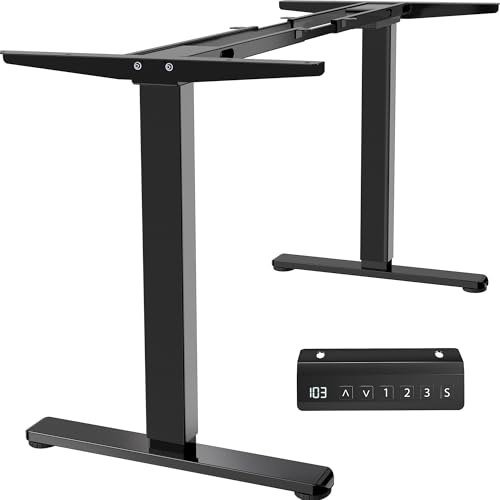
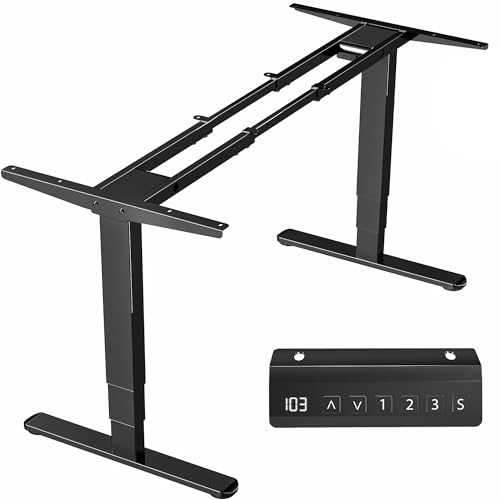
A standing desk frame — sometimes called a stand up desk frame or standing desk base — is the structural foundation of a sit-stand desk. It consists of the legs, the lifting mechanism (electric motors, a manual crank, or pneumatic assist), the crossbar that ties the legs together, and the control unit that raises and lowers the desk. The desktop itself sits on top and is usually sold separately.
Buying a frame separately gives you flexibility. You can pair a stand up desk frame with a wood desktop that matches your room, or reuse an existing top you already own. Many buyers researching frames already know they want a sit-stand setup — what they need is clarity on which frame specifications actually matter. That is exactly what this guide delivers.
Types of Standing Desk Frames
Frames fall into a few broad categories. Each has trade-offs in smoothness, stability, lifting power, and assembly complexity. Use the comparison below to match a frame type to your workflow.
Single-Motor Electric Frames
One motor drives both legs through a connecting rod. These entry-level frames are the simplest electric option and suit lighter setups such as a laptop and a single monitor. Movement is generally slower and slightly less smooth than dual-motor designs.
Entry-level tier
Dual-Motor Electric Frames
Two motors — one per leg — move in sync for smoother, faster, and quieter transitions. This is the balanced mid-range sweet spot for most home offices and supports heavier multi-monitor configurations with better stability at standing height.
Mid-range to high-end tier
Manual Crank Frames
A hand crank raises and lowers the desk with no electricity required. Manual frames are reliable, simple, and immune to power outages, but changing height takes effort and time. A solid choice for occasional standing sessions.
Essential tier
Pneumatic & Gas-Lift Frames
Gas springs assist the lift, often paired with a lever or pedal. These frames are fast to adjust and need no power, but they typically have a lower weight rating and are less common in full-size desks.
Specialty tier
If you are comparing a frame build against a complete desk, it helps to understand how the whole system works together. Our standing desk setup guide covers how frames, tops, and accessories combine into a cohesive workstation. For buyers who prefer a proven complete package, the double motor standing desk category shows how dual-motor frames perform in finished desks.
Key Frame Specifications Explained
Frame listings are full of numbers. Here is what each specification actually means for your day-to-day use.
| Specification | What It Means | What to Look For |
|---|---|---|
| Height range | The lowest and highest desktop positions the frame supports. | A range that fits both seated and standing ergonomics for your body height. |
| Lift capacity | The maximum weight the frame can raise and hold safely. | Headroom above your expected load — at least 20 to 30 percent extra. |
| Width range | How wide the frame extends to support different desktop sizes. | Match to your top; wider frames suit multi-monitor setups. |
| Motor type | Single, dual, or manual lifting mechanism. | Dual-motor for smooth, quiet, heavy-duty use. |
| Stability design | Leg shape, crossbar, and foot design that resist wobble. | Reinforced legs and a rigid crossbar for standing-height stability. |
| Memory presets | Saved height positions on the controller. | At least two presets for quick sit-stand switching. |
Height range is the specification most often overlooked. You can verify the ideal standing and seated heights for your body using an office desk height calculator before comparing frames. A frame whose maximum height falls short of your standing comfort point will undermine the entire sit-stand benefit.
Materials and Build Quality
Frame durability comes down to steel grade, tube thickness, and finish. Most quality frames use high-grade steel legs with a powder-coated, rust-proof finish. Heavier gauge steel and reinforced leg joints translate directly into less wobble at standing height — the single most common complaint about weaker frames.
- High-grade steel legs resist flex and lateral sway better than thin-walled tubing.
- Reinforced crossbars tie the legs together and stiffen the whole structure.
- Rust-proof powder coating protects against wear and humidity.
- Sturdy feet with adjustable leveling glides keep the frame planted on uneven floors.
A well-built frame is a long-term investment. The lifting mechanism and steel structure typically outlast several desktop swaps, so prioritizing build quality pays off across years of use. If you want to understand how frame legs differ specifically, our guide to standing desk legs breaks down leg shapes, columns, and stability profiles.
Matching a Frame to the Right Desktop
Frames are usually sold without a top, which is part of their appeal. Before you commit, confirm three things: the frame's width range fits your chosen top, the top's weight sits comfortably under the lift capacity, and the mounting pattern is compatible. Most frames use a standard set of screw holes, but always check.
Popular pairings include a wood desktop for a warm, natural look, or a lighter laminate top for a clean modern feel. If you are building from scratch, the stand up desk top guide covers thickness, edge profiles, and finish options that pair well with electric frames.
Consider your equipment too. A frame with generous lift capacity handles a monitor arm, speakers, and a docking station without strain. If you plan a multi-display layout, see our notes on a standing desk for 3 monitors to make sure the frame and top combination can carry the load.
Stability and Ergonomics
Stability is the make-or-break quality of any frame. At standing height, a desk amplifies every wobble, so a rigid structure matters more than almost any other feature. Look for frames with wide-set feet, reinforced leg columns, and a solid crossbar. Dual-motor frames with synchronized legs tend to feel steadier than single-motor designs because both sides lift evenly.
Ergonomics depend on pairing a stable frame with correct heights. Once assembled, set your seated and standing presets based on proper posture. Our standing desk setup guide walks through monitor height, keyboard placement, and transition routines so the frame's range is used to its full advantage.
If you also need mobility, some frames support casters. The standing desk on wheels guide explains how to add wheels without sacrificing stability, and the adjustable height standing desk with wheels overview shows how mobility-ready frames are configured.
Frame-Only vs Complete Desk: Which Should You Choose?
Buying a frame on its own is ideal if you already have a desktop you love, want a specific surface material, or plan to build a custom top. It gives you control over the look and the dimensions. Buying a complete desk is simpler if you want a matched set delivered together and no assembly decisions.
Either path works well. Frames are the component that most affects performance, so investing your attention there is smart. If you are weighing a complete sit-stand desk instead, explore the sit-stand desks for home office collection and the broader stand up desks for home office category to compare finished systems side by side.
Assembly and Setup Tips
- Assemble on a soft surface. Lay out the legs and crossbar on a rug or cardboard to avoid scratches.
- Leave screws slightly loose until aligned. Tighten everything only after the frame is square and the top is mounted.
- Mount the top before lifting. Attaching the desktop while the frame is low reduces strain.
- Calibrate the controller. Run the frame through its full range once to reset the controller and confirm smooth travel.
- Add cable management early. Route cables along the frame before final assembly to keep the lift path clear.
For a step-by-step walkthrough, the standing desk setup guide covers assembly, cable routing, and accessory placement in detail. If you prefer an adjustable model with a simpler build, the adjustable height standing desk overview shows how complete frames arrive pre-matched.
Standing Desk Frame Buying Checklist
Frequently Asked Questions
What is a standing desk frame?
A standing desk frame is the structural base of a sit-stand desk, consisting of legs, a lifting mechanism, a crossbar, and a controller. It supports the desktop and allows you to switch between sitting and standing positions.
What are the main types of standing desk frames?
The main types are single-motor frames, dual-motor frames, manual crank frames, and pneumatic frames. Dual-motor electric frames are the most common for home offices due to their stability and smooth operation.
What lift capacity should I look for in a standing desk frame?
Look for a frame with a lift capacity that exceeds your expected load by at least 20 to 30 percent. A mid-range dual-motor frame typically supports a comfortable working load for most home office setups, while high-end tier frames handle heavier multi-monitor and studio equipment.
Can I use my own desktop with a standing desk frame?
Yes. Most standing desk frames are sold separately from desktops, allowing you to pair them with a wood desktop, butcher block, laminate top, or custom surface. Check the frame's width range and weight rating before matching a top.