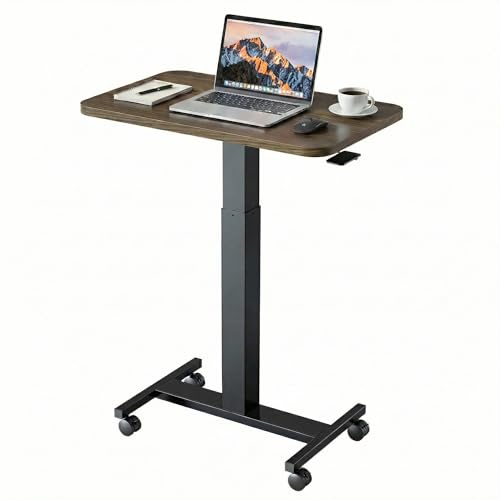
Standing Desk on Wheels: The Ultimate Mobile Workspace Guide
Transform any room into an ergonomic workstation with a rolling standing desk. Learn how caster design, frame stability, and height range work together to create a flexible sit-stand setup that moves with you.
EXPLORE MOBILE DESK OPTIONSWhy a mobile standing desk matters: A standing desk on wheels combines the health benefits of sit-stand alternation with true room-to-room flexibility. Whether you rotate between a home office, a sunny corner, or a shared living space, the right rolling desk keeps your posture, monitor height, and workflow consistent — without being anchored to a single wall. This guide breaks down the engineering details that separate a stable mobile desk from a wobbly one, so you can choose with confidence.
What Exactly Is a Standing Desk on Wheels?
A standing desk on wheels is a height-adjustable workstation mounted on casters rather than fixed feet. The core structure is identical to a conventional sit-stand desk — a lifting column system, a rigid frame, and a desktop surface — but the base terminates in wheels that allow the entire unit to roll across a floor. The best models pair this mobility with locking casters, so the desk behaves like a stationary platform once positioned.
There are two common configurations. The first is an integrated mobile standing desk, where the frame is engineered from the start with caster-ready legs and a reinforced lower crossbar. The second is a retrofit approach: a standard stand-up desk frame paired with an aftermarket caster kit. Integrated designs generally offer better rigidity because the load path from desktop to floor is designed as a single system.
Mobility changes how you use a workspace. Instead of treating a desk as fixed furniture, a rolling standing desk becomes a tool you reposition throughout the day — rolling it to a window for natural light, tucking it against a wall when guests arrive, or sharing it between two rooms. This flexibility is especially valuable in studio apartments and multi-use rooms, where a dedicated office footprint is not available.
How Mobility Affects Ergonomics
Ergonomics is not only about desk height. A mobile desk must hold its position while you type, and the casters must lock firmly enough that the desk does not creep during weight shifts. When a rolling desk is stable, the ergonomic experience matches a fixed sit-stand desk: elbows near 90 degrees, monitor top at eye level, and feet flat on the floor or a supportive mat. The mobility layer simply adds the freedom to relocate that setup without dismantling it.
Caster Types: The Hidden Factor Behind Stability
The casters are the most under-discussed component of a rolling standing desk, yet they determine whether the desk feels planted or skittish. There are three practical categories to understand before comparing models.
1. Locking vs. Non-Locking Casters
Non-locking casters are suitable only for desks that are repositioned and then immediately used for light tasks. For any serious workstation, dual-lock casters are essential: they lock both the wheel's rotation and its swivel axis, converting the desk into a rigid platform. Single-lock casters stop rolling but still allow the wheel to pivot, which introduces subtle side-to-side movement during typing. When reading product specifications, look explicitly for "dual locking" or "total lock" casters.
2. Wheel Material and Floor Compatibility
Soft polyurethane or rubber casters protect hardwood, laminate, and vinyl flooring from scuffs and reduce rolling noise. Hard nylon or plastic casters roll more easily over carpet but can mark delicate hard floors. If your workspace has a mix of surfaces, polyurethane is the safer universal choice. Caster diameter also matters: wheels of 2 inches or more roll over thresholds, rug edges, and power cords far more smoothly than small 1-inch casters.
3. Brake Systems and Swivel Locks
Some premium mobile desks use a central brake lever that locks all four casters simultaneously, which is faster than reaching under each leg. Others rely on individual foot-operated tabs. A full-swivel lock is worth prioritizing if you frequently lean on the desk edge or use a monitor arm that shifts weight forward. For heavier monitor arrays, pairing locking casters with a wide stance frame is the most reliable stability strategy.
| Caster Type | Best For | Stability When Locked | Floor Protection |
|---|---|---|---|
| Dual-lock polyurethane premium | Hardwood, laminate, mixed flooring | Excellent — full rotation and swivel lock | High — soft tread, non-marking |
| Dual-lock nylon mid-range | Carpet and rugs | Very good — firm lock, slight swivel play | Moderate — may scuff delicate hard floors |
| Single-lock plastic entry-level | Light, occasional repositioning | Fair — rolling stops, swivel remains | Low — hard tread, louder rolling |
Frame Architecture and Lifting Systems for Mobile Desks
Mobility places extra stress on a desk frame. Every roll across a floor introduces torsional forces that a stationary desk never experiences. Frames designed for casters usually include a lower crossbar or a wider foot profile to resist racking. When comparing options, examine three structural details.
Lifting Columns and Motor Configuration
Single-motor desks drive one column and transmit motion through a rod to the second leg. They are lighter and suit laptop-based workflows, but they can feel less planted at maximum height. Dual-motor systems move both legs independently and synchronously, which improves stability and lifting capacity — a meaningful advantage for multi-monitor configurations. A double motor standing desk in the mid-range tier is often the sweet spot for mobile use, balancing rigidity with manageable weight.
Height Range and Caster Clearance
Adding casters raises the minimum desktop height by roughly 2 to 4 inches depending on wheel size. This matters for shorter users who need a low starting position for seated work. Check that the desk's lowest height, with casters installed, still allows your elbows to rest near 90 degrees while seated. Desks with a wide adjustment range — typically from around 24 inches to 50 inches — offer the most flexibility across seated and standing postures. For taller users, verify the maximum height before committing.
Weight Capacity and Load Distribution
Mobile frames should be specified with headroom above your actual equipment load. A monitor arm, dual displays, a laptop dock, and speakers add up quickly, and the load is concentrated toward the rear edge where leverage is highest. Commercial-grade mobile desks typically publish higher lifting capacities and use thicker steel in the columns. If your setup includes heavy audio gear or a large display, prioritize a frame with a crossbar and a high-grade steel construction.
What to Evaluate Before Choosing a Rolling Standing Desk
Buyers researching this category usually already know they want height adjustability and mobility. The decision then narrows to a handful of practical trade-offs. The checklist below reflects the questions most commonly raised before a purchase.
Stability Under Real Working Conditions
Stability is best judged at full standing height, not at seated height. A desk that feels solid when lowered can develop noticeable front-to-back sway when raised, particularly if the frame lacks a crossbar or the casters are single-lock. If possible, look for user reports that specifically mention typing stability at maximum height. Premium mobile desks with reinforced bases and dual-lock casters consistently receive better feedback on this point than entry-level rolling frames.
Mobility Mechanics and Doorway Clearance
Measure your doorways and the tightest corner the desk must navigate. Most standing desks are wider than a standard interior door once assembled, so some disassembly may be required for room-to-room moves. Desks with removable desktops or a split-frame design are easier to transport. Also consider the desk's total weight: a heavy dual-motor desk with a solid wood top may require two people to move safely, even on casters.
Cable Management for a Moving Desk
A mobile desk that travels across a room will drag cables unless they are managed deliberately. Look for frames with integrated cable trays or under-desk channels. A wireless-leaning setup — a laptop with a dock and a single power lead to a wall outlet — is the most practical configuration for frequent repositioning. If you move the desk only occasionally, a simple cable sleeve and a floor-rated extension cord are sufficient.
Desktop Surface and Accessory Compatibility
Most mobile frames are sold as frame-only or with a factory desktop. If you plan to pair a custom top, confirm the frame's mounting pattern and weight limit. Solid wood and butcher block tops add stability through mass but increase rolling effort. Laminate and engineered wood tops are lighter and easier to maneuver. For monitor-heavy setups, a stable desk monitor stand or a clamp-mounted arm rated for the desktop thickness will keep displays secure while the desk is in motion.
Setting Up a Mobile Standing Desk for Daily Use
Once the desk is assembled, a few setup decisions determine how well the mobile workflow performs over months of use.
- Establish a primary station. Choose the desk's default position and mark the floor subtly if needed. Lock all casters firmly before adjusting height; adjusting while unlocked can cause the desk to drift.
- Calibrate seated and standing heights. Use a height calculator or measure directly. Seated: elbows at roughly 90 degrees, feet flat. Standing: elbows slightly above 90 degrees, monitor top at eye level. Save presets if the desk has a memory controller.
- Anchor heavy accessories. Secure monitor arms, speakers, and docking stations. Avoid clamping heavy loads to the front edge, which increases tipping leverage when the desk rolls over a threshold.
- Plan the cable path. Route a single power lead along the floor edge, and keep it clear of caster travel. A short, coiled extension cord prevents the cord from being caught under a wheel.
- Use a supportive floor mat. If you stand for long periods on a hard floor, an anti-fatigue mat improves comfort. Choose a mat that lies flat so casters roll over it without catching — or position the mat only under your feet, not under the wheels.
- Adopt a sit-stand rhythm. Alternate posture every 30 to 60 minutes. Mobility makes it easy to roll the desk to a different view, which naturally breaks long static sessions.
For users who want a fixed-height alternative that still offers some flexibility, a standing desk converter with dual monitor mount can sit on an existing table. However, a true rolling standing desk remains the better choice when the entire workstation needs to relocate, because the desktop, monitor, and accessories move as one unit.
Ready to Build a Workspace That Moves With You?
Browse a curated selection of mobile standing desks and rolling sit-stand frames chosen for stability, caster quality, and ergonomic range.
VIEW MOBILE DESK OPTIONSWho Benefits Most From a Standing Desk on Wheels?
Mobility is not a universal need, but several profiles gain outsized value from a rolling standing desk.
- Remote workers in multi-use rooms. If your desk shares space with a living area or guest room, rolling it out of the way restores the room's primary function.
- Small-apartment residents. A mobile desk can serve as an office by day and tuck into a corner at night, preserving floor space without sacrificing a proper ergonomic setup.
- Teachers, therapists, and presenters. Anyone who moves between a seated consultation position and a standing presentation position benefits from a desk that follows them.
- Shared-office households. Two people can share one desk by rolling it between workstations, adjusting height presets for each user.
- Creators who switch between sitting and standing. A mobile desk makes the sit-stand transition effortless, which encourages more frequent posture changes.
Conversely, if your desk will never move and you have a dedicated office, a stationary standing desk typically delivers slightly better rigidity for the same tier. Mobility is a feature worth paying for only when you will actually use it.
Mobile Standing Desk vs. Other Flexible Workspace Solutions
Buyers often compare a rolling standing desk against adjacent categories. The table below clarifies where each option fits.
| Solution | Mobility | Ergonomic Range | Best For |
|---|---|---|---|
| Standing desk on wheels | Full room-to-room movement | Full sit-stand range | Multi-use rooms, shared spaces |
| Stationary standing desk | None without disassembly | Full sit-stand range | Dedicated home offices |
| Standing desk converter | Portable but requires a host table | Limited to upper-body adjustment | Existing desks, quick upgrades |
| Adjustable-height desk chair | Rolls independently of desk | Seated support only | Pairing with a standing desk |
A rolling standing desk is the only option that relocates a complete ergonomic setup. Converters are practical when a fixed table must stay in place, and an adjustable height desk chair for standing desk complements a mobile setup by supporting brief seated breaks without lowering the desktop.
Frequently Asked Questions
Are standing desks on wheels as stable as stationary standing desks?
Premium mobile standing desks with locking casters and a reinforced frame offer stability comparable to stationary models. Entry-level options may have more wobble at full height, especially on uneven floors. Look for desks with dual locking casters and a crossbar-supported base for the best stability.
What type of casters should a rolling standing desk have?
Locking casters are essential. Look for models with dual-lock casters that lock both the wheel rotation and the swivel. Soft rubber or polyurethane casters protect hardwood floors and reduce noise, while hard plastic casters are better suited to carpet. A caster diameter of at least 2 inches handles thresholds and cords more smoothly.
Can I add wheels to an existing standing desk?
Yes, many standing desk frames accept aftermarket caster kits, provided the legs have pre-drilled mounting points or a compatible thread. Check the frame's weight capacity and leg design before adding casters. A dedicated standing desk frame with caster-ready legs is the most reliable option for a clean installation.
What weight capacity should I look for in a mobile standing desk?
Aim for a lifting capacity that comfortably exceeds your equipment load by at least 30 percent. Dual-motor mobile desks in the mid-range and premium tiers typically support heavier monitor arrays and multi-device setups, while single-motor entry-level models suit lighter laptop-based workflows.
Will casters damage my hardwood floor?
Soft polyurethane or rubber casters are non-marking and safe for hardwood when kept clean. Avoid dragging the desk with locked casters, and sweep the floor before rolling to prevent grit from scratching the finish. A thin floor protector under the desk's parking spot adds extra protection.
How do I manage cables on a desk that moves?
Use an under-desk cable tray to contain power strips and device leads, then route a single extension cord to the wall. Keep the cord clear of caster travel and consider a retractable cord reel if the desk moves frequently. A wireless-leaning setup with a laptop dock minimizes cable count.
Final Thoughts: Choose Mobility With Intent
A standing desk on wheels is at its best when mobility serves a real workflow need. The engineering details that matter most are unglamorous but decisive: dual-lock casters, a crossbar-reinforced frame, a height range that accommodates your body, and a weight capacity with headroom for your equipment. Get those right, and a rolling desk behaves like a fixed ergonomic workstation that happens to move.
If you are still deciding between a mobile frame and a conventional height-adjustable model, review the full range of adjustable height standing desk options and compare their caster compatibility. For a caster-ready design from the start, the adjustable height standing desk with wheels category gathers models built specifically for mobile use. Whichever direction you choose, prioritize stability at standing height — it is the foundation of every ergonomic benefit a standing desk provides.