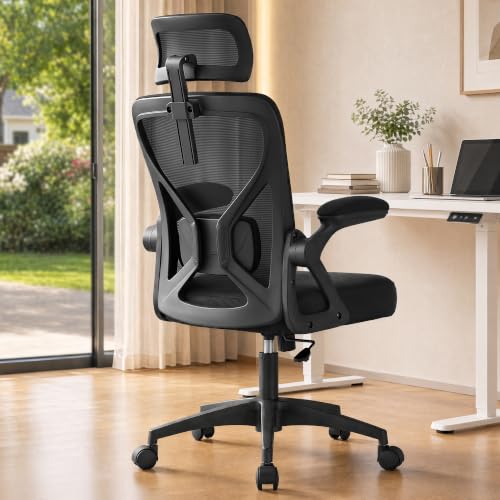
Ergonomic Desk Chairs: Your Complete Guide to Comfort & Support
Choosing the right ergonomic desk chair is one of the most important decisions for your home office. This guide covers lumbar support, adjustability, materials, and setup so you can work comfortably and protect your posture for years to come.
Explore Key FeaturesWhy an ergonomic desk chair matters: You spend hours at your desk, and poor seating quietly takes a toll on your back, neck, and shoulders. An ergonomic chair is a long-term investment in your health and daily productivity. In this guide, you will learn exactly what to look for — from lumbar height and seat depth to armrest adjustability and material quality — so you can choose a chair that truly fits your body and workspace.
Key Ergonomic Features That Matter Most
Every ergonomic chair is built around a set of core adjustments. Knowing these features helps you compare models intelligently and avoid paying for extras you do not need.
Lumbar Support
Adjustable lumbar support follows the natural curve of your lower back, reducing strain during long sitting sessions. Look for both height and depth adjustment.
Seat Depth & Height
The seat should let your feet rest flat on the floor with a small gap behind your knees. A sliding seat depth adjustment accommodates different leg lengths.
Armrest Adjustability
Four-dimensional armrests (height, width, depth, angle) keep your shoulders relaxed and wrists neutral while typing or mousing.
Recline & Tilt Tension
A recline mechanism with adjustable tilt tension encourages movement and relieves pressure on the spine throughout the day.
Headrest Support
An adjustable headrest helps reduce neck fatigue during extended reclined use. It is especially valuable for tall users.
Breathable Materials
Mesh backs improve airflow and keep you cool. Upholstered options can feel plush but may retain heat — choose based on your climate and preference.
Desk Chair Tiers: Matching Your Needs to the Right Class
Ergonomic chairs are grouped into broad quality tiers. Using these universal descriptors helps you set expectations without relying on fluctuating market values.
| Tier | Best For | Typical Strengths |
|---|---|---|
| Entry-Level | Occasional sitting, students, light home office use | Basic height adjustment, fixed armrests, simple tilt |
| Mid-Range | Daily home office work, hybrid schedules | Adjustable lumbar, sliding seat depth, 3D armrests |
| Premium | Full-time remote work, long sitting sessions | 4D armrests, synchronized tilt, headrest, breathable mesh |
| Luxury / Professional-Grade | Executives, designers, intensive daily use | Fully custom adjustments, premium materials, extended warranty |
How to Set Up Your Ergonomic Chair Correctly
Even the best chair underperforms if it is not adjusted to your body. Follow these steps each time you sit down — or at least after any change in your workstation configuration.
- Set seat height so your feet rest flat and your thighs are roughly parallel to the floor.
- Adjust seat depth so there is a two-to-three-finger gap behind your knees.
- Position lumbar support at the natural curve of your lower back, not at the belt line.
- Set armrests so your shoulders are relaxed and elbows bent near 90 degrees.
- Use tilt tension so the backrest follows your movement without feeling stiff.
- Align your monitor top near eye level to keep your neck neutral.
If you are still finalizing your workstation layout, the office desk height calculator is a practical companion for pairing your chair with the right desk height.
Chair Styles for Different Workspaces
The right ergonomic chair depends on where you work and how your room is arranged. A compact apartment, a shared home office, and a dedicated study each call for slightly different priorities.
Small Spaces
A comfortable desk chair for small spaces balances ergonomic support with a compact footprint, keeping a tight room functional.
Chair and Desk Pairing
See desk and chair for small space combinations to coordinate dimensions and style.
No-Wheel Options
A home office desk chair without wheels suits hard floors and shared rooms where fixed seating is preferred.
Height Adjustable Chairs
An adjustable height desk chair for home office supports varied users and changing tasks.
Standing Desk Pairing
Pair a height adjustable chair for standing desk with your sit-stand routine for smooth transitions.
Style and Color
Coordinate your chair with the overall desk color scheme for a cohesive workspace.
Materials, Build Quality, and Durability
Ergonomic performance depends on more than cushions and levers. The frame, gas lift, and base determine how stable and long-lasting a chair will be.
Look for chairs with a high-grade steel or reinforced aluminum frame, a smooth gas lift rated for your weight range, and a base with quiet, floor-friendly casters. A durable construction with a rust-proof finish is especially important in humid climates. Breathable mesh backs are excellent for warm rooms, while upholstered foam seats offer a softer feel for cooler environments.
If you plan to protect your flooring, consider an under desk chair mat for hardwood floors to reduce wear and make rolling smoother.
Common Ergonomic Mistakes to Avoid
- Sitting with the seat too high or too low, which stresses knees and lower back.
- Ignoring lumbar support height — a fixed pad rarely fits all body types.
- Locking the recline permanently and sitting statically for hours.
- Using armrests that are too high, forcing the shoulders upward.
- Skipping movement breaks — an ergonomic chair supports posture, but movement keeps it healthy.
Frequently Asked Questions
What makes a desk chair truly ergonomic?
An ergonomic chair offers adjustable seat height, seat depth, lumbar support, armrests, and recline tension. These adjustments let the chair conform to your body rather than forcing your body to conform to the chair.
How do I know if my chair is at the right height?
Your feet should rest flat on the floor, knees near a 90-degree angle, and thighs roughly parallel to the ground. If your chair has a sliding seat depth, leave a small gap behind the knees.
Is mesh better than upholstery?
Mesh improves airflow and suits warm rooms, while upholstered seats can feel softer and warmer. Many premium chairs combine a mesh back with a foam seat for balance.
How often should I adjust my chair?
Adjust your chair whenever you change tasks, switch between sitting and standing, or share the chair with another user. A quick adjustment takes seconds and prevents strain.
Do I need a headrest?
A headrest is helpful for tall users and for reclined working or reading. If you sit upright and use your chair mainly for focused typing, a headrest is optional.
For readers building out a full home office, our stand-up desks for home office guide complements this chair guide with desk-side advice.