Desk with Wheels and Adjustable Height: The Complete Buyer's Guide
Discover how a mobile height-adjustable desk can transform your workspace flexibility, from home offices to shared rooms and dynamic work environments.
Why a wheeled adjustable desk matters: A desk with wheels and adjustable height combines two powerful workspace advantages — portability and ergonomic adaptability. Whether you need to reconfigure your room, share a workspace, or simply transition between sitting and standing throughout the day, this hybrid desk category delivers unmatched versatility. This guide walks you through everything you need to know before making a confident purchase decision.
What Is a Desk with Wheels and Adjustable Height?
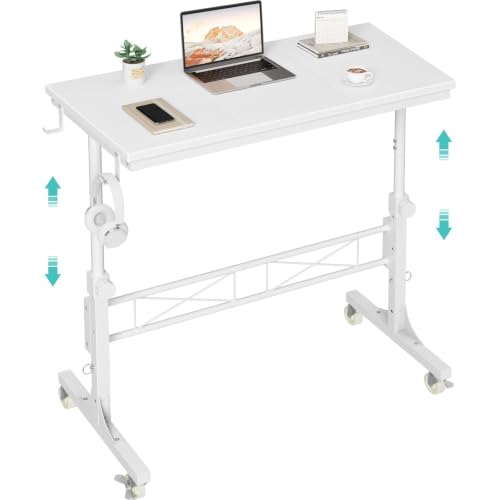
A desk with wheels and adjustable height is a workspace surface that integrates two key features: caster wheels for easy mobility and a height adjustment mechanism — either manual crank, pneumatic, or electric motorized — that lets you raise or lower the desktop to suit sitting or standing postures. Unlike a standard fixed desk, this hybrid design lets you move the desk across a room, reposition it for different tasks, and adapt its height throughout the day without replacing furniture.
These desks are particularly popular among remote workers, students in shared spaces, creative professionals who reconfigure their studios, and anyone who values a flexible home office. If you are exploring broader options, you may also want to browse our ergonomic desk collection or compare with a desk that goes up and down for a more stationary alternative.
The wheels typically come in two varieties: locking casters (which secure the desk in place once positioned) and standard rolling casters (for frequent movement). Most mid-range and top-tier models include locking casters as a standard feature, which is essential for stability during typing or standing work.
Why Choose a Mobile Height-Adjustable Desk?
The appeal of a desk with wheels and adjustable height goes beyond simple convenience. Here are the primary benefits that make this category a compelling choice for modern workspaces:
- Workspace flexibility: Easily reconfigure your room layout without disassembling furniture. Move the desk from a window view to a wall outlet, or shift it aside when guests arrive.
- Sit-stand transition: Adjust height throughout the day to reduce prolonged sitting, which supports better posture and energy levels.
- Multi-user adaptability: In shared households or offices, different users can adjust the height to their own ergonomic needs.
- Cleaning and maintenance: Wheels make it simple to access the floor beneath the desk for cleaning.
- Seasonal or task-based repositioning: Creatives and hobbyists can roll the desk between work zones — from a quiet corner to a collaboration area.
If your priority is a more permanent ergonomic upgrade, consider pairing your mobile desk with a dedicated desktop standing desk or exploring a electric adjustable desk for full sit-stand functionality without wheels.
Key Features to Evaluate Before Buying
1. Height Adjustment Mechanism
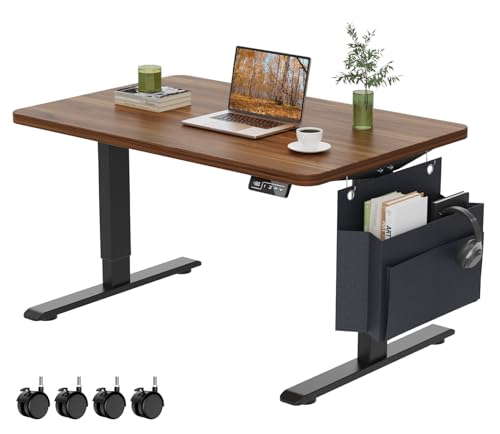
The adjustment mechanism is the heart of any height-adjustable desk. Manual crank systems are reliable and require no power, making them an entry-level choice. Pneumatic systems offer quick, gas-spring-assisted adjustments. Electric motorized systems — found in mid-range and top-tier models — provide the smoothest, most convenient operation, often with programmable memory presets. If you want a dedicated frame-only upgrade, browse our electric adjustable standing desk frame options.
2. Caster Wheel Quality
Not all wheels are created equal. Look for dual-wheel casters with soft treads for hardwood and laminate floors, and larger casters for carpet. Locking mechanisms are critical — without them, the desk may shift during use. Premium models often feature heavy-duty locking casters rated for repeated locking cycles.
3. Stability and Frame Construction
A mobile desk must remain stable when locked in place. Look for high-grade steel frames, reinforced crossbars, and a solid build that minimizes wobble at standing height. Entry-level models may exhibit slight sway at maximum height, while top-tier models are engineered for near-zero wobble through dual-motor systems and robust leg columns.
4. Weight Capacity
Weight capacity determines what equipment your desk can safely support. Entry-level models typically handle a basic laptop and monitor setup. Mid-range models support dual monitors and accessories. Top-tier and professional-grade models accommodate multi-monitor configurations, heavy desktop towers, and additional peripherals without strain.
5. Desktop Surface and Size
Desktop dimensions affect both productivity and mobility. Larger surfaces offer more room for equipment but may be harder to maneuver through doorways. Consider a desktop computer desk configuration that balances surface area with maneuverability, or a desk for small spaces if your room has tight clearances.
6. Cable Management
Mobile desks need integrated cable management to prevent tangling and snagging during movement. Look for built-in cable trays, grommets, or under-desk channels. Pairing your desk with dedicated desktop organizers keeps your surface efficient.
Quality Tiers: What to Expect at Each Level
To help you set expectations without referencing any specific numeric figures, here is a universal tier framework for this product category. All descriptors are relative and reflect market positioning rather than absolute features.
| Tier | Best For | Typical Characteristics |
|---|---|---|
| Entry-Level / Essential Tier | Students, light home use, occasional repositioning | Manual crank or basic pneumatic adjustment; standard casters (some without locks); simpler frame construction; lighter weight capacity; best for single-monitor setups. |
| Mid-Range / Balanced Tier | Remote workers, daily sit-stand users, shared home offices | Electric motorized adjustment with memory presets; locking casters standard; reinforced steel frame; dual-monitor support; improved stability at standing height. |
| Premium / High-End Tier | Professionals, multi-monitor setups, heavy daily use | Dual-motor electric system; whisper-quiet operation; heavy-duty locking casters; near-zero wobble; premium materials; advanced cable management; larger surface options. |
| Luxury / Flagship Tier | Executive offices, design studios, commercial-grade deployments | Commercial-grade build; programmable height presets with anti-collision sensors; premium finishes; integrated power outlets; maximum stability and weight capacity. |
As a rule of thumb, mid-range models usually offer the most balanced combination of features and durability, while entry-level models suit lighter, less frequent use. For a closer look at motorized options, see our guide to the electric height adjustable desk.
Pros and Cons of a Wheeled Adjustable Desk
✅ Advantages
- Exceptional workspace flexibility and reconfigurability
- Supports ergonomic sit-stand transitions
- Easy to clean beneath and around the desk
- Adaptable to multiple users and tasks
- Ideal for renters and shared living spaces
- No permanent installation required
❌ Considerations
- May have slightly more wobble than fixed desks at standing height
- Wheels require periodic inspection and locking discipline
- Cable management becomes more important
- Caster quality varies significantly across tiers
- Some carpet types reduce mobility
Ideal Use Cases for a Mobile Height-Adjustable Desk
This desk category shines in scenarios where static furniture falls short. Consider these common use cases:
- Home offices with limited space: Roll the desk against a wall when not in use to free up floor space. Explore desks for small spaces with drawer for added storage.
- Shared family workspaces: Each user adjusts the height to their own preference and locks the wheels for stability.
- Creative studios: Move the desk between natural light and task lighting zones depending on the project.
- Dorm rooms and apartments: A mobile desk adapts to semester changes and furniture rearrangements. See our dorm desk resources for related options.
- Classrooms and training rooms: Educators reconfigure layouts for group work or individual study.
- Hybrid work setups: Roll the desk into a video call corner and back to a focused work zone.
For broader workspace inspiration, explore our desktop computer desk for small spaces guide or consider a desk with storage for small spaces to maximize efficiency.
Setup Tips for Optimal Performance
Once you have chosen your desk, a few setup best practices will maximize stability, safety, and longevity:
- Lock the casters during use. Always engage the locking mechanism before placing heavy equipment or starting work.
- Route cables with slack. Leave enough cable length to accommodate height adjustments without strain. Consider a desktop organizer shelf for tidier routing.
- Distribute weight evenly. Place heavier items toward the center of the desktop and avoid overloading one side.
- Check floor compatibility. Soft rubber casters protect hardwood; larger casters roll more easily on carpet.
- Set memory presets. If your desk has electric adjustment, program your ideal sitting and standing heights for one-touch transitions.
- Pair with ergonomic accessories. A desktop monitor holder and a desktop computer mat complete a comfortable, organized workspace.
Maintenance and Long-Term Care
To keep your wheeled adjustable desk performing smoothly for years, follow a simple maintenance routine:
- Inspect casters monthly. Remove hair and debris from wheel axles; apply a silicone-based lubricant if rolling becomes stiff.
- Tighten fasteners periodically. Vibration from movement can loosen bolts over time — check frame connections every few months.
- Clean height-adjustment columns. Wipe down telescoping legs with a dry cloth to prevent dust buildup that can affect smooth operation.
- Lubricate manual crank mechanisms. A light application of multi-purpose grease keeps crank systems turning smoothly.
- Check motor calibration. For electric models, follow the manufacturer's reset procedure if the desk stops responding or drifts.
A desktop stand can also help elevate monitors independently, reducing strain on the adjustment mechanism over time.
Quick Buying Checklist
Before finalizing your choice, run through this checklist to ensure the desk meets your needs:
- ✅ Height range covers both your sitting and standing ergonomic positions
- ✅ Casters include locking mechanisms
- ✅ Weight capacity exceeds your equipment load with a safety margin
- ✅ Frame construction is reinforced and rated for your usage frequency
- ✅ Desktop dimensions fit your room and doorway clearances
- ✅ Cable management features are integrated or easily added
- ✅ Adjustment mechanism matches your preferred operation style (manual vs. electric)
- ✅ Warranty and customer support are adequate for your tier
- ✅ Surface finish and material align with your aesthetic and durability preferences
If you are still comparing broader options, browse our full desk collection or explore specialized configurations like a desk with outlets for integrated power access.
Ready to Upgrade Your Workspace?
Explore top-rated desks with wheels and adjustable height in our curated product section below — hand-picked for quality, stability, and value within their tier.
View Recommended Desks →Frequently Asked Questions
Final Thoughts
A desk with wheels and adjustable height is one of the most versatile workspace investments you can make. It blends ergonomic adaptability with mobility, making it ideal for remote workers, renters, students, and anyone who values a workspace that evolves with their needs. By evaluating height range, caster quality, frame stability, and weight capacity, you can confidently choose a model that delivers long-term value within your preferred tier.
Whether you pair it with a desk with monitor shelf, integrate a desk with LED lights built in, or keep it streamlined with a desktop table setup, the right mobile adjustable desk transforms how you work, create, and live in your space.