Sit Stand Desk with Storage: The Complete Workspace Upgrade Guide
Blend ergonomic movement with intelligent organization. Learn how a sit stand desk with storage transforms your home office into a healthier, tidier, and more productive environment — from frame mechanics to drawer configurations.
Explore Buying FactorsWhy a sit stand desk with storage matters: Standing desks promote circulation and reduce sedentary strain, but without built-in organization, the surface quickly becomes cluttered. A model with integrated storage — drawers, shelves, hutches, or side pockets — keeps essential tools within arm's reach while preserving the clean surface that makes height adjustment worthwhile. This guide walks you through storage types, frame quality, and configuration choices so you can match a desk to your daily workflow.
Why Combine a Standing Desk with Storage?
The core benefit of an adjustable desk is the freedom to alternate between sitting and standing throughout the day. But the ergonomic advantage collapses if your desk is buried under loose papers, stray cables, and scattered accessories. Built-in storage solves this by giving every item a designated home — and it does so without adding separate furniture that eats floor space.
Beyond organization, storage-integrated standing desks offer:
- Space efficiency: A single unit replaces a desk plus a separate filing cabinet or shelving unit, which is especially valuable in small desk storage scenarios.
- Better cable routing: Many storage models include grommets, trays, or raceways that keep power and data cables tidy as the desk moves.
- Improved workflow: Drawers and shelves keep frequently used items — notebooks, chargers, pens, files — within reach whether you're seated or standing.
- Stability through design: Quality storage desks use reinforced frames and balanced weight distribution, which often translates to better stability at standing height.
- Long-term investment: A well-built adjustable desk with storage adapts to changing needs — from student study sessions to full-time remote work.
Ergonomic reminder: Pair your standing desk with an adjustable height desk chair for standing desk use so you can transition smoothly between postures without losing support.
Types of Storage Found on Sit Stand Desks
Storage configurations vary widely. Understanding the main categories helps you narrow down which layout fits your room and workflow.
1. Built-In Drawers
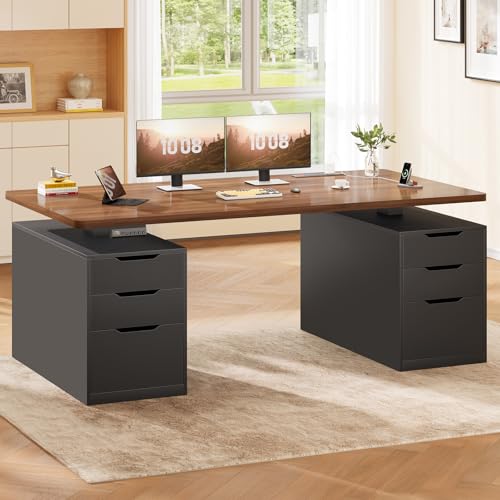
Drawers are the most common storage feature. They range from a single shallow pencil drawer to full pedestals with file-capable depths. Shallow drawers suit stationery and small devices; deeper drawers accommodate folders, laptops, or binders. Some models integrate drawers into the frame structure, while others attach as under-desk pedestals. If you prefer a drawer-based layout, explore options in the desks with storage drawers and shelves category.
2. Shelves and Hutches
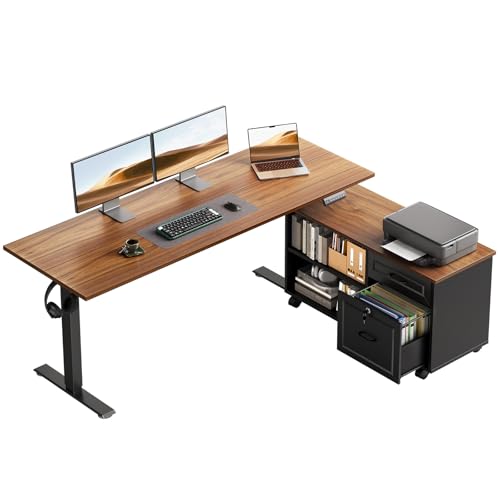
Shelving above or beside the desk surface adds vertical storage without consuming floor area. Hutches often include cubbies, small compartments, and sometimes a monitor riser shelf. A hutch is ideal for keeping reference materials, plants, and display items organized while freeing the main work surface. For an L-shaped layout with hutch storage, see L-shaped desk with hutch and storage.
3. Side Cabinets and File Cabinets
Some sit stand desks include a matching side cabinet or an integrated file drawer that moves with the desk. These are suited to document-heavy roles. If file storage is a priority, models like the L-shaped desk with drawers and file cabinet demonstrate how storage can be combined with generous work area.
4. Under-Desk Trays and Cable Management
Cable trays, raceways, and under-desk organizers aren't drawers in the traditional sense, but they are a form of storage essential to a clean standing desk. They keep power strips, adapters, and excess cable off the floor and out of sight — a detail that matters more on a moving desk than a static one.
5. Converters with Storage
If you already own a fixed desk and want standing capability plus storage, a stand-up desk converter with a built-in keyboard tray or side pockets can bridge the gap. Learn more in stand-up desk converter with adjustable keyboard tray.
Key Buying Factors for a Sit Stand Desk with Storage
When evaluating models, look beyond the storage count. The following factors determine long-term satisfaction and daily usability.
Height Range and Adjustment Mechanism
Your ideal standing height depends on your body proportions. A desk with a wider height range accommodates more users and more postures. Electric dual-motor frames generally offer smoother, faster, and quieter adjustment than single-motor or manual designs. For a focused look at motor quality, see double motor standing desk. To calculate your personal target height, use the office desk height calculator.
Weight Capacity and Stability
Storage adds weight — both the desk's own structure and the items you place in it. Check the load rating and consider how you'll distribute monitors, books, and equipment. Mid-range and premium frames typically use high-grade steel and reinforced crossbars; entry-level models may wobble at maximum height. Stability is especially important if you plan a multi-monitor array; see standing desk for 3 monitors for load considerations.
Storage Configuration Fit
Match the storage layout to your room and habits. Drawers on the dominant-hand side, open shelves for quick access, or a hutch for vertical storage — each has trade-offs. Consider whether you need locking drawers, file-depth capacity, or simply a place for a notebook and pens. If your space is compact, review small desk organizer ideas alongside built-in options.
Frame and Surface Materials
The desktop material affects durability, aesthetics, and weight. Laminate and engineered wood are common on mid-range models; solid wood and bamboo appear on premium tiers. Frame finish — powder-coated steel, for example — influences rust resistance and long-term appearance. For surface options, see wood desktops.
Mobility and Placement
Some adjustable desks include casters, making it easy to reconfigure a room or move the desk for cleaning. If mobility matters, look for models with lockable wheels. See adjustable height standing desk with wheels and standing desk on wheels.
Quality Tiers: What to Expect at Each Level
Rather than focusing on arbitrary figures, compare models by their position in the market. The descriptors below are relative and help you set expectations for build quality, storage sophistication, and adjustment performance.
Essential Tier
Single-motor or manual frames, basic laminate tops, and modest storage — often a single drawer or a small shelf. Suitable for light daily use, students, or occasional standing. Stability at full height is adequate but may show slight movement.
Balanced Tier
Dual-motor electric frames with smoother travel, reinforced steel construction, and more generous storage — multiple drawers, a hutch, or a side cabinet. Good value for its tier, with solid stability and a wider height range for shared use.
Top-Tier
Professional-grade frames, quiet dual or triple motors, anti-collision sensors, and premium materials. Storage is thoughtfully integrated — file drawers, cable management systems, and refined hutch designs. A long-term investment for full-time remote work or commercial settings.
As a rule of thumb, mid-range models usually offer noticeably smoother adjustment and better stability than entry-level designs, while top-tier models add refinement in materials, noise reduction, and storage ergonomics. Choose the tier that matches your daily hours of use and the weight of your equipment.
Storage Configuration Comparison
Use this table to compare common storage layouts against typical use cases.
| Storage Type | Best For | Space Impact | Accessibility |
|---|---|---|---|
| Single Drawer | Minimal setups, stationery, small devices | Low | High — within arm's reach |
| Multi-Drawer Pedestal | Document-heavy work, files, laptops | Medium | High — seated or standing |
| Hutch / Shelving | Books, plants, display items, reference materials | Vertical only | Medium — upper reach |
| Side Cabinet | Bulk storage, office supplies, personal items | Medium to high | Medium — requires turn or step |
| Cable Tray / Under-Desk Organizer | Power strips, adapters, cable routing | Low | Low — occasional access |
Setup Tips for a Storage-Equipped Standing Desk
Once you've chosen a desk, how you set it up determines whether the storage enhances or hinders your workflow. Follow these practical guidelines.
Prioritize the Primary Work Zone
Keep the center of the desk — the area directly in front of your monitor and keyboard — free of storage items. Drawers and shelves belong on the sides or above, so your arms and eyes have unobstructed space. For layout inspiration, see standing desk setup.
Distribute Weight Evenly
Heavy items like file binders or reference books should be stored symmetrically — for example, in drawers on both sides — to maintain balance when the desk is raised. Avoid concentrating heavy loads on one side of a dual-motor frame.
Plan Cable Routes Before Assembly
If your desk includes cable management, map out device placement and power access before tightening every bolt. A little planning prevents the tangle that often defeats the purpose of a clean standing desk. Under-desk cable trays pair well with a desk monitor stand that lifts displays and frees surface area.
Use the Storage to Enforce Habits
A drawer or shelf is only useful if it's used consistently. Assign categories — one drawer for chargers and cables, one shelf for notebooks — and do a quick reset at the end of each workday. Small habits preserve the ergonomic and visual benefits of your investment.
Consider Converters for Existing Desks
If you already have a desk you love, a stand-up converter with storage can add standing capability without replacing furniture. Explore stand-up desk converters and the stand-up desk on regular desk approach.
Pro tip: If you work with a laptop and an external monitor, a model like the stand-up desk converter for laptop and monitor can deliver standing ergonomics while your existing storage stays in place.
Common Mistakes to Avoid
- Overloading the desk: Storage encourages accumulation. Periodically review what you keep on and in the desk, and remove items you haven't used recently.
- Ignoring the height range: A desk that doesn't reach your ideal standing height undermines the entire purpose. Measure before you commit.
- Choosing storage you won't use: A hutch looks impressive but can block sightlines in a small room. Match storage to your actual daily tools.
- Neglecting stability at full height: Test reviews and specifications for wobble, especially if you type heavily or use multiple monitors.
- Skipping cable management: A moving desk amplifies cable chaos. Plan routes and use trays or sleeves from day one.
Frequently Asked Questions
What should I look for in a sit stand desk with storage?
Focus on height range, motor quality, weight capacity, and storage configuration. A dual-motor frame typically offers smoother operation, while built-in drawers, shelves, and cable management keep your workspace organized.
How much storage do I need on a standing desk?
The right amount depends on your workflow. A single drawer suits minimal setups, while integrated hutches, side shelves, and file cabinets serve document-heavy or multi-device work. Consider your daily tools and future growth.
Can a sit stand desk with storage support multiple monitors?
Yes, provided the desk has a sufficient weight capacity. Mid-range and premium models often support dual or triple monitor arrays. Always check the load rating and distribute weight evenly across the surface.
Does storage affect desk stability when raised?
Quality construction matters more than storage itself. Reinforced frames, anti-wobble mechanisms, and even weight distribution keep a desk stable at standing height. Heavier storage units should be placed near the center or on lower shelves.